How to drop a lead's name into your VICIdial script
Using VICIdial's --A--first_name--B-- and --A--last_name--B-- tokens, you can make every script greet the contact by name automatically. Here is exactly how to add it and what to watch out for.
The tokens you need
To drop a contact's name into your Agent script, you use VICIdial's variable substitution syntax. Two tokens handle the most common greeting:
- --A--first_name--B-- inserts the contact's first name from the lead record.
- --A--last_name--B-- inserts the contact's last name.
- --A--title--B-- inserts the title field (Mr., Mrs., Dr., etc.) if your lead records carry it.
These three together let you write a greeting line that reads completely naturally once the Lead record fills in the values.
Step-by-step: adding the greeting
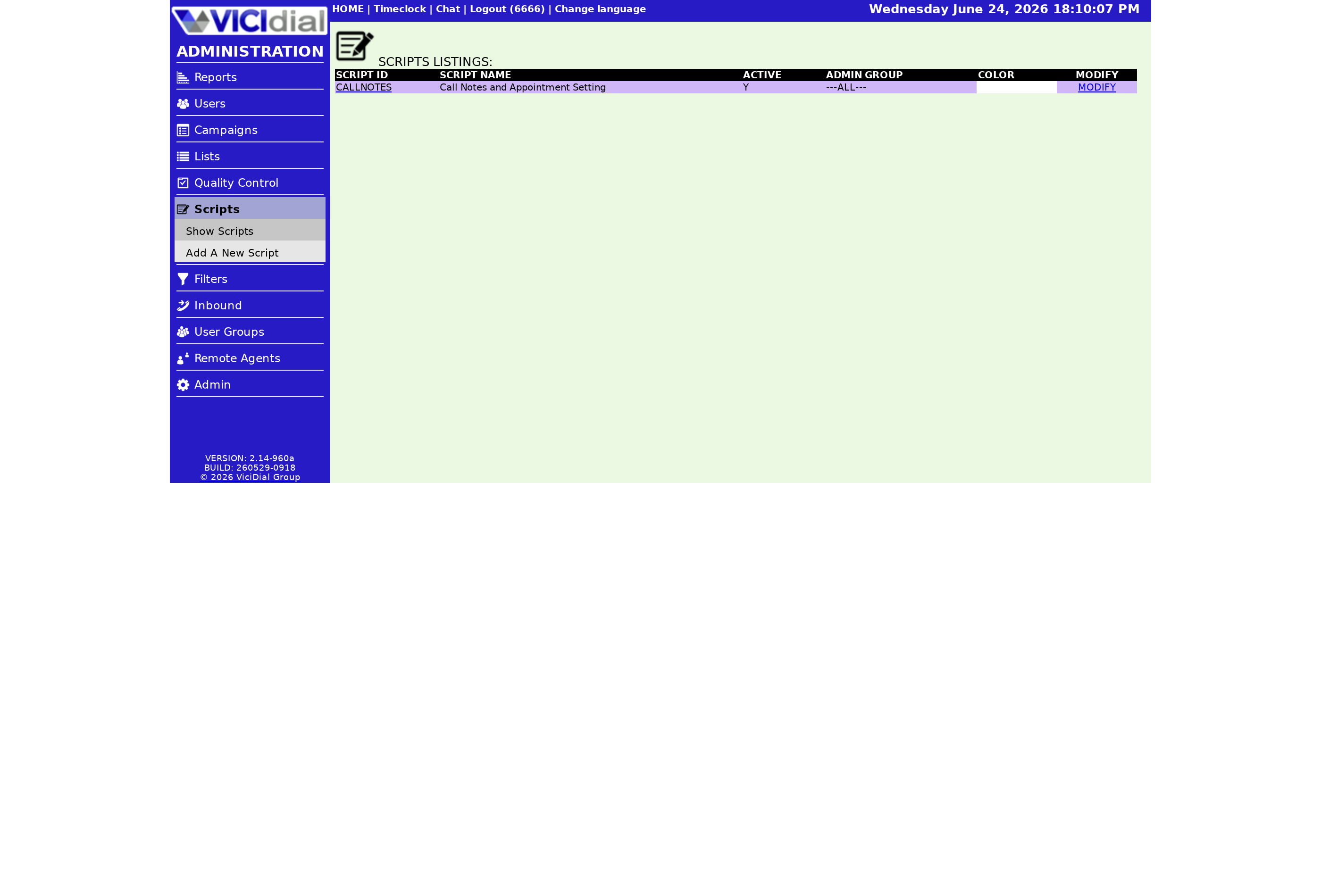
- Go to the VICIdial admin panel and open the Scripts section from the left-hand menu.
- Click the script you want to edit, or click ADD SCRIPT to start a new one.
- In the Script Text area, type your greeting. Include the name tokens exactly as shown: no spaces inside the dashes, no capital letters in the field name (first_name, not First_Name).
- Click the Preview Script link to see the script with sample data substituted in. Verify the name appears where you expect.
- Save the script. The tokens are live as soon as the next call loads the script tab.
A complete greeting example
Script text entered by admin:
Hello, can I speak with --A--first_name--B-- --A--last_name--B-- please? Well hello --A--title--B-- --A--last_name--B-- how are you today?
What the agent sees when the call connects:
Hello, can I speak with John Doe please? Well hello Mr. Doe how are you today?
No typing required from the agent - the Lead data fills in automatically the moment the script tab loads.
How it flows from lead record to screen
flowchart LR
  A[Lead record: first_name=John last_name=Doe title=Mr] --> B[Call dials and connects]
  B --> C[Agent screen loads script tab]
  C --> D[VICIdial replaces --A--first_name--B-- with John]
  D --> E[Replaces --A--last_name--B-- with Doe]
  E --> F[Replaces --A--title--B-- with Mr]
  F --> G[Agent reads fully personalized script]
What happens when name fields are blank
If the Lead record has no first_name value, the token is replaced with an empty string, producing a line like "Hello, can I speak with Doe please?" - note the double space. For Campaign lists where some records may be missing a first name, write your greeting to degrade gracefully. One approach is to use only last_name and title, since those fields are more consistently populated in most lead lists.
Tips for name tokens across different campaign types
How you use name tokens varies a little depending on the Campaign type. In an outbound predictive or power dialing Campaign, the lead is already identified when the agent receives the call, so the name tokens resolve immediately. In a manual dialing scenario, the agent dials from a lead record, which is also pre-loaded - the tokens still resolve correctly.
For inbound campaigns where the caller may not match a lead in the system, the tokens will resolve only if VICIdial has matched the inbound ANI to an existing Lead record. If no match exists, the token outputs a blank. Write your opening line with this in mind: a line that works with a name and also reads acceptably without one is more reliable than a greeting that sounds broken when the name is missing.
Going further with script variables
The name fields are just three of the dozens of lead and call context fields available. You can also pull in city, state, alt_phone, and custom fields like user_custom_one to personalize the script further. For the complete list and how the substitution engine works, see VICIdial script variables explained.
For the full agent screen configuration context that scripts sit within, see the VICIdial agent screen configuration guide.
Want personalized scripts across all your campaigns from day one? See pricing for VICIfast managed hosting plans.
Related from VICIfast
About VICIfast
We run VICIdial servers for call centres, so you don’t have to. You get the dialer set up, secured and kept running — we handle the server, the updates and the backups. Bring your own phone carrier; we never resell minutes. From $49 a month per server.
Questions? Call +1 636 556 0022 and talk to someone who runs dialers.
Citing this article
VICIfast Engineering. “How to drop a lead's name into your VICIdial script”. VICIfast LLC, June 24, 2026. Retrieved from https://vicifast.com/blog/how-to-add-lead-name-to-vicidial-script
Have questions?
Related posts
You might be interested in
VICIfast newsletter
Liked this? Get the next one in your inbox.
We ship the kind of stuff you just read - concrete, numbers-first, no drip. One email when a new post goes live. Unsubscribe in one click.
Comments
No comments yet - be the first.