How to add a new campaign in VICIdial
Adding a campaign is a two-step affair: a short add form, then the full settings page. The two rules that trip people up are the campaign ID format and the fact that the ID is permanent. Here's how to get it right the first time.
Creating a new campaign in VICIdial is quick, but there are two small rules that bite people who rush it. The good news is the system asks for very little up front and saves the long list of options for after the record exists. Here's the full path from clicking Add to having a working campaign shell ready to configure, with the two gotchas called out so you don't have to redo it.
Step one: the short add form
flowchart TD
    A[Admin -> Campaigns] --> B[Click Add A New Campaign]
    B --> C["Enter Campaign ID (6 chars, permanent)"]
    C --> D[Enter Campaign Name]
    D --> E[Submit short add form]
    E --> F[Full Campaign Detail page]
    F --> G[Set dial method and dial level]
    G --> H[Attach lists and hopper]
    H --> I[Set active to Y]
    I --> J[Campaign ready to dial]
From the Campaigns section, click the ADD CAMPAIGN link at the top. Like most VICIdial add-new forms, this one is intentionally short - it only asks for the essentials, then offers the rest of the settings once you've saved. All you have to supply to get past it is the campaign ID and the campaign name. Miss either and the form simply won't accept your submission.
This is also where you decide what kind of dialing the new Campaign will eventually do, even if you don't set every detail yet. If you're planning Predictive dialing from the start, our dialing strategies guide is worth reading before you fill out the detail page, so you know which options to look for.
The two rules people get wrong
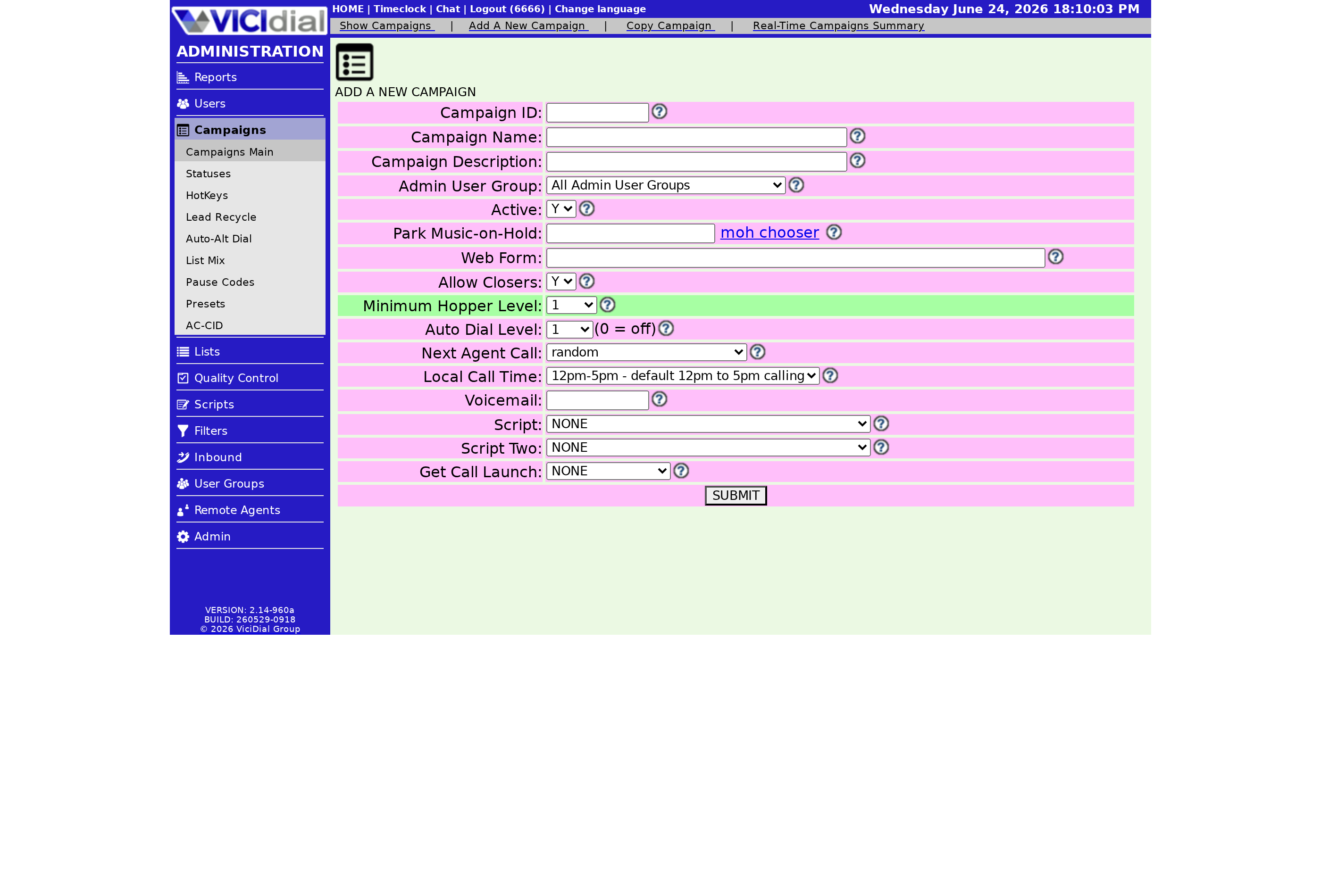
First, the campaign ID has a strict format. It must be two to eight characters, letters or numbers only - no spaces, no punctuation, and specifically no dashes. It also can't reuse an ID already taken by another campaign or by an in-group, since those share the same naming space across the system.
Second - and this is the one that stings - the campaign ID is permanent. Once you submit, you cannot edit it. The only way to change it is to delete the campaign entirely and recreate it under a new ID. So before you click submit, make sure the ID is one you can live with for the life of the campaign. The campaign name, by contrast, is just a description and can be changed later, so don't agonize over it.
Step two: the full settings page
After you submit the short form, VICIdial drops you into the full campaign modification screen. This is where the real work happens: setting the Dial method, choosing your dial statuses, picking your list-order, and flipping the Active toggle once you're ready for agents to log in. There's a lot on this page, but you only need the basics to get a first call out the door - you can refine the rest later.
A few starter settings to get right early:
- Dial method and dial level - how aggressively the campaign places calls per active agent.
- Dial statuses - which lead statuses the campaign is allowed to call from your active lists.
- Active toggle - leave it off until your lists are attached, then switch it on so agents can log in.
If you set the pacing too high out of the gate, you'll likely see dropped calls climb - our walkthrough on lowering your VICIdial drop rate covers how to settle a new campaign in without breaching your abandonment limit.
Build a few campaigns this way and the two-step flow becomes second nature. If you'd rather skip the server setup entirely and just build campaigns, our managed plans hand you a ready dialer - see the pricing page.
Frequently asked
- No. The campaign ID is locked the moment you submit. To change it you'd have to delete the campaign and create a new one with the ID you want, so pick carefully.
- Letters and numbers only, between two and eight characters. No spaces, no punctuation, no dashes. It also can't match any existing campaign or in-group ID.
› Can I change a campaign ID after creating it?
› What characters are allowed in a campaign ID?
Related from VICIfast
About VICIfast
We run VICIdial servers for call centres, so you don’t have to. You get the dialer set up, secured and kept running — we handle the server, the updates and the backups. Bring your own phone carrier; we never resell minutes. From $49 a month per server.
Questions? Call +1 636 556 0022 and talk to someone who runs dialers.
Citing this article
VICIfast Engineering. “How to add a new campaign in VICIdial”. VICIfast LLC, June 19, 2026. Retrieved from https://vicifast.com/blog/add-new-vicidial-campaign
Have questions?
Related posts
You might be interested in
VICIfast newsletter
Liked this? Get the next one in your inbox.
We ship the kind of stuff you just read - concrete, numbers-first, no drip. One email when a new post goes live. Unsubscribe in one click.
Comments
No comments yet - be the first.