A field guide
VICIdial Without the Ops
Everything power dialing gives you, without the Linux weekend that usually comes with it. Eighteen chapters on architecture, sizing, compliance, storage, migration and what things actually cost - including the parts most vendors leave out.
Free, no gate. The whole guide is on this page.
The VICIdial bargain
VICIdial is the most capable open-source contact-centre platform ever built, and it asks a price that has nothing to do with money.
Predictive, progressive and manual dialing. Inbound queues and blended agents. Recording on every channel, real-time supervision, dispositions, callbacks, DNC handling, calling-window rules, a reporting suite that goes deeper than most commercial platforms. Tens of thousands of seats run on it worldwide. The licence costs nothing.
The price is operational. VICIdial is Asterisk, MariaDB, Apache, Perl daemons and a large amount of accumulated convention, and it expects you to know all of it. A working install means kernel tuning, timing sources, database indexes that VICIdial does not create for you, a firewall that will otherwise be found by scanners within hours, TLS certificates that expire quietly, and a set of keepalive scripts whose failure modes are documented mainly in forum posts from 2014.
Most teams discover this after the demo. The dialer works beautifully on a test box with four agents, and then something in the stack gives way at forty — audio one-way, agents dropping, a database table locking under predictive load — and the people who chose it because it was free find themselves paying for it in evenings.
The software is free. The operations are not, and nobody quotes you for them at the start.
That gap is the entire reason this platform exists. Not to replace VICIdial, or wrap it in something proprietary, or hold your data hostage. To take the part that ruins weekends and leave you the part you actually wanted.
Is VICIdial right for you?
It is the right answer for a specific shape of operation, and the wrong one for others. Better to find out here than three months in.
It fits well when
- You dial at volume. Predictive dialing exists to keep agents talking rather than waiting. Below roughly ten seats the maths barely justifies the machinery, and a simpler tool will serve you.
- You want your own carrier economics. If you have negotiated termination rates, or you dial destinations a SaaS provider prices badly, keeping the carrier relationship is worth real money every month.
- You need the data. Full call logs, recordings and a database you can query. Regulated work, quality programmes and anything with an audit obligation all get easier when the records are yours.
- You want per-seat costs to stop scaling. A server costs the same at 60 agents as at 30. Seat-priced platforms do not work that way, and the crossover comes sooner than most people expect.
Look elsewhere when
- You have five agents and no dialing pattern. The overhead outweighs the benefit; a hosted seat-based tool is genuinely the better buy.
- Nobody will own it. Even fully managed, VICIdial expects an administrator — someone who owns campaigns, lists and dispositions. If that role is unassigned, the platform will not fill it.
- You need a CRM more than a dialer. VICIdial dials, records and reports. It is not a system of record for your customer relationships, and bending it into one goes badly.
We would rather tell you at the enquiry stage that fifty seats of predictive is not what you actually need than sell you a Velocity box you will cancel in month four. If a scoping call reaches that conclusion, we will say so.
What "managed" actually means
The word is used loosely enough to be meaningless, so here is the exact line we draw.
We run the platform. The server, the operating system, Asterisk and MariaDB, the firewall, TLS certificates and their renewal, monitoring and telemetry, nightly backups, patching, and the provisioning that turns a bare machine into a working dialer. If the box needs attention at three in the morning, that is our problem.
You run the dialer. Campaigns, lists, carriers, dispositions, agents, scripts, in-groups, DIDs, calling rules. Full VICIdial administration on every server, unrestricted. It is your contact centre, and nobody at VICIfast decides how you dial.
That split matters commercially as well as technically. You are not renting seats and you do not have to buy minutes from us — you are renting a machine that arrives already correct, and operating it yourself. And "managed" here does not mean "sealed": you can have root on the box whenever you want it (§12).
Ordering a server is not a ticket and a wait. The machine is created, hardened, installed, TLS-issued, DNS-pointed and handed over automatically — typically in under 40 seconds. Nothing about that step involves a human on our side, which is precisely why it is reliable.
Everything else in this guide follows from that division: what we take on, what stays yours, and where the two meet.
The interface problem
Anyone who has used VICIdial knows the admin screen is its weakest point, and it is the part your staff touch every day.
It is a dense PHP interface that has changed little in fifteen years: hundreds of fields on a page, no hierarchy, terminology that assumes you already know the answer. Training a new administrator on it takes weeks. Training a supervisor to find one recording takes longer than it should.
We rebuilt the operator experience around it — not a thin skin over the same screens, but purpose-built interfaces for the things people do daily.
Campaign and list management
Campaigns, in-groups, user groups, DIDs, call menus, dispositions, lead import and time/shift rules through clean screens built for the task rather than for the database schema.
Live floor monitor
Every agent and campaign in real time, with listen, whisper and barge on any active call in a single click — the whole supervision loop without a console.
Enhanced reporting
VICIdial's full native reporting, plus our own suite: KPI dashboards, trend charts, drill-downs, and PNG, PDF or XLSX export.
Recordings and QA
Search, play and export recordings from the dashboard, with an optional AI quality-audit module for scorecards and review workflow.
Audio, soundboards, TTS
Manage prompts and music-on-hold, build branded agent soundboards, and generate audio from text without touching the filesystem.
Infrastructure, self-serve
Firewall rules, SIP trunks, DID routing, server timezone, hostname, backups and one-click restore — all from the same dashboard.
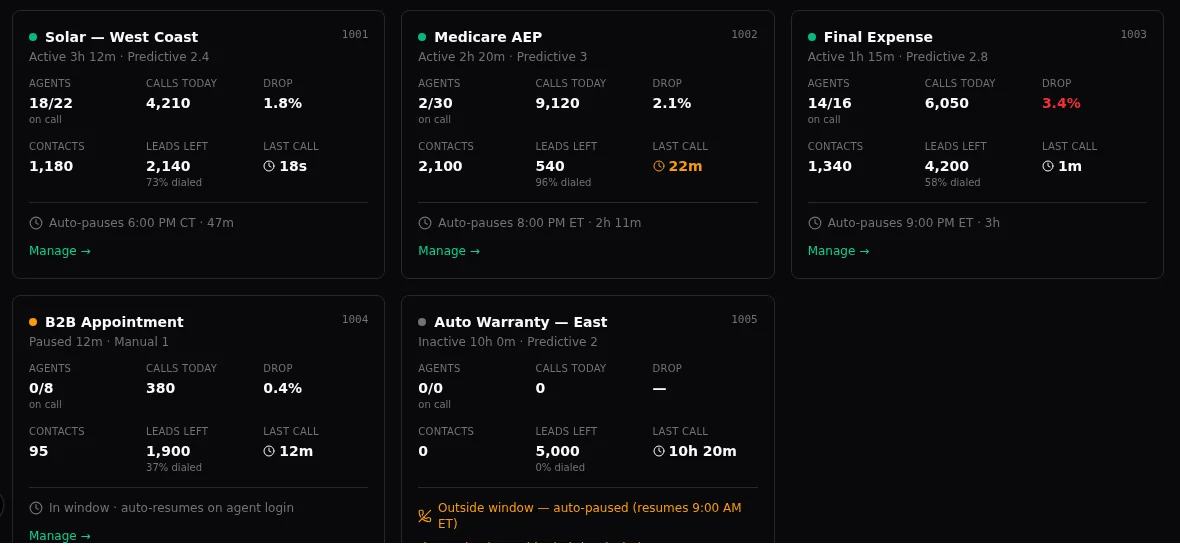
There is also a supervisor mobile app, currently in beta, for the floor manager who is not at a desk.
We have not found another VICIdial platform that comes close to this, and we would rather you went and checked than took our word for it.
Agents anywhere
Every agent gets a branded browser softphone. No handset, no softphone install, no VPN.
The webphone is WebRTC over WSS/TLS, served from your own domain, and it works the same whether the agent is in your office, at home, or on a laptop in another country. For most deployments this removes an entire category of IT work — no per-desk provisioning, no client software to update, no VPN concentrator to size.
How access actually works
Worth understanding, because it is unusual and it is the single thing new customers most often misread.
Every dialer we run is default-deny. It answers only IP addresses that have been approved, and ignores everything else outright — an unapproved machine gets no response at all, not a login page and not an error. That is what keeps a public VICIdial box from being found and hammered by scanners within hours of going up, which is the fate of most unprotected installs.
Because an unapproved address gets silence rather than an error, a first-time agent can conclude the dialer is broken when it is simply not expecting them. Every account gets a self-service link: the agent opens it once, approves their own address, and lands on the agent screen. Share that link on day one and this never becomes a problem. We now say so in the setup email, on the dashboard, and here.
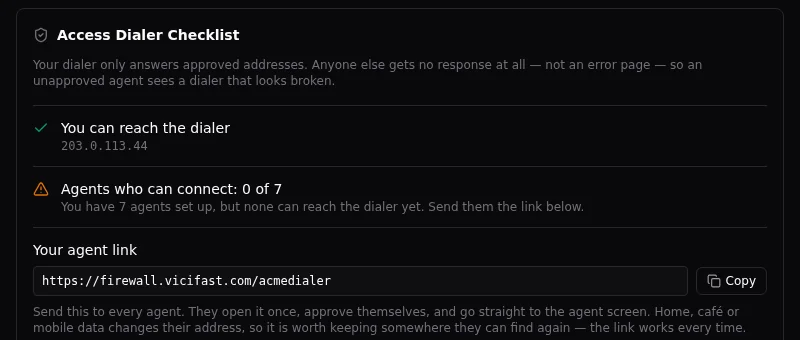
Approving an address takes the agent one click and no ticket. Home, office, café and mobile data are each different addresses, so the link is worth keeping somewhere they can find it again.
Your carriers, your margins
Bring your own carrier and we add nothing to its minutes - or use VICIfast Voice, our own optional US termination and DIDs.
You bring your own SIP trunks and keep your own rates. Any carrier, including carriers outside the US, with multiple trunks, failover routing and inbound DID-to-queue mapping. If you have negotiated good termination, you keep the benefit of it; if you change carrier next quarter, that is a configuration change and not a contract renegotiation.
This is a deliberate commercial position: bring-your-own-carrier works on every plan, and we put nothing between you and your carrier's rates. If you would rather not run a carrier relationship, VICIfast Voice is our own optional termination and DIDs - US-first, Canada included - from $0.0085/min outbound billed 6/6, DIDs at $1/month with no setup fee, inbound at $0.005/min, and AI answering-machine detection at no extra cost.
Trunk management is in the dashboard, with presets for common providers and a generic path for anything else, IP-authenticated or registration-based.
Compliance and call controls
Outbound dialing is regulated, and the penalties are per call. The controls exist; the responsibility for using them is yours.
Calling windows
Local calling hours are enforced from the lead's own timezone, not the server's. That distinction matters more than it sounds: a dialer whose clock has drifted, or whose timezone was set to whatever the hosting region defaulted to, will happily place calls outside legal hours and record them neatly for whoever asks. Timezone is explicit and manageable per server, and we treat clock drift as a fault rather than a curiosity.
DNC handling
Internal do-not-call lists at both the system and the campaign level, so a suppression applied for one client does not silently leak into another's campaign. Numbers scrubbed at load time and at dial time.
TCPA litigation scrubbing
Optional lookup against a litigation-risk database before a number is dialled, configured per server with your own provider credentials. It has a deliberate design decision worth knowing: you choose the failure mode. If the lookup service is unreachable, the platform can either allow the call or block it. Neither answer is universally right — allowing keeps the floor dialing, blocking keeps you compliant — so it is your policy, set explicitly, not our default imposed quietly.
Recording
Full call recording on every channel, retained per your policy (see §10 for the storage arithmetic), with a searchable interface for retrieval and export. Consent announcements and per-campaign recording rules are configured in VICIdial itself.
We provide the controls and keep them working. We do not give legal advice, we do not certify your campaigns as compliant, and we cannot tell you what your regulator expects. The platform will do exactly what you configure it to do, including the wrong thing.
Quality, recordings and AI
Recording every call is easy. Doing anything useful with thousands of hours of audio is the hard part.
Recordings are searchable and playable from the dashboard, exportable individually or in bulk. That covers the "pull that call from Tuesday" case, which is most of what a supervisor needs.
Structured quality review
The optional Quality Audit Module turns ad-hoc listening into a repeatable programme: build scorecards with weighted sections and checkpoints, define sampling rules so reviews are drawn fairly rather than from whoever the manager remembers, and track scores over time by agent, campaign and reviewer. Scorecards are versioned, so tightening your criteria next quarter does not silently rewrite last quarter's results.
AI-assisted analysis
Recordings can be transcribed and analysed automatically against prompts you define — flagging compliance language, sentiment, objections or whatever your programme cares about — so human reviewers spend their time on the calls that warrant it rather than sampling blind.
Automated analysis is good at triage and poor at judgement. It will reliably tell you which fifty calls out of five thousand deserve a human ear. It will not replace the human, and any vendor telling you otherwise is selling you a scoring rubric with a language model behind it.
Text-to-speech, prompt management and branded agent soundboards round out the audio side — prompts and music-on-hold are managed from the dashboard rather than by dropping files onto a filesystem.
Sizing it honestly
Most sizing advice in this market is optimistic. Here are numbers we will stand behind.
The binding constraint on a predictive dialer is rarely agents — it is channels. At a 3–4× predictive ratio, fifty agents means roughly 150–200 simultaneous call channels, each carrying audio and, if you record everything, each writing to disk at the same time.
| Plan | Resources | Agents | From |
|---|---|---|---|
| Velocity Dedicated CPU | 16 vCPU · 64 GB RAM · 360 GB NVMe | 150 | $549/mo |
| Turbo | 32 vCPU · 128 GB RAM | 250 | $1,099/mo |
| Hyper | 48 vCPU · 192 GB RAM | 400 | $1,749/mo |
Dedicated CPU matters more than the core count. Shared-vCPU instances are cheaper and will run a dialer adequately until a noisy neighbour steals cycles at the wrong moment. Voice timing is unforgiving about that — jitter, choppy audio, and dropped calls that look like a carrier fault and are not. For anything above a pilot, dedicated CPU is the difference between a platform and a science experiment.
Beyond a single box you can scale vertically to a larger dialer, or horizontally by adding servers — one per customer or per business unit, which also gives you clean data isolation.
Recordings and storage maths
This is where deployments most often get planned wrong, so it is worth doing the arithmetic before you sign anything.
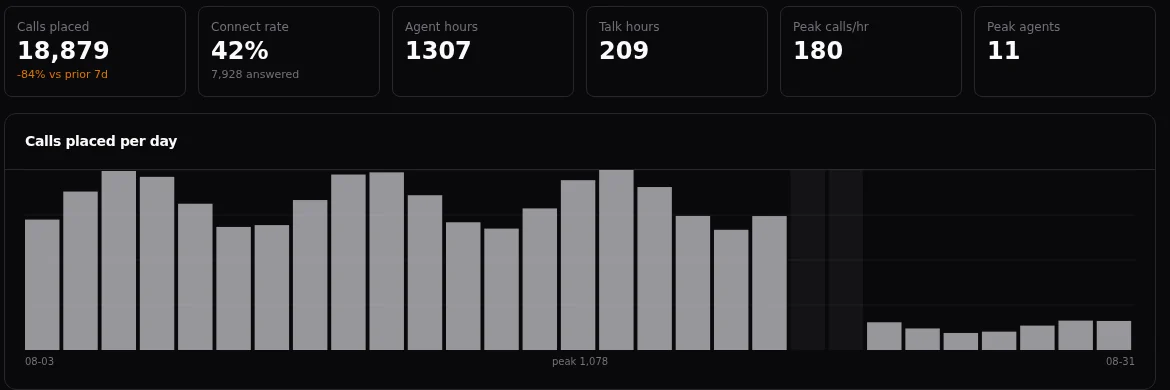
A fifty-seat operation recording every call typically generates 150–300 GB per month, depending on codec and talk time. That number compounds against whatever retention policy your compliance team has written down.
Read those last two together. Ninety days of recordings does not fit on the dialer — not at the top of the range, and not at the bottom once the OS, VICIdial and the database have taken their share. A Velocity box holds roughly a month of everything-recorded audio comfortably, and more if you record selectively.
There are two honest ways to get to a long retention window, and they solve different problems:
Keep it all live — add storage
Attach additional block storage to the server so the whole retention window stays on the box and plays back directly in the VICIdial screens. Right when QA needs any call from the last quarter on demand.
Keep it recent — archive the rest
Recent calls stay on the dialer for instant playback; nightly, a full recordings archive goes to your own S3-compatible storage. Cheaper, and right when the long window is a compliance obligation rather than a daily tool.
Archived recordings are not playable through the VICIdial interface. They are retrieved from your bucket when needed. If your QA team expects to click any call from ninety days ago inside the agent screen, you want the storage on the box, not in an archive.
Security, backups, recovery
An unprotected VICIdial box on the public internet is found within hours. Ours are not reachable in the first place.
The firewall
Every server runs a managed, default-deny firewall: approved addresses only, geo-blocking, automatic scanner blocking, and a self-service portal where agents approve themselves without raising a ticket. TLS certificates are issued and renewed automatically. Administrative access sits behind short-lived credentials rather than a permanent open port.
Backups
The Platform 7-Day Backup add-on takes a nightly compressed database dump and a full recordings archive to managed off-box storage on a rolling seven-day retention, with on-demand "back up now" whenever you want one. Every backup is complete — a full DB dump plus the recordings — which means it is also a clean export if you ever leave.
You can additionally mirror nightly backups to your own S3-compatible bucket, so a copy always exists somewhere we do not control.
Recovery
Recovery is backup-based: we restore to a fresh server from any of the last seven days, keeping your IP and DNS, usually in under an hour. Carrier resilience comes from multiple trunks with failover routing.
This is restore-based recovery, not a hot standby. A single dialer is a single machine, and a total loss means an hour of restore, not a seamless failover. If your operation cannot tolerate that, a clustered multi-server architecture can be scoped — but you should choose it deliberately rather than assume it.
Monitoring runs on 60-second telemetry with alerting. We target ~99.9% availability and our track record is around 99.94%. Standard plans carry no contractual service credits, which we would rather say here than bury.
Two ways to run it
Both give you the same dashboard and the same management. They differ on whose machine it is.
Managed hosting — from $549/mo
We provide and run the server on our infrastructure, and you still get root. Add your own SSH public key from the dashboard and you have a root shell on the box, plus a browser console if you would rather not leave the tab.
BYOI — your infrastructure, $29/mo
Point us at a clean Ubuntu server you already own. We install and manage VICIdial on it exactly as we would our own — same dashboard, same monitoring, same backups — and you keep full root from minute one. We never bill for compute or touch your hypervisor.
BYOI suits teams with existing infrastructure commitments, specific data-residency requirements, or an accounting preference for owning the hardware. Managed suits teams who would rather the machine not be their problem. You can mix both under one account.
Root access, on either model
This is where we differ from most managed VICIdial hosts, so it is worth being explicit: a managed server is not a black box. From the server page you add your own SSH public key and connect from your terminal as root, exactly as you would with a machine you bought yourself. Keys are managed in the dashboard — add, name and revoke them — and take effect immediately.
There is also a browser console on every server for the times you want a shell without a terminal, or without your key to hand. Console sessions are recorded, and you can have one rendered to video and emailed to you afterwards — useful for handing a colleague evidence of what was changed, and for your own audit trail.
Root means you can genuinely break it. The platform manages the OS, firewall, TLS and backups, so changes made by hand at that layer may be reconciled or overwritten by the platform. Use it freely for VICIdial work and diagnosis; tell us before you re-architect the box underneath us.
Hosting regions today: Ashburn and Hillsboro in the US; Nuremberg, Falkenstein and Helsinki in the EU; Singapore in Asia.
Teams and access control
One account, many servers, and the people in your business who should not all have the same buttons.
Servers group into projects — by client, by business unit, by whatever structure you actually run. Teammates are invited to the account and granted roles per project rather than globally, so the person who manages one client's dialer does not inherit access to the rest.
Admin
Full control of the servers in the project, including billing-adjacent and destructive actions.
Operator
Day-to-day running — campaigns, agents, firewall, trunks — without the ability to terminate or restructure.
Viewer
Read-only. Right for analysts, client-side stakeholders and anyone who needs the numbers but not the controls.
On top of the role, individual capabilities can be granted or withheld per member — SSH access, firewall management and similar — so a trusted operator can be given shell without being made an administrator.
Actions are recorded. Who changed a subscription, who whitelisted an address, who ran a repair and when, all of it retained. When something changes unexpectedly on a server your team shares, that history is the difference between a conversation and an argument.
Your first week
The server is ready in under a minute. Getting a floor dialing productively takes rather longer, and the order matters.
Day one — prove the path
Create one agent, open the agent screen, and place a single manual call to your own mobile. If you hear yourself on both ends, your audio path is clean end to end and everything after this is configuration. Allow the microphone when the browser asks; skipping that prompt produces an agent who appears logged in and hears nothing, which is the most common first-day support ticket we see.
Then send the agent access link to anyone else who will log in. Because the dialer only answers approved addresses (§05), an agent who has not approved theirs will see a page that never loads and reasonably conclude the platform is broken.
Day two — connect a carrier
Add your trunk with the credentials your carrier gave you. Two things account for most "my calls fail instantly" reports: the carrier must allow your server's IP, and your outbound dial prefix must point at the trunk you intend to use. Place one manual call through it before going further.
Day three — one small campaign
Load a short list, build a single campaign, and run it manually or at a low dial ratio with two or three agents. Resist the temptation to start at a 3× ratio on a list of fifty thousand. You are validating dispositions, recordings, hold audio and reporting, not testing capacity.
The rest of the week — turn it up
Raise the dial ratio gradually and watch the drop percentage as you go. Add agents. Check that recordings are landing and that your reports show what you expect. By the end of the week you should know your real connect rate, which is the number every later decision depends on.
Professional setup covers exactly this week — initial configuration, campaign tuning for your use case, and agent training — from $2,000 one-time. Most teams comfortable with VICIdial do it themselves; most teams new to it find the fortnight it saves worth more than the fee.
Migrating an existing dialer
Most people arriving here already have a VICIdial somewhere. Moving it is a self-service wizard on your new server, not a project you hire someone for.
You start it from the server page, point it at your existing box, and run it yourself. It brings across campaigns, lists and leads, users and user groups, dispositions, in-groups, DIDs and call menus, and your recordings archive. What you end up with is your dialer, unchanged, on a platform that maintains itself.
It looks before it leaps
You name your source server and the wizard mints a public key for you to paste onto it — so we never ask for your password, and access is revocable from your side the moment you are done.
Then it probes before touching anything: reachability, distribution, VICIdial revision, available disk, and what is actually on the box. You get a manifest of what will move and a pass or fail on every check. If your source is on a VICIdial revision that will not transplant cleanly, or the disk maths does not work, you find out in the probe rather than at cutover.
Rehearse, then cut over
Two features do most of the work of making this feel seamless:
Dry run
Rehearse the whole migration without committing to it. You see exactly how long each stage takes on your data, which is the only reliable way to plan a cutover window.
Sync-only
After the bulk move, run an incremental sync that carries just what changed. Your cutover becomes a short final catch-up rather than a full transfer.
You can schedule the dump for a window that suits you, and the destination is never overwritten without an explicit confirmation from you. You keep dialing on the old system throughout; the switch itself is a DNS and carrier change at a moment you pick.
Rarely the data. Usually the carrier: your trunk is authenticated against your old server's IP, so it has to be re-authorised for the new one, and that runs on your provider's turnaround rather than ours. Start that conversation before migration day, not on it.
The second thing to plan is recordings. A large archive takes real time to copy, which is exactly what the dry run tells you — move the bulk ahead of cutover and let the final sync carry the remainder.
Or hand it to us
White-glove migration is $499 one-time and still stands. Teams comfortable with their own VICIdial generally run the wizard themselves in an afternoon; teams inheriting a box nobody documented tend to prefer that we drive.
Running it as an agency
If you sell contact-centre services rather than run one, the platform is built to disappear behind your brand.
Every customer-facing surface white-labels: the VICIdial admin screen, the agent screen, the webphone and the access portal, all on your own domain with your logo and colours. Your customers never see our name.
One account holds every server, grouped into projects, with teammate roles and per-member capability controls for your staff. Each end-customer runs on its own isolated server — separate database, recordings, firewall and domain — which is both cleaner operationally and a far easier conversation when a client asks where their data lives.
Carriers stay per-customer and stay theirs, and we add nothing to those minutes. A customer who would rather not bring one can use VICIfast Voice instead.
We do not yet operate a formal reseller or wholesale-margin tier — the pricing in this guide is our standard list, and agencies buy at it. An affiliate programme paying 15% recurring on referred accounts is available today, and we are open to early-partner conversations. We would rather tell you that now than after you have built a margin model on an assumption.
What it costs
Per server, per month, in USD. No provisioning fee. Annual billing saves 17%.
| Item | What it covers | Price |
|---|---|---|
| Velocity | 16 vCPU · 64 GB · 360 GB · up to 150 agents | from $549/mo |
| Turbo | 32 vCPU · 128 GB · up to 250 agents | from $1,099/mo |
| Hyper | 48 vCPU · 192 GB · up to 400 agents | from $1,749/mo |
| BYOI | Your server, our platform and management | $29/mo |
| Automated provisioning | Server and platform stood up automatically | $0 |
| Platform 7-Day Backup | Daily off-box DB + recordings, 7-day retention | $29/mo |
| Agent Mobile App | Android softphone (iPhone coming) | Included |
| Quality Audit Module | AI QA scorecards and review workflow | $49/mo |
| White-glove migration | We migrate an existing ViciBox in for you | $499 |
| Professional setup | Initial setup, campaign tuning, agent training | from $2,000 once |
| VICIdial support retainer | VICIdial debugging, patching, configuration and optimisation | $2,000/mo |
Platform support — the server, provisioning, backups, the dialer being up — is included in every plan and never billed as engineering time. The retainer covers VICIdial-level work: dialplan changes, carrier troubleshooting, campaign strategy, custom reporting.
What we don't do
Every platform has edges. Knowing ours early is worth more to you than discovering them in month three.
- We do not make you buy our minutes or numbers. Bring your own carrier and your own DIDs on any plan. If you want a single vendor for termination and platform, VICIfast Voice is our own optional US termination and DIDs, Canada included.
- We do not offer hot failover on standard plans. Recovery is restore-based and usually under an hour. Clustered architectures are possible, and are a scoping conversation.
- We do not run your campaigns. The platform is self-service by design. Setup and ongoing VICIdial work are available, and priced above, but the default assumption is that you operate your own dialer.
- We do not have a wholesale tier yet. Agencies buy at list today.
None of that is likely to change quietly. If any of it becomes a problem for your deployment, the honest answer is usually a different architecture rather than a workaround, and we will tell you so.
The vocabulary
Terms that appear in every VICIdial conversation and are rarely explained to the person paying for it.
| Term | What it actually means |
|---|---|
| Predictive dialing | Dialing several numbers per available agent, predicting how many will answer, so an agent is talking rather than waiting. Efficient, and the source of most compliance risk. |
| Dial ratio / level | How many numbers are dialled per free agent. 3× means three calls per agent. Higher ratio, more talk time, more dropped calls. |
| Drop rate | Calls answered by a human that no agent was free to take. Regulators care about this number; in most regimes 3% is the line. |
| Channel | One live call leg. Fifty agents at a 3–4× ratio means 150–200 channels — the number that actually sizes your server. |
| Trunk | The connection to your carrier that calls travel over. IP-authenticated (the carrier knows your server's address) or registration-based (your server logs in). |
| DID | A phone number that can be called. Inbound DIDs map to queues or menus. |
| In-group | An inbound queue. Calls to a DID land in an in-group and are distributed to the agents assigned to it. |
| Disposition | The outcome an agent records for a call. Your entire reporting layer is built on these, so define them before launch, not after. |
| Hopper | The buffer of leads VICIdial pre-loads and dials from. An empty hopper stops a campaign dead, and it is the first thing to check when dialing stalls. |
| Blended | Agents taking inbound calls and outbound dials in the same session. |
| Barge / whisper / listen | Supervisor joins a live call audibly, speaks only to the agent, or listens silently. The three modes of coaching a floor. |
| WebRTC | Voice in the browser. Why your agents need no handset, no softphone install and no VPN. |
Take it with you
A PDF of everything above, for sharing internally or reading offline.