Whitelabeling the VICIdial agent screen
How VICIfast gives your agents a modern VICIdial agent screen in your brand, light and dark, without editing VICIdial itself.

Your agents spend the whole shift on the VICIdial agent screen. On VICIfast you can give them a modern one in your own brand, with your logo, your name and your colours, while the VICIdial underneath stays exactly as it is.

What the agent screen is
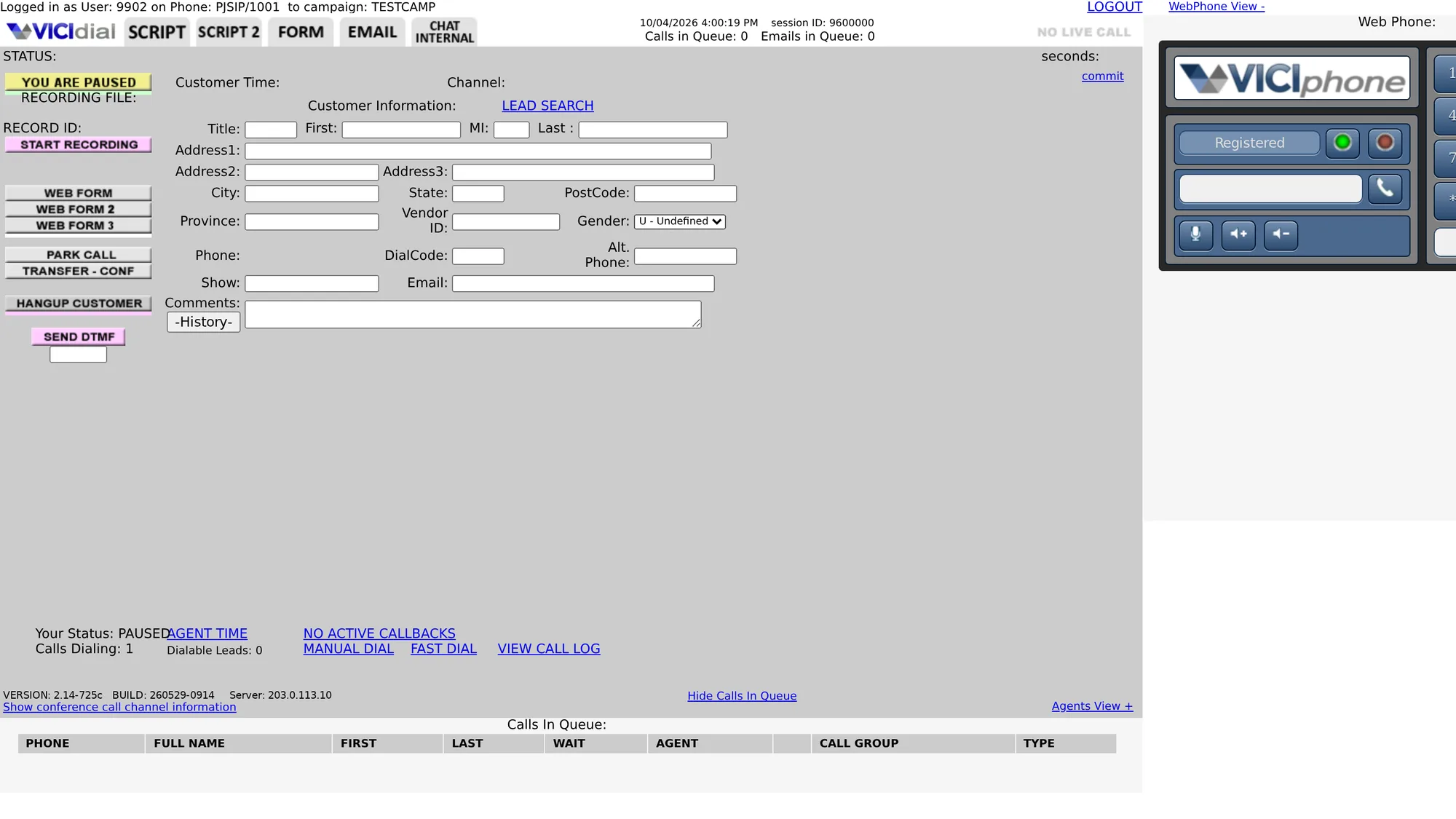
The agent screen is the page an agent works in all day. It shows the lead on the line, the call controls, the Disposition buttons and any Agent script attached to the campaign. Out of the box it looks the way VICIdial always has: dense, grey and full of small image buttons. That is fine for an internal team, but it feels out of place when you resell the service under your own name, and new agents take longer to find their way around it.
Two looks to choose from
Every VICIfast server can show one of two agent screens, and you choose per brand:
- VICIfast screen: a clean, light layout with big call buttons, sheets instead of pop-up boxes, a dark mode each agent can switch on, and a sign-in page with a photo beside the form.
- Classic VICIdial: VICIdial's own screen, with your logo in the header and a branded sign-in card on your background colour.
Both keep every VICIdial feature. The difference is how much of the page carries your brand.
How it works without touching VICIdial
The VICIfast screen is one line in VICIdial's options.php file, the hook VICIdial provides for adding to its pages. That line loads a script and a stylesheet, and in the browser they rebuild the page around VICIdial's own elements. Every button still calls the same VICIdial function, every field still belongs to the same form, and nothing in VICIdial's code is edited.
That matters when VICIdial updates. Because the program files are untouched, an upgrade does not wipe your branding, and you never end up maintaining a forked copy of the agent screen. If anything ever misbehaves, the page falls back to stock VICIdial instead of breaking. The Classic look is lighter still: it adds your rules to VICIdial's custom.css file, which loads after the default styles.
What your agents see
- A status band across the top: green on a live call, amber when paused, blue at disposition.
- The lead in one card, with the name, the customer's local time and their city.
- Big tiles for hang up, transfer, park, record and DTMF. A greyed-out tile says why when you hover it, such as "available during a live call".
- Disposition, callbacks, manual dial and lead search open as sheets over the screen, with VICIdial's own choices inside. Transfer opens a panel right under the lead.
- Light by default, dark for any agent who prefers it. The Webphone switches with the screen.


Setting it up
Branding lives in a whitelabel pack in your VICIfast dashboard. Open Whitelabel, click Create pack, add your logo and company name, pick an accent colour, choose the VICIfast screen, then the login picture and a heading. The preview beside the settings is the real login and agent screen with your pack on it, so you can check it on a sample call, in light and dark, before any agent sees it.

When it looks right, apply the pack to a server, or to a project to brand every server in it. VICIfast pushes it to your box, and agents get the new screen the next time they sign in. Every setting is walked through in the step-by-step guide.
flowchart TD
  A[Build a pack: logo, colours, login picture] --> B[Check the real screens in the preview]
  B --> C[Apply the pack to a server or project]
  C --> D[VICIfast adds one line to options.php]
  D --> E{VICIdial files edited?}
  E -->|No| F[Agent signs in and sees your screen]
A way back for agents
Some agents have used stock VICIdial for years. Classic view in the header signs them out, and from then on their browser opens the stock screen. The sign-in page keeps a link to come back to the new one. To move a whole team back, switch the pack to Classic VICIdial and apply it again.
Who this is for
A branded agent screen earns its keep when agents are not your own staff, or when the screen is part of a product you sell on. Resellers want their customers to see one brand. Operators running several clients on separate boxes want each team to see the right look. Because the branding lives on a single box per customer, none of those setups bleed into each other.
Where VICIfast fits
A branded agent screen is one piece of the larger picture in what VICIfast adds to VICIdial. For a closer look at every part of the screen, see the VICIdial theme page. If you also want to brand the phone, see the branded webphone. Since each server provisions in under 40 seconds, you can stand up a branded instance the same day you decide to. The pricing page lists what each plan includes.
Related from VICIfast
About VICIfast
We run VICIdial servers for call centres, so you don’t have to. You get the dialer set up, secured and kept running — we handle the server, the updates and the backups. Bring your own phone carrier at no markup, or use VICIfast Voice, our own US calling and numbers, from $0.0085 a minute. From $49 a month per server.
Questions? Call +1 636 556 0022 and talk to someone who runs dialers.
Citing this article
VICIfast Engineering. “Whitelabeling the VICIdial agent screen”. VICIfast LLC, June 29, 2026. Retrieved from https://vicifast.com/blog/vicifast-branded-agent-screen
Have questions?
Related posts


You might be interested in




VICIfast newsletter
Liked this? Get the next one in your inbox.
We ship the kind of stuff you just read - concrete, numbers-first, no drip. One email when a new post goes live. Unsubscribe in one click.
Comments
No comments yet - be the first.