How to add a new list in VICIdial
A walkthrough of adding a new list in VICIdial, including the list ID rules that trip up most first-timers.

A list in VICIdial is a labeled bucket that holds your phone records. Every Lead in the system belongs to exactly one list, and a list is what you attach to a Campaign so the dialer knows what numbers to call. Before any calling can happen, you need a list to pour those records into.
If you are new to all of this, start with the lists and leads guide for the full picture, then come back here when you are ready to make your first one.
Getting to the Add List screen
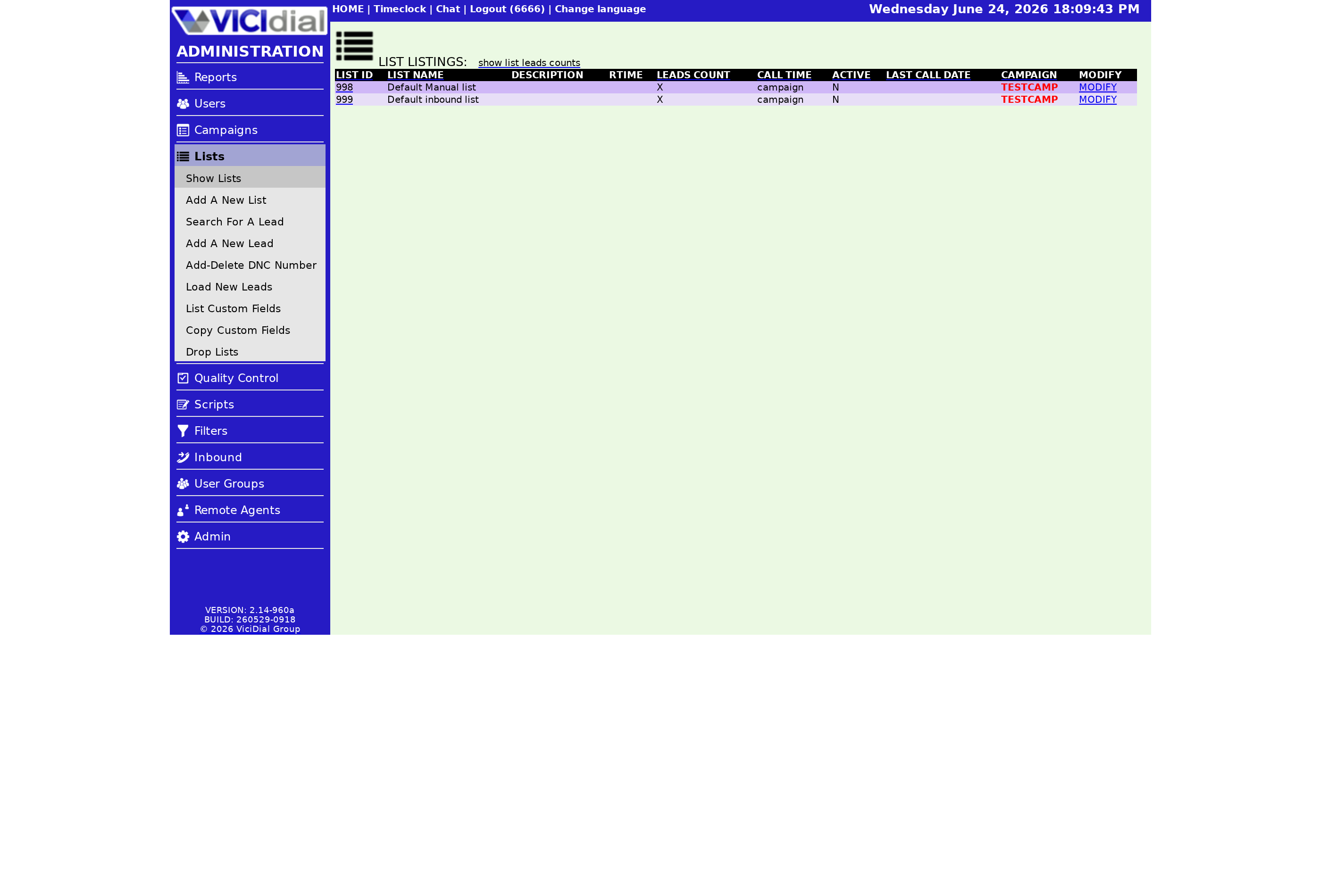
Open the LISTS section from the left side of the admin screen. You will see every list already in the system with its ID, name, the campaign it belongs to, and its active status. At the top of that table is an ADD NEW LIST link. Click it and you land on a short form with two fields you absolutely must fill in: the list ID and the list name.
The list name is just a short description, between 2 and 20 characters, so you can recognize it later. The list ID is where people get stuck, because it follows strict rules.
The list ID rules
- Numbers only - no spaces, letters, or punctuation.
- Between 3 and 8 characters in length.
- It cannot start with a zero, and it must be greater than 99.
- It must be unique - no two lists can share the same ID.
What happens after you save
Once the list exists, it is empty. You assign it to a campaign and load records into it, and only then does the dialer start feeding numbers into the Hopper - the short queue of leads waiting to be dialed. From there the campaign's dial method and statuses decide which records actually go out the door.
flowchart TD
  A[ADD NEW LIST link] --> B[Set list ID + name]
  B --> C{Valid ID?}
  C -->|No| B
  C -->|Yes| D[List saved empty]
  D --> E[Assign to campaign]
  E --> F[Load leads]
  F --> G[Hopper feeds the dialer]
A common first question is whether the list and the records are the same thing - they are not. The list is the container; the records are what you put inside. For a deeper look at the container itself, see what a VICIdial list is.
One more habit worth forming: pick a naming scheme for your list IDs before you create your tenth list, not after. Because the ID is permanent and numeric, a little planning goes a long way - many teams reserve a range of numbers per source or per month so they can tell at a glance where a batch of records came from. It costs nothing now and saves a lot of squinting later when you have dozens of lists side by side in the table.
That is the whole job: name it, ID it, save it. The hard part is the rules around the ID, and now you know them. If you would rather skip the server setup entirely and have a secure dialer ready in under 40 seconds, take a look at our managed VICIdial plans.
Frequently asked
- No. List IDs are numbers only, between 3 and 8 digits, and they cannot start with a zero.
- The two most common reasons are a missing list name and an invalid list ID - for example one that is too short, starts with a zero, or duplicates an existing list.
- No. Every list ID must be unique across the whole system.
› Can I use letters in a list ID?
› Why was my new list rejected?
› Can two lists have the same ID?
Related from VICIfast
About VICIfast
We run VICIdial servers for call centres, so you don’t have to. You get the dialer set up, secured and kept running — we handle the server, the updates and the backups. Bring your own phone carrier at no markup, or use VICIfast Voice, our own US calling and numbers, from $0.0085 a minute. From $49 a month per server.
Questions? Call +1 636 556 0022 and talk to someone who runs dialers.
Citing this article
VICIfast Engineering. “How to add a new list in VICIdial”. VICIfast LLC, June 22, 2026. Retrieved from https://vicifast.com/blog/add-vicidial-list
Have questions?
Related posts



You might be interested in



VICIfast newsletter
Liked this? Get the next one in your inbox.
We ship the kind of stuff you just read - concrete, numbers-first, no drip. One email when a new post goes live. Unsubscribe in one click.
Comments
No comments yet - be the first.