Read your phone line traffic
What the Overview and Traffic pages under VICIfast Voice tell you about your VICIfast Voice line: answer rate, ring delay, failed calls, caller IDs, costs and detection.
Phone lines, numbers & caller ID · 5 min read
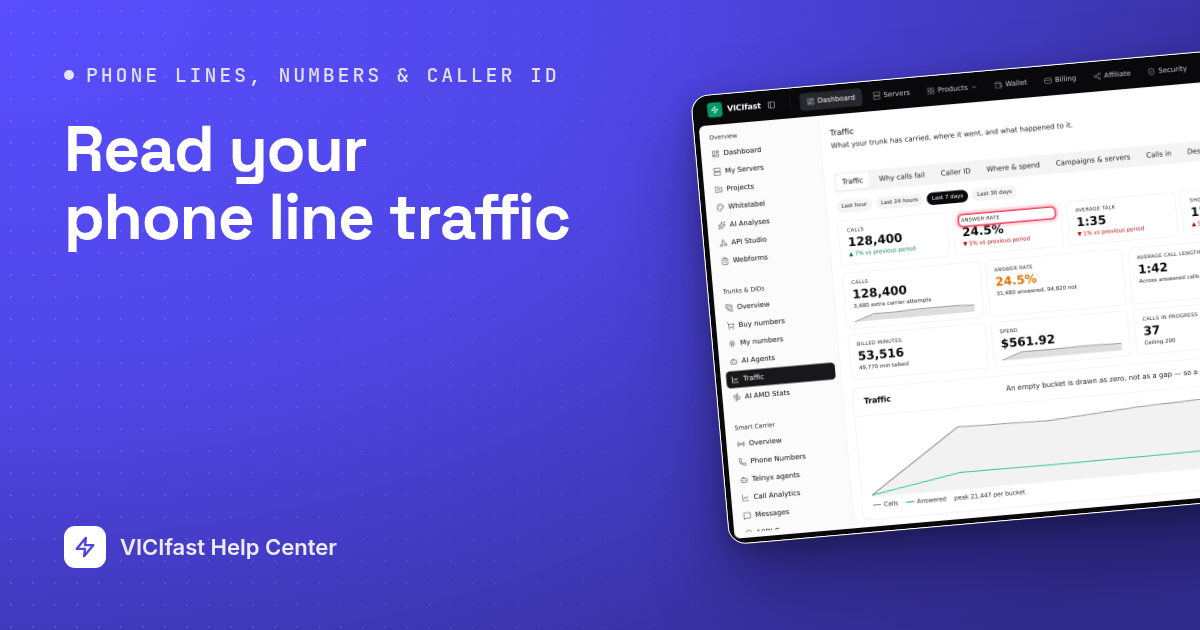
Your VICIfast Voice phone line (trunk) has two pages that show what it is doing. Overview tells you whether the line is up right now. Traffic tells you what happened to your calls: how many were answered, why the others failed, what they cost. Use this guide when answer rates drop, calls are refused, or you want to check spend.
What you need
- You must be the account owner.
- An approved VICIfast Voice line. See VICIfast Voice: apply, buy numbers and route them.
Step 1: Check the line is up
- In the sidebar, under VICIfast Voice, click Overview.
- On the Status tab, check that Carrier account says Active and that your servers are listed as Allowed under Servers allowed to send us calls. A server that is not on this list has every call refused.
- Click the Account tab. Limits shows Simultaneous calls, New calls per second and your Time zone. Billing shows your Balance, Credit limit and Minimum billed.

Step 2: Open Traffic and pick a period
- Under VICIfast Voice, click Traffic.
- Pick a period from the pills: Last hour, Last 24 hours, Last 7 days or Last 30 days. Every tab on this page uses it.
- The tabs are Traffic, Why calls fail, Caller ID, Where & spend, Campaigns & servers, Calls in, Destinations, Detection and Calls.
Step 3: Read the headline numbers
The Traffic tab opens first. The top row compares this period with the one before it (for example "▲ 12% vs previous period"). Below it:
- Answer rate: answered calls out of all calls. Green from 25%, amber from 10% to 25%, red below 10%.
- Average call length: answered calls only.
- Ring delay (median): time from sending the call to the first ring. It turns amber above 4 seconds. A dash means nothing rang in the period.
- Calls in progress against your ceiling, and Busiest second: the most new calls started in one second. Compare it with New calls per second on the Account tab when calls are refused.
If you see "calls needed more than one carrier", we retried those calls on another carrier before they connected. You are not billed twice, but it adds ring delay.

Step 4: Find out why calls fail
- Click Why calls fail. How calls ended lists every outcome. In Outcomes over time, a new colour appearing is usually the start of a problem.
- Check How long answered calls lasted. A rise in calls under 6 seconds usually means a tired list or a caller ID that is being flagged.
- Best time to call shows the answer rate by day and hour. Hours on this chart are UTC.
- Click Destinations for Where your calls went (each bar coloured by that destination's own answer rate), Carrier responses (the code the far end sent back) and When you dial, shown in your account's time zone.

Step 5: Check your caller IDs
- Click Caller ID. Falling answer rate counts caller IDs whose answer rate dropped 15 points or more within the period.
- In the Caller IDs table, the Trend column compares the first half of the period with the second. A number falling like this is usually being labelled as spam: rest it or replace it.
- Same area code and Different area code show whether local caller IDs answer better for you. Call signing (STIR/SHAKEN) shows how your calls were signed; A and B are normal.

Step 6: See costs, campaigns and incoming calls
- Where & spend: Cost per answered call, Cost per talk minute, This month so far and a Month forecast, then spend by state and city.
- Campaigns & servers: answer rate and spend By campaign and By server. Click a campaign to see the other tabs for that campaign alone.
- Calls in: calls to your numbers, how many were answered, and By number. If some did not get through, a box lists why; those calls were turned away before they reached your server.

Step 7: Check detection and download your calls
- Click Detection. Read Coverage first: it is the share of answered calls that got a verdict. Below 70% it turns amber: the rest of your calls connected without a verdict, so check this before you rely on the other numbers.
- Reached a person and Machine split the verdicts. Slowest verdict (p95) turns amber above 2 seconds. What the detector actually said lists the detector's raw answers.
- Click Calls for the list of calls in the period, with ring time, talk time, billed time, the detection result and the charge. Times are UTC.
- Click CSV or Excel to download the calls for the whole period, up to 50,000 calls.

If something goes wrong
Frequently asked
- We could not reach the line's system for a moment. This does not affect calls in progress. Refresh in a minute; if it stays, chat with support.
- Only that panel could not load. It does not mean you have no calls. Refresh in a moment.
- Your server is added automatically the next time it applies its trunk settings. If it is still missing after a few minutes, chat with support.
- Compare Calls in progress with its ceiling, and Busiest second with New calls per second on the Account tab. Calls over either limit are refused. Chat with support to raise a limit.
- Your campaigns are not sending calls over this line. Set the campaign's Campaign trunk (Trunk / Routing tab) to VICIfast SIP, or pick a longer period.
- Detection is included with the line but is not switched on for your account yet. Chat with support and we will turn it on, then switch it on per campaign.