In one screen
A busy VICIdial server rarely runs out of CPU first. It runs out of one lock or one thread. We found two such bottlenecks, measured both on live floors and on a load rig, and fixed or worked around each.
- Table locks on VICIdial's MyISAM tables. One slow read of the call log makes the dialer's next write wait, and every read after that write waits too. Agents sit idle while answered calls drop.
- Asterisk's AMI. VICIdial moves every answered call to AMD and an agent over a brand-new AMI connection, and gives the move 2 seconds. Asterisk accepts those connections on one thread into a queue of 10. Past about 250 calls per dialer the queue overflows and the move arrives late. VICIdial then logs the answered call as no-answer, or AMD hangs up on the live person as a machine, while the CPU is a third idle. Behind it, every AMI event is built on one more thread. Opening both in Asterisk saved the answered calls but not the people: the redirect was still late, inside Asterisk.
| Bottleneck | What it causes | Fix | Result | |
|---|---|---|---|---|
| 1 | MyISAM table locks on the big log and lead tables | One slow report freezes the dialer's writes. Agents sit idle while answered calls drop | Move about 8 high-traffic tables to InnoDB; never cap a writing account; keep the rest MyISAM | Dialer pace under report load: 34% → 90% of normal. 0 statements stuck at twice the normal call rate |
| 2 | Asterisk's AMI front door | Past about 250 calls per dialer, the AMI connection that moves each answered call waits 1–7 s: calls lost as no-answer, live people hung up on as machines | Keep a dialer under about 250 calls with AMD on. The AMI fixes and the longer Wait we tested save answered calls, not people (§7.3) | On a load rig: 0% lost at 200 calls; at 300, 8.7% lost and a third of live people never reached an agent, CPU 64%. Both AMI fixes: 1.2% lost at 300, but only 42% of people reached an agent: the redirect is still late inside Asterisk. Test servers only |
| 2b | Asterisk's AMI event thread | Events queue without limit; VICIdial sees answers late and its dialing stalls | Stop the 4 event types nothing reads (configuration only) | −59% AMI events, −83% peak AMI queue, −26% Asterisk CPU per call; on the rig, a third fewer calls lost as no-answer. Rolled out to about 50 production servers |
The numbers, before and after:
- Our test server, four report loops on a live floor: dialer pace 34% → 90% of its pace with no reports; statements queued on a table lock 29 → 0 at worst; longest wait 8 s → 0 s. That is MyISAM against InnoDB (§3.3).
- A 70-agent outbound cluster, still on MyISAM, after we fixed our own readers: calls that left while an agent on their own dialer was free, ≈ 151 → ≈ 29 an hour; wait for an agent, median and 90th percentile, 2 s / 5 s → 1 s / 2–3 s (§3.4).
- The same floor and the same reports on both engines: at worst 90 of VICIdial's own statements stuck behind a lock on MyISAM, 2 on InnoDB; a user-stats report up to 18 s against under half a second (§4).
- VICIdial's lead search by phone, with an index: 0.46 s → 0.01 s per search on 2.4 million rows (§6.3).
- One dialer on the load rig, 200 → 300 calls: answered calls lost as no-answer 0% → 8.7%; live people who reached an agent 99% → 65%; connection attempts the kernel dropped on full listen queues, with the AMI's full, 0 → about 11 a second. A person reached an agent 90–98% of the time when the redirect took under half a second, and never when it took 1.5 s or more (§7.2).
- Inside Asterisk, with the AMI fixed: at 300 calls the redirect's channel lookup waited up to 1.7 s (95th percentile) behind Asterisk's global channel tables, whose updaters were stuck waiting on the memory allocator; jemalloc took that to 0.1 s, but the call then waited longer to start in AMD and fewer people reached agents (§7.3).
- The AMI trim, same load: 628 → 259 events a second; peak AMI queue 1,528 → 262; Asterisk CPU per call 6.3 → 4.6 milli-cores (§7.5).
- The Asterisk 21/22 users.conf leak: 69 extra subscribers on one server, so every call event was handled 70 times; each one costs about 0.35% of Asterisk's CPU (50 cost +18%); 0 after the fix and an idle restart (§7.7).
- Power cuts: 7–8 of 9 MyISAM tables failed
CHECK TABLEafter every one, and the newest 1–28 s of acknowledged writes were gone; InnoDB never corrupted and lost at most the last second (§5).
Along the way:
- A nightly VICIdial job holds every agent screen's writes for up to about 25 seconds at midnight; one table on InnoDB removes it (§8.1).
- An hourly VICIdial job locks the table the redirect reads for about 25 seconds at minute 11 on a busy dialer (§8.5).
- Aria does not help with locking (§5).
- Twenty open wallboards cost the database the same as one (§4.3).
- Our servers were logging every dialplan step, about 1.6 GB a day (§8.3).
What to do on your server
- Run the four read-only checks at your busiest hour. They change nothing: table locks and the lead search, the AMI, its connection queue and the leak, the kernel's UDP buffers.
- Apply the AMI trim, after checking that no other AMI client on the server reads those events. Two configuration files (§7.5).
- Fix your own readers of
vicidial_log. Read VICIdial's running totals instead of scanning the day, cut the scans you keep into short slices, serve every viewer from one poller, and cap report queries, never an account that writes (§6). - Index
vicidial_log.phone_number, off-shift, if Check 2 says the lead search reads the whole table (§6.3). - On Asterisk 21 or 22, move
users.confaside and restart Asterisk while it is idle (§7.7). - Move the hot log and lead tables to InnoDB, off-shift, after a backup, with a larger buffer pool (§4, Appendix A). VICIdial's developers advise against InnoDB (§1): this is a deliberate exception for a few tables, with a revert, not a blanket change.
- Scale out, not up, once a dialer nears about 250 calls (§9). If Check 3 shows dropped AMI connections at your peak, that dialer is already past its wall (§7.1).
- On a busy dialer, run VICIdial's hourly flush every few minutes, so its delete at minute 11 stops holding the redirect lookup for 25 seconds (§8.5).
How to read this report
Every number is measured unless it is marked otherwise. The key claims carry one of three labels:
- Measured: we ran it, on our test server, on the production cluster, on our load rig or in an isolated test, and the section says how.
- Inferred: a conclusion drawn from measurements or from reading VICIdial's and Asterisk's source code. It has not been measured itself.
- Estimate: arithmetic on measured numbers, such as a capacity figure. Treat it as the starting point for your own test.
A Note that starts with "Not measured yet" marks a test we have not run, planned for the next revision. The fix states the change that removes a problem and what it costs. A Warning marks a step that can hurt a live floor if it is done carelessly.
Scripts carry a safety badge: "Read-only: safe on a live floor", "Run off-shift", or "Changes your server: back up first". The four checks in this report are all read-only. The database checks log in the way VICIdial's own scripts do, from /etc/astguiclient.conf, through a temporary file only root can read, and never print the password. Commands in the text that change a server sit next to a warning.
Terms with a dotted underline open a short definition, and the full list is in the Glossary. A few of them are ours: the Floor tab and the Today tab are views in the VICIfast dashboard, the stats agent is the script that reports each server's totals to it, and the shift watch is our read-only sampler.
Tested on
- VICIdial
- SVN r4032 (2.14-967a admin / 2.14-727c agent). Most test-server runs were on r4000 (schema 1743), before its upgrade on 2026-10-22.
- Asterisk
- 22.5.1, stock. The experimental patches in sections 7.3 and 7.6 ran on test servers only.
- MariaDB
- 10.6.23 (the Ubuntu 22.04 package) on the test server, the production cluster and the isolated local tests
- Operating system
- Ubuntu 22.04.5 LTS, x86_64
- Test server
- 8 shared vCPU, 15 GB RAM, NVMe. A simulated floor: about 45 bot agents in real agent sessions, a simulated carrier on the same machine.
- Load rig
- A throwaway VICIdial dialer on 16 dedicated vCPU / 64 GB with the same Asterisk and MariaDB builds, a fake carrier on a second server sending real audio, and 42–45 real agent screens on WebRTC on a third. Deleted after the test.
- Power-cut test
- A throwaway server of the test server's type with the same MariaDB package and configuration, VICIdial's nine busiest tables on three engines, a writer on a second server. Deleted after the test.
- Production cluster
- A 70-agent outbound cluster on dedicated hardware: one database and web server (16 cores / 32 threads, 128 GB RAM, NVMe) and three dialers (8 cores / 16 threads, 64 GB RAM each). Tables on MyISAM, Asterisk stock.
- Fleet
- About 50 VICIdial servers we operate: the AMI trim rollout and the users.conf survey
- Data windows
- Test server 2026-10-21 to 2026-10-22. Production cluster: load test 2026-10-15; 35 minutes on 2026-10-21; a full shift on 2026-10-22, 07:30 to 18:45 local time. Load rig, redirect trace and power-cut test: 2026-10-23.
1. Background: what VICIdial stores, and why it uses MyISAM
What the schema holds. VICIdial's schema (SVN schema 1743, version 2.14b0.5) has 344 tables: 336 MyISAM and 8 MEMORY. On our test server that is 371 MyISAM tables (3.26 GB) and the same 8 MEMORY tables.
| Group | Examples | Size share | Engine |
|---|---|---|---|
| Call and agent logs | vicidial_log, call_log, vicidial_dial_log, vicidial_carrier_log, vicidial_log_extended, vicidial_agent_log | most of the data | MyISAM |
| Archives | *_archive | large, cold | MyISAM |
| Leads | vicidial_list, vicidial_list_alt_phones, custom_* | large, hot | MyISAM |
| Settings | system_settings, vicidial_campaigns, vicidial_users, … | small | MyISAM |
| Live state | vicidial_live_agents, vicidial_live_inbound_agents, vicidial_manager | tiny, written every second | MyISAM |
| Rebuildable live state | vicidial_hopper, vicidial_auto_calls, live_channels, live_sip_channels, parked_channels, server_updater, … | tiny | MEMORY |
What the code relies on. We read VICIdial's own source on a live server:
- No transactions anywhere. Every statement stands alone.
- MyISAM is pinned on purpose. The table-creation SQL names
ENGINE=MyISAM286 times. A 2025 change to the custom-fields admin page addsENGINE=MyISAMso new tables do not inherit MariaDB's InnoDB default. Tables created at run time are MyISAM too. LOCK TABLESis used as a mutex onvicidial_live_agents(inAST_VDadapt.plandVD_email_inbound.pl) and onvicidial_settings_containers.- No MyISAM-only SQL: no
INSERT DELAYED,HIGH_PRIORITYorLOW_PRIORITY, no FULLTEXT, and no secondary-column auto-increment keys.
Why MyISAM.
- VICIdial dates from the MySQL 3/4 era.
- Its workload is thousands of tiny single-row writes, which MyISAM handles without a redo log, a doublewrite buffer or a sync on every commit.
- MyISAM is about half InnoDB's size on disk.
- Whole-table locking is simple, and the code is written around it.
The VICIdial project's own position is plain. Its lead developer, on the project's forum in 2014:
"Vicidial does NOT use Innodb. It is strongly recommended that you do NOT use InnoDB as your database storage engine for Vicidial use." — vicidial.org forum, 28 June 2014
and, in the same thread, that InnoDB "does NOT keep better consistency than MyISAM for Vicidial use", based on years of high-volume systems. Section 4 is therefore off the upstream support path, and says so: it converts only a few log and lead tables, keeps everything VICIdial uses as a lock or a queue on MyISAM or MEMORY, and comes with a revert.
2. How we measured
- Local, isolated tests. A private MariaDB 10.6.23 on a local socket, loaded with VICIdial's real schema, and 3-million-row copies of
vicidial_log. - Our test server.
- Hardware: 8 shared vCPU, 15 GB RAM.
- Software: MariaDB 10.6.23, Asterisk 22.5.1, VICIdial 2.14b0.5 (SVN r4000, upgraded to r4032 on 2026-10-22).
- Floor: a simulated floor of about 45 bot agents logged into real VICIdial agent sessions; an outbound and a blended campaign; a simulated carrier on the same machine; inbound through a DID, an IVR and in-groups; recordings.
- Its calls are cheaper than real ones (see §9).
- The load rig (§7.2): three throwaway servers, a VICIdial dialer on 16 dedicated vCPU with our production builds, a fake carrier sending real audio, and 42–45 real agent screens on WebRTC; ramped from 200 to 700 calls, six times, one Asterisk or dialplan variant each time.
- The power-cut test (§5): a throwaway server with VICIdial's MariaDB configuration and its nine busiest tables on three engines, a writer on a second server, and 10 crashes.
- Sampling.
- Every 0.5–10 s: MariaDB lock waits, statements running 1 s or more (from the process list), InnoDB lock waits and deadlocks, the AMI queue depth, CPU, and call outcomes.
- An AMI client that tallies every event and checks the order of events on each channel.
- Comparisons: before and after windows at the same load on the same server. Absolute numbers depend on hardware; take away the ratios.
- Production: a 70-agent outbound cluster, one database and web server and three dialers, and about 50 VICIdial servers that we operate. On the cluster our shift watch only reads: about 4 small queries a second on the database (two tiny MyISAM tables, the rest MEMORY tables or
information_schema), and 3asterisk -rxshow commands every 5 s on each dialer.
The four read-only checks in this report use the same methods and are in Downloads. The test harness is listed in Appendix B.
3. Finding 1: the MyISAM lock convoy
3.1 What you see, and why it happens
On a busy floor:
- answered calls drop while agents show as ready;
- the dialer slows down while idle agents pile up;
- dispositions take seconds to save;
SHOW FULL PROCESSLISTshows dozens of statements in "Waiting for table level lock" behind one longSELECT.
Why. MyISAM locks a whole table:
- a query that reads takes a shared lock for as long as it runs;
- an
UPDATEneeds an exclusive lock, so it waits; - MyISAM gives waiting writers priority (low_priority_updates is off by default), so every new read queues behind that writer.
One slow read therefore freezes all access to the table. That queue is a lock convoy.
INSERTs escape through concurrent_insert, which allows appends alongside reads. That is why production waits show up as UPDATEs plus everything queued behind them.
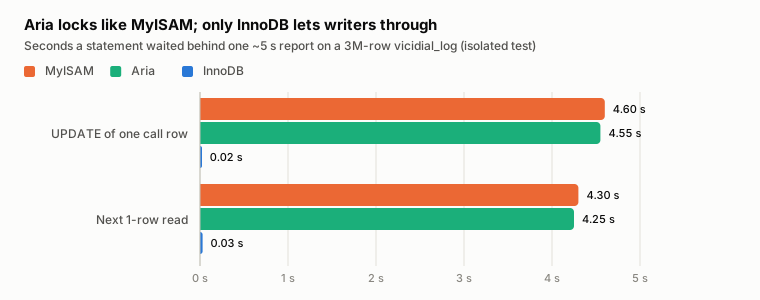
| Engine | INSERT | UPDATE one call row | Next 1-row read |
|---|---|---|---|
| MyISAM | 0.01 s | 4.60 s | 4.30 s |
| Aria | 0.01 s | 4.55 s | 4.25 s |
| InnoDB | 0.04 s | 0.02 s | 0.03 s |
Aria locks like MyISAM; only InnoDB lets writers through
Seconds a statement waited behind one ~5 s report on a 3M-row vicidial_log (isolated test)
- MyISAM
- Aria
- InnoDB
Grouped bar chart. The UPDATE waited 4.60 s on MyISAM, 4.55 s on Aria and 0.02 s on InnoDB; the next 1-row read waited 4.30, 4.25 and 0.03 s.
INSERTs are not shown: concurrent_insert lets them through on every engine (0.01–0.04 s).
Measured on a private MariaDB 10.6.23 with VICIdial’s schema, 3-million-row vicidial_log. Report §3.1.
3.2 Evidence: a production floor
On the 70-agent cluster, on 2026-10-21, before any fix:
- 164 calls dropped in 35 minutes.
- 30% of those dropped while an eligible agent was free for 2–7 seconds. VICIdial's call routing (VDAD) stayed stuck until the 5-second drop timer fired.
- About 50 queries waited on table locks at any moment, for up to 9 seconds.
- The longest lock holder was our own stats agent: full-day aggregates over
vicidial_logandvicidial_list, running from four servers against one database, 26–40 seconds each.
Pausing it for one minute:
| Stats agent running | Stats agent paused | |
|---|---|---|
| Lock waits | 58/s | 14/s |
| Calls frozen before routing | 24 of 49 | 0 of 20 |
| p90 agent wait | 7 s | 2 s |
3.3 Evidence: reproduced on our test server
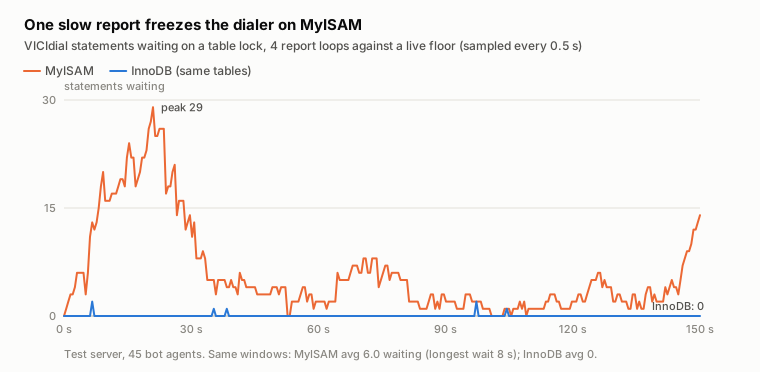
Four report loops ran against the live floor. Then vicidial_log and vicidial_list were switched to InnoDB and the same windows repeated.
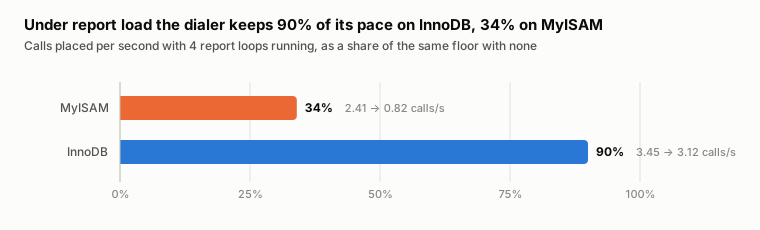
Under the same report load, the dialer kept 34% of its normal pace on MyISAM and 90% with the two tables on InnoDB. On InnoDB no VICIdial statement waited on a table lock.
| MyISAM | InnoDB | |
|---|---|---|
| Dialer pace under report load (vs no load) | 34% | 90% |
| VICIdial statements waiting on a table lock (avg / max) | 6.0 / 29 | 0 / 0 |
| Longest wait | 8 s | 0 s |
| Idle agents (no load → load) | 15.5 → 22.7 | 21.0 → 20.7 |
| Report run time | 4.6 s | 1.4 s |
One slow report freezes the dialer on MyISAM
VICIdial statements waiting on a table lock, 4 report loops against a live floor (sampled every 0.5 s)
- MyISAM
- InnoDB (same tables)
Line chart. On MyISAM up to 29 statements wait at once; on InnoDB at most 2.
Same windows: MyISAM avg 6.0 waiting (longest wait 8 s); InnoDB avg 0.
Measured on the test server (45 bot agents), 2026-10-21: the same 150 s window on each engine. Report §3.3.
Under report load the dialer keeps 90% of its pace on InnoDB, 34% on MyISAM
Calls placed per second with 4 report loops running, as a share of the same floor with none
Bar chart. Under report load MyISAM keeps 34% of its normal dial pace (2.41 to 0.82 calls/s); InnoDB keeps 90% (3.45 to 3.12).
Compare within each engine: the floor restarted between the two baselines.
Measured on the test server, 2026-10-21 (120 s baseline and 150 s loaded windows per engine). Report §3.3.
Idle agents rising while the dialer slows is exactly the production signature.
3.4 Evidence: the same floor, a full shift later
The next day we watched the same cluster for a whole shift with our read-only shift watch: every call and agent once a second, and the database every 5 seconds, from 07:30 to 18:45 local time. Agents were on from about 08:20; there were 57–61 of them most of the day, on three dialers. Since the day above, three things had changed:
- the stats agent read VICIdial's running totals instead of scanning the day (1 second per run instead of 26–40);
- the dialers no longer sent database-wide totals;
- the AMI trim from §7.5 was live.
Its tables were still MyISAM.
The convoy was gone. The day before, about 50 statements were queued behind a lock at any moment, with waits of 7–9 s. This shift the median queue was 0 in every hour.
Callers felt the difference:
| Day before (35 min, 72 agents) | This shift (10.5 h, ~60 agents) | |
|---|---|---|
| Answered calls that waited: median / 90th percentile wait | 2 s / 5 s | 1 s / 2–3 s |
| Left while an agent was free, per hour | ≈ 206 | ≈ 66 |
| …with the free agent on the caller's own dialer, per hour | ≈ 151 | ≈ 29 |
| …and for 2 s or more ("frozen"), whole window | 49 in 35 min | 39 in the whole shift |
A call in the last row is a frozen call. Most of the remaining "agent free" cases were one agent free for one second, often on another dialer: the hand-off gap between dialers rather than a lock (Inferred).
What still stalled it: other people's reads (Measured). Pile-ups did still happen, a few times an hour, and each traced to one statement reading vicidial_log while the dialer waited:
| Lock holder (samples where it ran ≥ 1 s while others waited ≥ 1 s) | Samples | Where it comes from |
|---|---|---|
... FROM vicidial_log WHERE phone_number = ? | 61 | VICIdial's lead search by phone (admin_search_lead.php). No index on phone_number, so it reads all 1.5–1.75 million rows. |
Day-long COUNT(*) … SUM(CASE WHEN status IN …) (two shapes) | 35 | Our own Floor tab, while an operator had it open. |
... FROM vicidial_log WHERE user = ? AND call_date >= ? | 11 | VICIdial's user stats page. |
SELECT count(*) FROM vicidial_list WHERE called_since_last_reset = ? | 8 | VICIdial's hopper and list counts. |
8-day DATEDIFF(CURDATE(), DATE(call_date)) and day-long sales sums | 4 | Our own Today tab. |
A join of vicidial_log, vicidial_users and vicidial_list | 2 | VICIdial's Export Calls report. |
The top holder is VICIdial's lead search, and the fourth is the hopper filling its queue. Two are ours: the Floor tab and the Today tab of our dashboard.
The dashboard made a natural experiment, because the operator opened the server page twice and closed it in between:
| Window (local) | Queued statements, 95th percentile / max | Samples with ≥ 20 queued | Longest wait | Frozen calls |
|---|---|---|---|---|
| 09:05–09:47, page closed | 1 / 53 | 1.2% | 2 s | 0 in 42 min |
| 09:47–11:12, Floor tab open | 21 / 334 | 5.2% | 4 s | 9 in 85 min |
| 11:12–15:54, closed | 3 / 176 | 1.4% | 4 s | 11 in 4.7 h |
| 15:54–16:21, Floor and Today tabs open | 46 / 159 | 9.9% | 7 s | 11 in 27 min |
| 16:21–18:30, closed | 3 / 182 | 0.9% | 6 s | 8 in 2.2 h |
With the page open, frozen calls ran at 6–24 an hour; with it closed, 2–4 an hour.
The lesson generalises. On MyISAM any read of a day's calls in one statement stalls the dialer for as long as it runs, however rarely it runs. Caching changes how often, not how long.
Our fixes, in the order they shipped:
- the Floor tab's day totals read in five-minute slices, so no statement holds the table for long (§6.1);
- the Today tab's day scans refreshed every ~5 minutes instead of ~72 s on a busy box, with an hourly-slice version next;
- an index on
vicidial_log.phone_numberfor VICIdial's lead search (§6.3), now on every new server we build: 0.46 s → 0.01 s per search on 2.4 million rows.
VICIdial's own user stats and export reports have no such fix on MyISAM: they read real date ranges. Moving the log tables to InnoDB is what takes them off the dialer's path (§4).
Everything else was quiet (Measured).
- Agent screens: average latency 156–186 ms each hour, with at most 8 checks over 1 s in the busiest hour.
- Asterisk on each dialer: 7.1–9.1 ms of CPU per call-second. The deepest manager subscriber queue was 16, the deepest router queue 77.
- Database: under 1 core on median, 3.1 at peak.
- The web server returned no 5xx all day.
Drops were high in places, up to 23% of answered calls in one hour, almost all at LIVE-3 on a 3-second drop timer. That was the dial level against 4–8 ready agents, not the database. The last hour dropped 36% as agents logged off at dial level 9: pacing again.
The hour-by-hour numbers for this shift are in Downloads as shift-hourly.csv.
3.5 The fix
Take the long reads off the dialer's path.
- Move the hot log and lead tables to InnoDB (§4). Readers then never block the dialer's writes, VICIdial's own reports included.
- Until then, keep every read of
vicidial_logandvicidial_listshort: VICIdial's running totals instead of day scans, the scans you keep cut into five-minute slices, one poller for all viewers, and a time cap on report queries (§6). - Index
vicidial_log.phone_number, so the lead search reads one number's calls instead of the whole log (§6.3).
3.6 Check your server
Check 1 samples the process list once a second for 30 seconds and counts table-lock waits. Run it on the database server at your busiest hour, as root. It reads /etc/astguiclient.conf for the login.
#!/usr/bin/env bash
# VICIfast Research, Report 01: "The Two Bottlenecks Inside a Busy VICIdial Server"
# Check 1: who is holding VICIdial's tables right now?
#
# READ-ONLY. Safe on a live floor: it reads MySQL's process list and two
# status counters about once a second, for 30 seconds by default.
# Usage:  sudo bash vicidial-check-locks.sh [seconds]
#
# On MyISAM a statement locks the whole table while it runs. One slow read
# (a report, a dashboard, a lead search) makes the dialer's next write wait,
# and every read after that write waits too: a lock convoy. This shows how
# often that happens, how deep the queue gets, and which statements hold it.
set -u
SECS=${1:-30}
# Shared by the report's database checks: connect the way VICIdial does,
# from /etc/astguiclient.conf, through a temporary client file only root can
# read, so the password never appears in `ps` or on screen.
CONF=${ASTGUICLIENT_CONF:-/etc/astguiclient.conf}
MYCNF=$(mktemp)
chmod 600 "$MYCNF"
trap 'rm -f "$MYCNF"' EXIT
conf() { awk -F'=>' -v k="$1" '{ gsub(/[[:space:]\r]/, "", $1) } $1 == k { gsub(/^[[:space:]]+|[[:space:]\r]+$/, "", $2); print $2; exit }' "$CONF"; }
if [ -r "$CONF" ]; then
  printf '[client]\nhost=%s\nuser=%s\npassword=%s\nport=%s\n' \
    "$(conf VARDB_server)" "$(conf VARDB_user)" "$(conf VARDB_pass)" "$(conf VARDB_port)" > "$MYCNF"
  DB=$(conf VARDB_database)
else
  echo "Cannot read $CONF: run this as root on a VICIdial database server." >&2
  exit 1
fi
M() { mysql --defaults-extra-file="$MYCNF" -N -B "$@"; }
M -e 'SELECT 1' >/dev/null 2>&1 || { echo "Cannot connect to MySQL with the credentials in $CONF." >&2; exit 1; }

echo "== VICIdial lock check on $(hostname -s), $(date '+%Y-%m-%d %H:%M:%S %Z'), ${SECS}s"
echo
echo "-- Engines of the busiest VICIdial tables"
M -e "SELECT table_name, engine, table_rows FROM information_schema.tables
      WHERE table_schema='$DB' AND table_name IN ('vicidial_log','vicidial_list','vicidial_agent_log',
      'vicidial_closer_log','call_log','vicidial_live_agents','vicidial_auto_calls','vicidial_log_extended')
      ORDER BY table_rows DESC" | awk -F'\t' '{ printf "   %-24s %-7s %12s rows\n", $1, $2, $3 }'
echo "   concurrent_insert=$(M -e 'SELECT @@concurrent_insert')  low_priority_updates=$(M -e 'SELECT @@low_priority_updates')"
echo

SAMPLES=$(mktemp); trap 'rm -f "$MYCNF" "$SAMPLES"' EXIT
w0=$(M -e "SHOW GLOBAL STATUS LIKE 'Table_locks_waited'" | awk '{print $2}')
i0=$(M -e "SHOW GLOBAL STATUS LIKE 'Table_locks_immediate'" | awk '{print $2}')
t0=$(date +%s)
maxq=0; busy=0
for _ in $(seq 1 "$SECS"); do
  # One row per running statement: seconds, state, and the statement with
  # numbers and quoted values blanked, so the same query groups together.
  M -e "SELECT TIME, IF(STATE LIKE '%table level lock%' OR STATE='Locked','WAIT','RUN'),
        LEFT(REGEXP_REPLACE(REGEXP_REPLACE(REPLACE(REPLACE(INFO, '\n', ' '), '\t', ' '),
        '\\'[^\\']*\\'', '?'), '[0-9]+', '#'), 110)
        FROM information_schema.PROCESSLIST
        WHERE COMMAND='Query' AND INFO IS NOT NULL AND INFO NOT LIKE '%PROCESSLIST%'" > "$SAMPLES.now" 2>/dev/null
  q=$(awk -F'\t' '$2=="WAIT"' "$SAMPLES.now" | wc -l)
  [ "$q" -gt "$maxq" ] && maxq=$q
  [ "$q" -ge 20 ] && busy=$((busy + 1))
  # A statement running a second or more while others wait is a holder.
  if [ "$q" -gt 0 ]; then awk -F'\t' '$2=="RUN" && $1>=1 { print $3 }' "$SAMPLES.now" >> "$SAMPLES"; fi
  sleep 1
done
rm -f "$SAMPLES.now"
t1=$(date +%s)
w1=$(M -e "SHOW GLOBAL STATUS LIKE 'Table_locks_waited'" | awk '{print $2}')
i1=$(M -e "SHOW GLOBAL STATUS LIKE 'Table_locks_immediate'" | awk '{print $2}')
dt=$((t1 - t0)); [ "$dt" -lt 1 ] && dt=1
waits=$(( (w1 - w0) / dt )); total=$(( (w1 - w0) + (i1 - i0) )); [ "$total" -lt 1 ] && total=1

echo "-- Lock waits: $waits per second ($(( 100 * (w1 - w0) / total ))% of table locks had to wait; most are brief)"
echo "-- Deepest queue: $maxq statements waiting at once; $busy of $SECS samples had 20 or more"
echo
if [ -s "$SAMPLES" ]; then
  echo "-- Statements that ran 1 s or more while others waited (samples, statement):"
  sort "$SAMPLES" | uniq -c | sort -rn | head -8 | sed 's/^/   /'
else
  echo "-- Nothing ran 1 s or more while others waited."
fi
echo
echo "-- Verdict"
# Queue depth, not waits per second, is what the dialer feels: a healthy busy
# floor still logs 40-60 brief lock waits a second with nothing queued.
if [ "$maxq" -ge 20 ] || [ "$busy" -ge 2 ]; then
  echo "   Lock convoys: the dialer's writes are queueing behind slow reads."
  echo "   Match the statements above against section 3 of the report (vicifast.com/research/vicidial-bottlenecks):"
  echo "   day-long COUNT/SUM over vicidial_log = a dashboard or stats tool; 'vicidial_log where phone_number'"
  echo "   = VICIdial's lead search without an index (check 2); 'where user=' = user_stats.php."
elif [ "$maxq" -ge 5 ]; then
  echo "   Some queueing, not yet convoys. Run it again at your busiest hour."
else
  echo "   Healthy right now: no queue worth the name."
fiRead the deepest queue and the statements that held it first. The script ends with one of three verdicts:
Healthy right now: no queue worth the name.
Some queueing, not yet convoys. Run it again at your busiest hour.
Lock convoys: the dialer's writes are queueing behind slow reads.
Healthy is a deepest queue under 5. A convoy is 20 or more statements waiting at once, and the holders list tells you whose read it is. The lock-wait rate alone can mislead: after its fixes, the production cluster above still had 40–60 waits a second in most hours, each one short, with a median queue of 0.
Paste its output, or SHOW FULL PROCESSLIST, into the analyzer below. It finds the statements waiting on a table lock and the ones holding it, and matches each holder to the readers in §3.4 with its fix. Nothing you paste leaves your browser.
Processlist analyzer
Based on §2, §3, §6 and the production shift in §3.4
Paste what your database is running right now. The analyzer finds the statements waiting on a table lock, the long statements most likely holding it, groups the waits by table, and matches the holders against the lock holders the report found, with the fix for each.
Runs in your browser. Nothing you enter or paste leaves this page.
mysql -e 'SHOW FULL PROCESSLIST'in a terminal (a boxed table)mysql -e 'SHOW FULL PROCESSLIST' > plist.tsv(tab-separated)mysql -e 'SHOW FULL PROCESSLIST\G'(one field per line)
Read-only and safe on a live floor. Run it at the busiest moment you can: one sample is one moment.
How the analyzer reads a process list
Waiting: a statement whose state is Waiting for table level lock (older servers: Locked). Metadata-lock waits (Waiting for table metadata lock) are counted apart: they come from ALTER, OPTIMIZE and similar.
Holding: a statement that has run 1 s or more and is not waiting, the line the report’s samplers use (§2). On MyISAM it holds the lock on every table it reads until it finishes; the writes wait behind it, and every later read waits behind the writes (§3.1). Idle connections, replication threads and the SHOW PROCESSLIST itself are left out.
Tables come from the statement: FROM, JOIN, UPDATE, INSERT INTO, DELETE FROM. A wait is filed under the table it writes, or the first it reads. VICIdial’s per-dialer cid_channels_recent_* tables count as one.
Known holders are matched by the shape of their SQL, the way they appeared on the report’s floors. A match is a strong hint, not proof: check the statement.
Check 2 asks MariaDB how it would run VICIdial's lead search by phone, with EXPLAIN, so it costs nothing on a live floor.
#!/usr/bin/env bash
# VICIfast Research, Report 01: "The Two Bottlenecks Inside a Busy VICIdial Server"
# Check 2: does VICIdial's lead search read your whole call log?
#
# READ-ONLY. Uses EXPLAIN, which plans the search without running it, so it
# costs nothing on a live floor.
# Usage:  sudo bash vicidial-check-lead-search.sh
#
# Admin > Search for a lead by phone number also lists that number's calls:
#   SELECT ... FROM vicidial_log WHERE phone_number = '...'
# Stock VICIdial has no index on vicidial_log.phone_number, so on MyISAM each
# search reads every row of the call log with the table locked.
set -u
# Shared by the report's database checks: connect the way VICIdial does,
# from /etc/astguiclient.conf, through a temporary client file only root can
# read, so the password never appears in `ps` or on screen.
CONF=${ASTGUICLIENT_CONF:-/etc/astguiclient.conf}
MYCNF=$(mktemp)
chmod 600 "$MYCNF"
trap 'rm -f "$MYCNF"' EXIT
conf() { awk -F'=>' -v k="$1" '{ gsub(/[[:space:]\r]/, "", $1) } $1 == k { gsub(/^[[:space:]]+|[[:space:]\r]+$/, "", $2); print $2; exit }' "$CONF"; }
if [ -r "$CONF" ]; then
  printf '[client]\nhost=%s\nuser=%s\npassword=%s\nport=%s\n' \
    "$(conf VARDB_server)" "$(conf VARDB_user)" "$(conf VARDB_pass)" "$(conf VARDB_port)" > "$MYCNF"
  DB=$(conf VARDB_database)
else
  echo "Cannot read $CONF: run this as root on a VICIdial database server." >&2
  exit 1
fi
M() { mysql --defaults-extra-file="$MYCNF" -N -B "$@"; }
M -e 'SELECT 1' >/dev/null 2>&1 || { echo "Cannot connect to MySQL with the credentials in $CONF." >&2; exit 1; }

echo "== Lead-search check on $(hostname -s), $(date '+%Y-%m-%d %H:%M:%S %Z')"
read -r rows mb engine <<<"$(M -e "SELECT table_rows, ROUND((data_length+index_length)/1048576), engine
  FROM information_schema.tables WHERE table_schema='$DB' AND table_name='vicidial_log'")"
oldest=$(M "$DB" -e "SELECT MIN(call_date) FROM vicidial_log")
echo "-- vicidial_log: ${rows} rows, ${mb} MB, ${engine}, oldest call ${oldest}"
idx=$(M -e "SELECT GROUP_CONCAT(DISTINCT index_name ORDER BY index_name) FROM information_schema.statistics
  WHERE table_schema='$DB' AND table_name='vicidial_log'")
echo "-- indexes: ${idx}"
plan=$(M "$DB" -e "EXPLAIN SELECT lead_id FROM vicidial_log WHERE phone_number='0000000000'" | awk -F'\t' '{ print "type=" $4 ", key=" $6 ", rows read=" $9 }')
echo "-- the lead search's plan: ${plan}"
if crontab -l 2>/dev/null | grep -q ADMIN_archive_log_tables; then
  echo "-- ADMIN_archive_log_tables.pl is scheduled (old calls are archived)"
else
  echo "-- ADMIN_archive_log_tables.pl is not in root's crontab (the call log keeps growing)"
fi
echo
echo "-- Verdict"
case "$plan" in
  *type=ref*key=phone_number*)
    echo "   Indexed: a lead search reads only that number's calls." ;;
  *)
    secs=$(( rows / 150000 + 1 ))
    echo "   Every lead search by phone reads all ${rows} rows of vicidial_log."
    [ "$engine" = "MyISAM" ] && echo "   On MyISAM the dialer's writes wait while it does."
    echo "   The fix (section 6 of the report), OFF-SHIFT: it locks the table while it builds,"
    echo "   roughly ${secs} s at ~150,000 rows a second (measured on a 2.37-million-row copy):"
    echo
    echo "     ALTER TABLE vicidial_log ADD INDEX phone_number (phone_number);"
    ;;
esacIf it prints Indexed: a lead search reads only that number's calls., there is nothing to do. If it prints Every lead search by phone reads all … rows of vicidial_log, every search an admin runs locks the call log for as long as the scan takes. The fix is in §6.3.
4. Finding 2: InnoDB on the hot tables
InnoDB locks rows, not tables, and a reader reads a consistent snapshot. A long report therefore never blocks the dialer's writes. The question is which of VICIdial's tables can move, and what it costs.
4.1 The fix: which tables to convert, and what it costs
The full schema converted to InnoDB:
- 341 of 344 tables convert under MariaDB's default strict mode.
- The other three are the wide settings tables:
system_settings(261 columns),vicidial_campaigns(368) andvicidial_inbound_groups(215). They fail with "Row size too large". With strict mode off they convert, and a worst-case write succeeds, but there is no reason to convert them. - Aria: all 344 convert.
Convert 8 tables: vicidial_log, vicidial_list, call_log, vicidial_log_extended, vicidial_carrier_log, vicidial_dial_log, vicidial_agent_log, vicidial_closer_log.
Leave alone: the settings tables; the live tables, which are locked as a mutex and are tiny; the MEMORY tables.
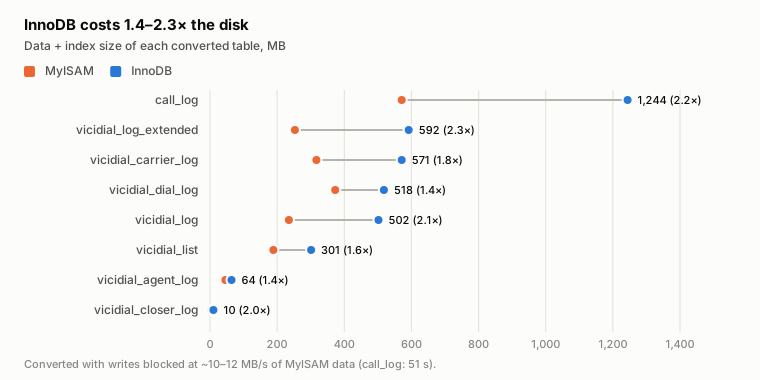
Costs measured during conversion:
| Table | MyISAM | InnoDB | Growth | Conversion time (writes blocked) |
|---|---|---|---|---|
call_log | 571 MB | 1,244 MB | 2.2× | 51 s |
vicidial_log_extended | 253 MB | 592 MB | 2.3× | 20 s |
vicidial_carrier_log | 317 MB | 571 MB | 1.8× | 15 s |
vicidial_dial_log | 373 MB | 518 MB | 1.4× | 15 s |
vicidial_log | 235 MB | 502 MB | 2.1× | 17 s |
vicidial_list | 189 MB | 301 MB | 1.6× | 18 s |
vicidial_agent_log | 46 MB | 64 MB | 1.4× | 3 s |
InnoDB costs 1.4–2.3× the disk
Data + index size of each converted table, MB
- MyISAM
- InnoDB
Dumbbell chart. Each converted table grows 1.4 to 2.3 times on InnoDB; call_log goes from 571 MB to 1,244 MB.
Converted with writes blocked at ~10–12 MB/s of MyISAM data (call_log: 51 s).
Measured on the test server during the conversion, 2026-10-21. Report §4.1.
- Planning rule: about 10–12 MB/s of MyISAM data, with writes blocked meanwhile, so convert off-shift.
- Size the InnoDB cache, the buffer pool (
innodb_buffer_pool_size), for the converted tables' hot rows. Defaults sized for "nothing is InnoDB" (128–256 MB) are too small; we used 3 GB on a 15 GB server.
ALTER TABLE … ENGINE=InnoDB blocks every write to the table until it finishes. Run it off-shift with dialing stopped, one table at a time, after a backup. The commands, the backup and the configuration are in Appendix A.
4.2 Evidence: no statement waited under pressure
Our test server was driven to its practical ceiling:
| Baseline | Pressure | |
|---|---|---|
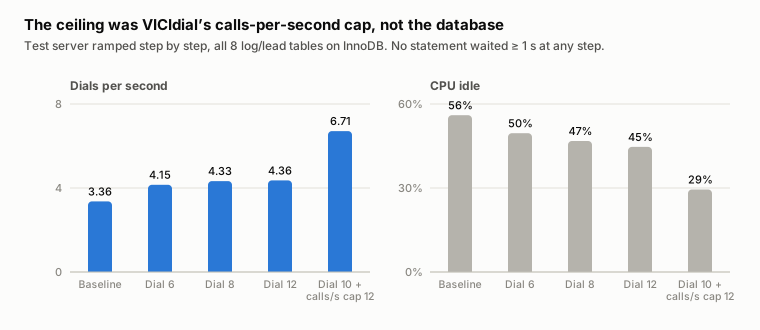
| Dials/s | 3.4 | 6.7 |
| Channels (avg / peak) | 460 / 526 | 766 / 938 |
| CPU idle | 56% | about 30% |
With the 8 tables on InnoDB, no database statement waited 1 second or more at any point. The real ceiling was VICIdial's per-server calls-per-second cap, not the database.
The ceiling was VICIdial’s calls-per-second cap, not the database
Test server ramped step by step, all 8 log/lead tables on InnoDB. No statement waited ≥ 1 s at any step.
Two column charts. Raising the dial level took dials per second from 3.36 to about 4.4; raising the calls-per-second cap reached 6.71, with CPU idle falling from 56% to 29.5%.
Dials per second
CPU idle
Dial level alone stalled near 4.4 dials/s; raising the per-server calls-per-second cap reached 6.7.
Measured on the test server (8 vCPU, 15 GB), 2026-10-21; CPU idle averaged from vmstat, numeric rows only. Report §4.2.
4.3 Evidence: twenty wallboards cost what one does
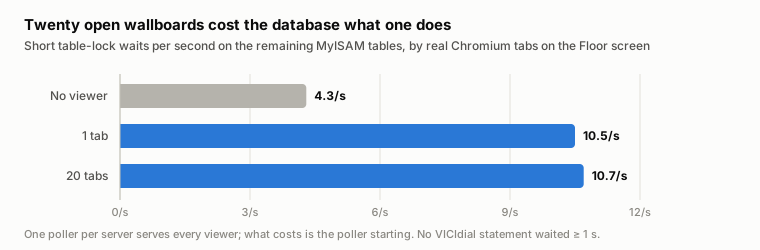
Real browsers opened the live Floor tab: 1, 10 and 20 tabs. Our platform polls each server once, however many people watch, so 20 tabs cost the same as 1.
What does cost is the first viewer, which starts the poller: short table-lock waits on the remaining MyISAM tables doubled, from 4.3/s to 10.5/s. Its slow queries are the "today" rollups over vicidial_log. On InnoDB they no longer block the dialer.
Lesson for dashboard builders: design pollers so one query serves every viewer, and cap their run time (§6).
Twenty open wallboards cost the database what one does
Short table-lock waits per second on the remaining MyISAM tables, by real Chromium tabs on the Floor screen
- No viewer (baseline)
- Floor screen open
Bar chart. Table-lock waits per second: 4.3 with no viewer, 10.5 with one tab, 10.7 with twenty tabs.
One poller per server serves every viewer; what costs is the poller starting. No VICIdial statement waited ≥ 1 s.
Measured on the test server under full pressure, 2026-10-21 (one 120–150 s window per stage). Report §4.3.
4.4 Evidence: VICIdial's nightly jobs on InnoDB
At 01:01–01:03 VICIdial runs:
- a time-zone update across
vicidial_list(bulkUPDATEs); - a live-state reset;
- OPTIMIZE TABLE on 20 tables.
Measured on InnoDB at full pressure (about 400 calls, 44 agents):
| Before | During the jobs | After | |
|---|---|---|---|
| VICIdial statements ≥ 1 s (max) | 0 | 3 | 2 |
| Longest statement | none | 30 s (OPTIMIZE of call_log, online) | 1 s |
| InnoDB lock waits / deadlocks | 0 / 0 | 0 / 0 | 0 / 0 |
- OPTIMIZE ran as an online rebuild: the dialer kept writing, and the tables shrank (
call_log1,244 → 1,025 MB,vicidial_log502 → 353 MB). - On MyISAM the same OPTIMIZE write-locks each table for the whole rebuild.
- One 5-minute dip (−8% calls, +25% drops) lined up with VICIdial's 01:02 live-state reset, which deletes the server's live-agent and in-flight-call rows while a floor is still working. That cause is inferred, and it is not an engine effect (§8.4).
The same OPTIMIZE TABLE vicidial_log under the same floor load took 12.8 s on InnoDB, with the dialer's writes carrying on, and 19.9 s on MyISAM, with the whole table locked for all of it. It was the worst moment of the MyISAM run.
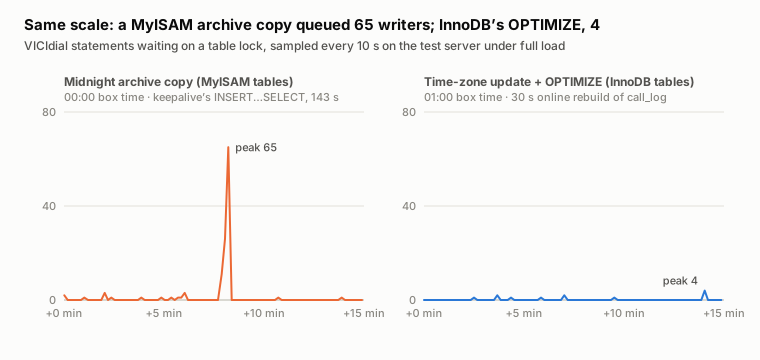
Same scale: a MyISAM archive copy queued 65 writers; InnoDB’s OPTIMIZE, 4
VICIdial statements waiting on a table lock, sampled every 10 s on the test server under full load
Two line charts on the same scale. During the MyISAM archive copy up to 65 statements wait on a table lock; during OPTIMIZE on the InnoDB tables, at most 4.
Midnight archive copy (MyISAM tables)
00:00 server time · the keepalive’s INSERT…SELECT, 143 s
Time-zone update + OPTIMIZE (InnoDB tables)
01:00 server time · 30 s online rebuild of call_log
Both windows start 5 minutes before the job and run 15 minutes.
Measured on the test server during the overnight run, 2026-10-22 (server local time). Report §4.4, §8.
4.5 Evidence: endurance and the full A/B
The 20-hour soak
We then left the eight tables on InnoDB under the same pressure for 20.4 hours: about 44 agents, 170–230 calls in flight, 1,900–2,570 queries a second.
InnoDB itself was quiet: 3 deadlocks and 51 row-lock waits in 20.4 hours, almost all well under a millisecond. On the tables still on MyISAM, a median of 0 statements waited in every hour, and VICIdial statements running a second or more were 0 in median every hour.
Two incidents stood out, and neither was InnoDB's:
- Midnight. VICIdial's own nightly job copies the day's
vicidial_agent_latency_loginto its archive (INSERT … SELECT, 12 s), deletes it (13 s) and runsOPTIMIZE TABLEon the archive. That table was still MyISAM. Every agent screen's latency write queued behind it: 65 statements waiting, waits up to 23 s, one statement running 143 s. On a floor that works at midnight, every agent screen stalls. See §8.1. - 07:01 local time. 25 reads of
vicidial_listswaited 5–10 s on a metadata lock: a schema change or long transaction on that table. The hour's three deadlocks fall in the same minutes. Whatever held it never ran long enough as a single statement for our sampler to name it.
Side by side, under identical load
Last, the same floor and the same reads on both engines: pressure mode, about 44 agents, and for 15 minutes the heavy reads we saw on the production floor running together. They were a day rollup every 20 s, an eight-day sales pace every 30 s, VICIdial's user-stats query every 15 s, a per-campaign report every 30 s, and one OPTIMIZE TABLE vicidial_log ten minutes in. Converting the eight tables back to MyISAM between the windows took 2 minutes 15 seconds.
| Same floor, same reads | InnoDB | MyISAM |
|---|---|---|
| Dials a second | 6.60 | 6.43 |
| Drops | 4.7% | 5.5% |
| VICIdial statements stuck 1 s or more, average / worst | 0.0 / 2 | 1.8 / 90 |
| Statements queued on a table lock, worst | 22 | 83 |
| Day rollup, average / worst | 0.08 / 0.11 s | 0.50 / 13.3 s |
| User-stats query, average / worst | 0.35 / 0.42 s | 1.02 / 18.2 s |
The averages barely moved: this ran in the small hours, when the day's tables are small. The worst moments did: 90 of VICIdial's own statements stuck behind a lock on MyISAM against 2 on InnoDB, and the same report taking up to 18 seconds instead of under half a second.
4.6 How to revert
Converting back is the same ALTER with ENGINE=MyISAM, under the same rules: off-shift, dialing stopped, one table at a time. Then return innodb_buffer_pool_size to its old value. Both are in Appendix A.
After a VICIdial upgrade, check that the converted tables are still InnoDB: Check 1 (§3.6) prints the engines of the busiest tables.
5. Aria and crash safety
Locking: Aria behaves like MyISAM (§3.1), so it is no answer to the convoy.
Crash safety, measured with real power cuts. We built a throwaway server of the same type as our test server, with the same MariaDB package and VICIdial's own MariaDB configuration, and loaded VICIdial's nine busiest tables onto it three times: on MyISAM, on Aria (TRANSACTIONAL=1) and on InnoDB, filled to 0.3–2 million rows each. A writer on a second server sent each copy about 490 acknowledged statements a second and recorded every acknowledgement. Then we crashed it, 10 times:
- 7 cloud power-offs, which cut the power the way pulling the plug does;
- 2 kernel crashes with no disk sync;
- 1
kill -9of the database process.
| Over 9 crashes (7 power-offs, 2 kernel crashes) | MyISAM | Aria | InnoDB |
|---|---|---|---|
Tables failing CHECK TABLE after a crash | 7–8 of 9, every time | 1 table, in 1 crash | 0 |
| Repair needed | the automatic repair at start failed on 0–5 tables a crash (27 in all); each then took a REPAIR TABLE of 1.7–27 s at 2 million rows | the automatic recovery rebuilt the one table itself | none: crash recovery, ready 3–4 s after start |
| Acknowledged inserts lost | 10% of each run: always the newest 1–28 s | 0 | the last 0.1–0.9 s at innodb_flush_log_at_trx_commit = 2; 0 at = 1 |
| Acknowledged lead updates lost | 57–1,332 a crash | 3, in 1 crash | included above |
| Whole leads deleted by the repair | 2 | 0 | 0 |
kill -9 of the database | nothing lost | nothing lost | nothing lost |
- Why MyISAM loses the last half-minute. MyISAM never syncs to disk. Its writes sit in the kernel's page cache until the kernel flushes them, up to 30 seconds later. A power cut throws that away, and each table's data and index files stop agreeing. A process kill does not: the kernel still holds the writes, which is why
kill -9tests look clean. - The repair can make it worse. On Ubuntu, MariaDB's start script opens every table about 3 seconds after start, and VICIdial's
myisam_recover_optionsrepairs each one marked crashed. In our series that repair deleted two whole leads that existed before the test ("Found 999999 of 1000000 rows"). One table passedCHECK TABLEwith warnings and then failed its next insert as "index corrupt". - InnoDB's price is the last second. At
innodb_flush_log_at_trx_commit = 2, the setting Appendix A uses, a power cut can lose the last second of acknowledged writes. At1it lost nothing in 2 power cuts and cost about 2.5% of the write rate on this cloud disk. - Aria is in between. It never lost an acknowledged insert, but in one crash one table's indexes disagreed with its rows, and 3 lead updates from 45 seconds earlier were gone until its automatic recovery rebuilt the table.
- No rollback on MyISAM: a failed multi-statement job keeps whatever it already wrote. We once had 55,508 rows commit before an import failed.
If a power cut on your server is possible, the hot tables on InnoDB (§4) turn "repair and lose half a minute" into "lose at most the last second". Set innodb_flush_log_at_trx_commit = 1 if that second matters more than about 2.5% of write throughput.
6. If you stay on MyISAM
Everything here shortens how long a read holds a MyISAM table. None of it changes VICIdial.
6.1 Keep reads short
Read VICIdial's own running totals instead of scanning a day of vicidial_log. Cache, and poll less. Our stats agent went from 26–40 s per run to 1 s.
-- VICIdial keeps these up to date itself: one row per campaign, no scan.
SELECT campaign_id, calls_today, answers_today, drops_today, drops_answers_today_pct
FROM vicidial_campaign_stats;
When you need something the running totals do not hold, read the day in short call_date slices and keep the result of every slice that is over. A finished slice never changes, so each refresh only reads the current one.
-- One five-minute slice. Writers get the table back between slices.
SELECT campaign_id, COUNT(*) AS calls
FROM vicidial_log
WHERE call_date >= '2026-10-22 09:00:00'
  AND call_date <  '2026-10-22 09:05:00'
GROUP BY campaign_id;
On our test server, with 358,985 calls in the day, the five-minute-slice totals for our Floor tab matched the single full-day query exactly, per campaign, in all five columns. The first read was 182 statements of about 8 ms each, 1.46 s in all against 0.93 s for the single query, but none of them held the table for long. Each refresh after that took 0.11 s.
Serve every viewer from one poller (§4.3), so ten people watching a wallboard read the table once.
The calculator below models how long the readers on a floor hold vicidial_log over a shift, and what slicing or InnoDB changes. Its defaults are the production floor in §3.4; put in your own call volume and readers.
Lock-time calculator
Based on §3, §4 and §6
On MyISAM a scan of vicidial_log holds the table for as long as it runs, and the dialer’s writes wait behind it (§3.1). Pick what reads the table on your floor; the calculator gives the seconds an hour the writes are held and the longest single hold. Every default is a measurement from the report.
Runs in your browser. Nothing you enter or paste leaves this page.
Your floor
Rows VICIdial adds to vicidial_log in a day. Default: the 70-agent production floor, about 533k (§3.4).
Measured: 203K rows in 2.4 s on the production database (§3.4). Faster disks or a smaller table change it.
A day-long scan grows as the day’s calls pile up: 115K rows by 11:00, using the production floor’s hourly shape (§3.4).
The campaign’s drop_call_seconds. VICIdial’s default is 5 s (§3.2); the production floor ran 3 s.
What reads vicidial_log
Problem: Each scan holds the dialer’s writes for up to 1.4 s
Writes held per hour
240 s
6.7% of the hour, at 11:00
Longest single hold
1.4 s
Floor tab open; drop timer 5 s
One day-long scan right now: 115K rows in 1.4 s as one statement on MyISAM.
| Reader | Hold | Runs/h | Held/h |
|---|---|---|---|
| Floor tab opentwo day-long rollups | 1.4 s | 88 | 240 s |
Across the shift
Same readers, every 15 minutes from 08:00 to 18:00.
Writes held per hour (s)
Longest single hold (s)
How this is calculated
Scan time. A day-long scan reads today’s rows of vicidial_log: rows so far = calls per day × the share of the day logged by that time (the production floor’s hourly dials, §3.4). Its run time = rows ÷ rows per second. Default rate: 203K rows in 2.4 s. The lead search reads the whole table at its own measured rate, 1.49M rows in about 2 s, because it filters instead of aggregating.
How often. A cached scan runs again when its result expires: the cache keeps it a multiple of its own run time, within a floor and a cap, and the screen asks on its poll. Floor tab: 30×, at most 120 s, polled every 1.5 s. Today tab: 120× up to 600 s now, or 30× up to 120 s as measured, polled every 30 s. Because the cache grows with the scan, the share of the hour stays about the same all day (1 ÷ the factor per scan) until the cap; what grows is each hold. Caching cuts how often, not how long (§3.4).
What is held. On MyISAM a writer waits for the scan to finish, and MyISAM then gives it the lock before the next reader, so the longest hold is one statement. Scans run back to back hold the table for their sum; scans run in parallel (the Today tab) for about one. Held per hour = held per run × runs per hour, added over the readers and capped at the hour. Overlaps are not netted out, so the total is an upper bound when several readers run at once.
Slices. Settled 5-minute slices are cached, so a refresh reads only the open slice: one 5-minute share of the current hour’s rows (about 8 ms a statement in our test, §3.4). The stats collector instead reads VICIdial’s running totals (vicidial_campaign_stats), which do not touch vicidial_log. The lead search gets its index: about 0.01 s. VICIdial’s user stats page is left as it is: it is not ours to rewrite (§6 suggests a replica).
InnoDB. Readers take a consistent snapshot and no table lock, so nothing here holds the writers (§4). Other tables still on MyISAM keep a few short waits.
Not modelled. Reads of vicidial_list and other tables; a scan’s own wait for the lock; disk and CPU contention when many scans run at once. The stats collector’s 26–40 s runs on the production cluster included those, so its real holds were longer than the model’s.
6.2 Cap your own report queries
Give each report query a time limit with max_statement_time:
SET STATEMENT max_statement_time=2 FOR SELECT …;| Report | UPDATE behind it waited |
|---|---|
| Uncapped (5.9 s) | 5.55 s |
| Capped at 1 s | 0.71 s |
A per-user MAX_STATEMENT_TIME also kills UPDATEs, and on MyISAM a killed UPDATE keeps the rows it already changed. Never put it on an account that writes. On our servers the dashboard code shared VICIdial's own database login, which ruled that out. Cap the statement, not the account.
- Time spent waiting for a lock counts toward the cap.
- The cap limits how long each stall lasts, not how often stalls happen. A 1-second query polled every 1.5 s still holds the table about two thirds of the time.
6.3 Index the lead search
Stock vicidial_log has no index on phone_number: only the primary key (uniqueid), lead_id and call_date. VICIdial's lead search by phone also lists that number's calls, so each search reads the whole call log with the table locked. On the production cluster that was 1.49 million rows (135 MB) after 14 days, about 2 s per search, and the top lock holder of the shift (§3.4). Check 2 (§3.6) tells you whether your server has the index.
On a 2.37-million-row MyISAM copy, the lead-search statement went from 0.46–0.48 s to 0.007–0.014 s with the index. Building it held the copy for 15.8 s. On our test server's InnoDB table the search went from 0.73 s to 0.01 s, and the index built online in 4.6 s while VICIdial kept logging.
On MyISAM, ADD INDEX locks vicidial_log while it builds: about 150,000 rows a second in our test. Run it off-shift, after a backup.
-- off-shift on MyISAM: the table is locked while the index builds
ALTER TABLE vicidial_log ADD INDEX phone_number (phone_number);

-- to revert
ALTER TABLE vicidial_log DROP INDEX phone_number;
Archiving old calls with VICIdial's own ADMIN_archive_log_tables.pl also keeps the scan short, because it keeps the table small. Check 2 says whether it is scheduled.
6.4 Send reports to a read replica
VICIdial supports a read replica natively (slave_db_server, reports_use_slave_db), and the replica's tables can be InnoDB while the primary stays stock. We have not tested it.
7. Finding 3: Asterisk's AMI, the front door and the event thread
7.1 What you see, and why it happens
As a dialer nears its wall, VICIdial logs answered calls as no-answer and hangs up on live people it took for answering machines, while the dialer's CPU is a third idle.
Why. Every answered outbound call has to be moved, and VICIdial moves it through Asterisk's AMI.
- The move. VICIdial dials through a Local channel. When the carrier answers, an AGI looks up the carrier's channel and asks Asterisk to move it to AMD and the agents. That redirect goes over a brand-new AMI connection: VICIdial starts a Perl process, which connects, logs in, sends the redirect and logs off. The dialplan gives it 2 seconds (
Wait(2)), then hangs up and takes the answered call with it. VICIdial logs the call NA when its dial timeout runs out. - The front door. Asterisk accepts AMI connections into a listen queue of 10. Between two connections its accept thread walks every AMI session and takes each session's lock, to expire idle web sessions. A busy VICIdial dialer keeps about 200 AMI sessions open (177–232 on our rig) and opens about 20 new connections a second, one for each call placed and one for each call answered. Past about 250 calls the accept thread falls behind, the queue overflows, and the kernel drops the first packet of each new connection. Those connect only on the SYN retry, after 1, 3 or 7 seconds, and the redirect misses its 2 seconds.
- The event thread. Everything else VICIdial learns about a call arrives as AMI events, built on one Asterisk thread. The manager module subscribes one stasis message router, and a router processes its messages strictly in order, on one taskprocessor. When that thread falls behind, events queue without limit and VICIdial sees answers and hangups late. On our rig its dialing stalled once the backlog passed about a minute of events.
On our load rig at 300 calls, stock Asterisk with the AMI trim (§7.5):
- 8.7% of answered calls were lost as no-answer, and only 65% of live people reached an agent (99% at 200 calls);
- the AMI's listen queue was full (11 waiting for its 10 slots), the kernel dropped about 11 connection attempts a second on full listen queues, and a new AMI connection took up to 1–3 s (95th percentile: 1.0 s);
- the event thread kept up: the backlog's 95th percentile was 1,984 events.
The connection numbers come from the run with the patched event thread (§7.6), whose front door is the same stock code; we added that probe there.
On the 70-agent cluster's pre-launch load test, the AMI queue on a dialer went over its high-water mark from about 330 calls per dialer, while the dialers' CPU was at most 56%. Answered calls lost as "no answer": 0% at up to 800 calls across the cluster, 0.6% at 900, 1.7% at 1,000, 2.6% at 1,100, about 6.8% at 1,200.
We blamed the cluster's losses on the event thread at the time. The rig shows that on a VICIdial floor the losses follow the front door: with the event thread fixed and nothing else, they stayed the same (§7.2). The cluster's dialers most likely lost their calls the same way.
This is why "add cores" does not raise a VICIdial dialer's ceiling. Asterisk alone is multi-threaded and handles far more calls. VICIdial's per-call AMI connections, one accept thread with a 10-slot queue, and one event thread are the single lanes. The estimator in §7.8 puts your own dialer against these walls.
7.2 Evidence: a load rig, 200 to 700 calls on one dialer
The rig. Three throwaway servers, deleted after the test (our load rig):
- The dialer: VICIdial (SVN r4032) on 16 dedicated vCPU and 64 GB, installed the way we install every server, with the same Asterisk 22.5.1 and MariaDB 10.6.23 builds as our fleet and the database on the same server.
- The carrier: an Asterisk on a second server that answers by a rule on the dialled number: 90% after 1–34 s of ringing, 1 in 8 of those a person (a recorded "hello?", then talk) and the rest voicemail; 6% never answer, 4% are busy or fail. Real audio both ways.
- The agents: 42–45 real VICIdial agent screens in headless Chrome on a third server, on WebRTC. Each takes every call, talks for 3–18 s and sets a disposition.
- The campaign: ratio dialing, AMD, every call recorded, a 35 s dial timeout and a 5 s drop.
- The ramp: a controller holds VICIdial's live calls at each target for 5 minutes, 200 to 700, and we count the last 4. Every run dials the same leads in the same order. A guard ends a run when the event router falls 200,000 events behind.
Talk is shorter than on a real floor so that 42–45 agents keep up; the AMI work per call is the same.
Answered calls lost as no-answer, by variant (all with the same leads in the same order; "stopped" is a step the guard never let the run reach):
| Calls | Stock, no trim | Stock + trim | Patched event thread | Accept fix | Accept fix + patched event thread | Stock + trim, Wait(10) |
|---|---|---|---|---|---|---|
| 200 | 0.1% | 0% | 0% | 0% | 0% | 0% |
| 300 | 14% | 8.7% | 7.6% | 0.5% | 1.2% | 1.4% |
| 400 | 28% | 23% | 21% | 6.7% | 6.6% | 5.6% |
| 500 | 41% | 33% | 26% | 15% | 14% | 9.2% |
| 600 | stopped | 34% | 34% | stopped | 19% | 15% |
| 700 | stopped | 27% | 38% | stopped | 20% | 23% |
Live people who reached an agent, by variant (all with the same leads in the same order; "stopped" is a step the guard never let the run reach):
| Calls | Stock, no trim | Stock + trim | Patched event thread | Accept fix | Accept fix + patched event thread | Stock + trim, Wait(10) |
|---|---|---|---|---|---|---|
| 200 | 98% | 99% | 98% | 100% | 100% | 100% |
| 300 | 69% | 65% | 69% | 36% | 42% | 52% |
| 400 | 40% | 41% | 45% | 0.5% | 17% | 34% |
| 500 | 30% | 34% | 32% | 0.4% | 0.4% | 27% |
| 600 | stopped | 31% | 24% | stopped | 0.4% | 0.4% |
| 700 | stopped | 6% | 24% | stopped | 0.3% | 0% |
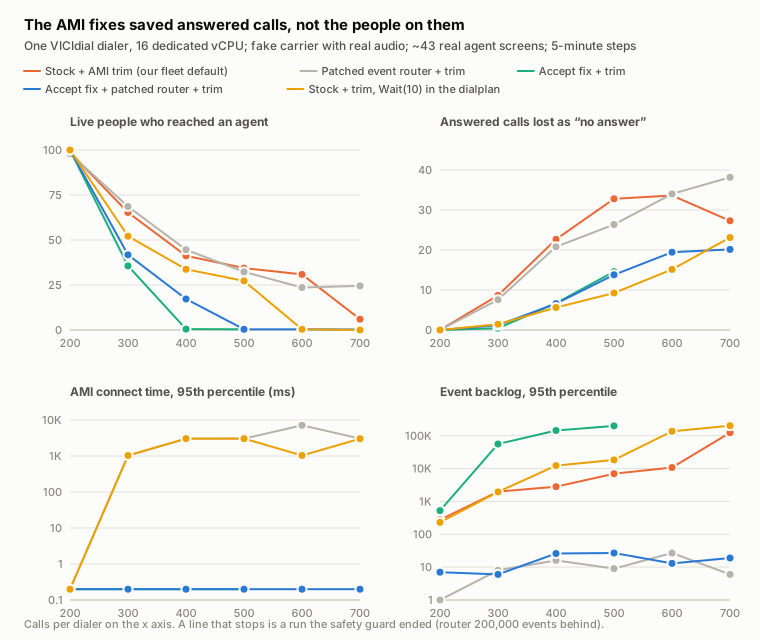
The AMI fixes saved answered calls, not the people on them
One VICIdial dialer, 16 dedicated vCPU; fake carrier with real audio; ~43 real agent screens; 5-minute steps
- Stock + AMI trim (our fleet default)
- Patched event router + trim
- Accept fix + trim
- Accept fix + patched router + trim
- Stock + trim, Wait(10) in the dialplan
Four line charts by calls per dialer, 200 to 700. People reaching an agent fall from about 99% at 200 calls to 65% at 300 on stock Asterisk with the trim, and lower still with the AMI fixes; answered calls lost as no-answer fall with the fixes; the AMI connect time drops from seconds to under a millisecond with the accept fix; the event backlog stays near zero only with the patched event thread.
Live people who reached an agent
the rest were lost as no-answer or hung up on as machines
Answered calls lost as “no answer”
share of the calls the carrier answered
AMI connect time, 95th percentile (ms)
log scale; Linux retries a dropped connection after 1 s, then 3 s
Event backlog, 95th percentile
log scale; Asterisk warns at 3,000
A gap is a step the run did not reach: a safety guard stops a run when the event router falls 200,000 events behind. The AMI connect time was measured from the patched-router run on.
Measured on our load rig, 2026-10-23. Report §7.2.
Where a redirect's time goes. With the accept fix in place and the trim on, at 300 calls, from the moment the AGI starts to the call reaching AMD:
| Stage | Median | 95th percentile | Worst |
|---|---|---|---|
| AGI: database connect | 11 ms | 18 ms | 57 ms |
AGI: channel lookup in cid_channels_recent (MyISAM) | 2 ms | 424 ms | 1.5 s |
| Send child: Perl start | 36 ms | 53 ms | 95 ms |
| Send child: TCP connect to the AMI | 1 ms | 3 ms | 13 ms |
| Send child: AMI banner | 34 ms | 215 ms | 1.7 s |
| Send child: login | 2 ms | 70 ms | 293 ms |
| Asterisk's reply to the redirect | 2 ms | 1.5 s | 5.4 s |
| After the reply, until AMD starts | 293 ms | 1.0 s | 2.0 s |
| Total | 593 ms | 2.4 s | 5.3 s |
Without the fix the TCP connect alone took 1.0 s at the 95th percentile at 300 calls, 3.0 s at 400 and 7.1 s at 600: the kernel's retry steps (§7.3).
What decides whether a person reaches an agent. Every live person in two runs, by how long their redirect took from the AGI's start to the call reaching AMD:
| Redirect delay | Stock + trim: people | reached an agent | Accept fix + trim: people | reached an agent |
|---|---|---|---|---|
| under 0.5 s | 557 | 98% | 327 | 90% |
| 0.5–1 s | 95 | 92% | 77 | 38% |
| 1–1.5 s | 158 | 53% | 65 | 3% |
| 1.5 s or more | 436 | 0% | 422 | 0% |
| never redirected | 417 | 0%: lost as no-answer | 5 | 0% |
Everyone a redirect reached late was hung up on as a machine.
AMD starts listening only once the call reaches it. A person who said "hello?" before that is heard as silence followed by talk, which AMD takes for a machine. So the 2 seconds of Wait(2) are not the real budget: with AMD on, the redirect has about a second, less on a busier dialer, where VICIdial's own steps before AMD take longer too (the accept-fix run carried more load). A late redirect fails either way, as a no-answer or as a person hung up on.
One lost call, traced (stock Asterisk with the trim, 300 calls, server time): dialled at 12:27:49; the carrier answered a person at 12:27:53.887; the AGI found the carrier's channel and queued the redirect 0.1 s later; the Local channel hung up at 12:27:56.749 and took the call with it; at 12:28:38 VICIdial logged it NA.
7.3 Fixes we tested for the wall
We tried two Asterisk changes and one dialplan change, each on the same rig, leads and agents.
The accept fix. Two lines of Asterisk: give the AMI a listen queue of 1024 instead of 10, and run the session sweep at most once a second instead of before every connection.
--- a/main/tcptls.c
+++ b/main/tcptls.c
-	if (listen(desc->accept_fd, 10)) {
+	if (listen(desc->accept_fd, 1024)) {
--- a/main/manager.c
+++ b/main/manager.c
 static void purge_old_stuff(void *data)
 {
 	struct ast_tcptls_session_args *ser = data;
+	static struct timeval last;
+	struct timeval now = ast_tvnow();
+	/* runs on every pass of the AMI accept loop and locks every session: at most once a second */
+	if (ser->poll_timeout != 1 && ast_tvdiff_ms(now, last) < 1000) {
+		return;
+	}
+	last = now;
The patch is in Downloads (vicifast-ami-accept-fix.patch). It changes only the asterisk binary (make main); the listen queue applies to every Asterisk TCP server, the AMI among them.
What each fix did on the rig, step by step (Measured, §7.2):
- The accept fix alone removed the front door: 0 connection attempts dropped, AMI connect under 1 ms at every step, and answered calls lost at 300 calls fell from 8.7% to 0.5%. It did not get more people to agents: redirects now arrived, but many arrived late, after the person's "hello?", and AMD hung up on them (36% reached an agent at 300 calls, against 65%). And with connections flowing, the stock event thread fell behind: 56,000 events at 300 calls, and the guard ended the run at 500.
- The accept fix with the patched event thread kept both open up to 700 calls: no dropped connections, and an event backlog under 30. Calls lost as no-answer at 300 calls: 8.7% → 1.2%; at 500: 33% → 14%. But people who reached an agent fell further, 65% → 42% at 300 calls and to almost none from 500, because the redirects that now got through arrived after the person's "hello?".
- Raising
Wait(2)toWait(10)in the dialplan, without rebuilding Asterisk, let late redirects through the stock front door: calls lost as no-answer at 300 calls 8.7% → 1.4%, at 500 33% → 9.2%. People who reached an agent fell the same way, 65% → 52% at 300 and 41% → 34% at 400, and the stock event thread fell 200,000 events behind at 700.
Inside Asterisk: what a late redirect waits on. With both fixes the redirect was still late inside Asterisk: at 300 calls, a median 645 ms and a 95th percentile of 2.7 s from the AGI to AMD, most of it Asterisk's reply to the redirect (95th percentile 2.3 s). To see why, we added timing lines to Asterisk's Redirect handler (action_redirect in manager.c) and ran the rig again:
| Inside Asterisk, both fixes on | 300 calls: median | 95th percentile | 400 calls: median | 95th percentile |
|---|---|---|---|---|
| Waiting for the redirect to be read | 1 ms | 13 ms | 1 ms | 11 ms |
Finding the channel by name (ast_channel_get_by_name) | 2 ms | 1.7 s | 0 ms | 3.5 s |
| Channel lock, goto, reply | 0 ms | 29 ms | 0 ms | 28 ms |
| Leaving the bridge | 1 ms | 138 ms | 1 ms | 188 ms |
| From the goto to the call starting in AMD | 293 ms | 1.7 s | 659 ms | 2.5 s |
What the threads were doing. We took six snapshots of every Asterisk thread with gdb, 900–1,400 threads each, at 300 and 400 calls. Each one froze Asterisk for 17–39 s, so they were taken after the measured windows.
- In four of the six, 72–210 threads were waiting on glibc's memory-allocator lock, most of them queueing audio frames (
ast_queue_frame,ast_bridge_channel_queue_frame): Asterisk allocates and frees a buffer for every 20 ms of audio on every channel. - 20–40 threads were waiting to write to Asterisk's global channel tables (
ast_channel_publish_snapshot, which every dialplan step calls), and the threads in the middle of that update were themselves waiting incalloc. - 139–227 AMI session threads were sitting inside Originates: VICIdial's originate holds its AMI connection and its thread until the carrier answers or gives up.
A convoy: under about 1,200 threads, memory allocation stalls the threads that hold Asterisk's global channel locks, and the redirect's channel lookup and every channel's next dialplan step queue behind them.
The same build with jemalloc instead of glibc's allocator (per-thread caches, loaded with LD_PRELOAD): the lookup's 95th percentile fell from 1.7 s to 0.1 s at 300 calls, for the same CPU (8.3 against 8.1 Asterisk cores). But the call then waited a median 1.3 s to start in AMD (95th percentile 3.6 s, against 0.3 s and 1.7 s on glibc), and fewer people reached an agent: 24% against 31% at 300 calls, 3% against 21% at 400. On 16 vCPU at 300 calls the run queue came in bursts of up to 80 threads, and 32–46% of the CPU was spent in the kernel.
The timing lines cost something too: the same fixes without them connected 42% of people at 300 calls, so compare these two runs with each other, not with the table in §7.2.
What we take from it. Every change that let late redirects through (the accept fix, both patches together, a longer Wait, jemalloc) cut the calls lost as no-answer and lowered the share of people who reached an agent. Stock Asterisk with the trim, with or without the patched event thread, connected the most people. There is no single lane to widen: at this load each fix moved the wait to the next serial point, from the AMI front door to the event thread, the global channel locks, the allocator and finally the CPU scheduler, all inside AMD's one-second budget. So we keep the fixes on test servers. What would raise the wall is a design that does not need a redirect, a fresh AMI connection and a held originate thread for every call. Until then, the measured limit is the one in §9.
Upstream. We have drafted an Asterisk issue for the accept path. Like the users.conf leak (§7.7), it is not filed yet; this page will link it.
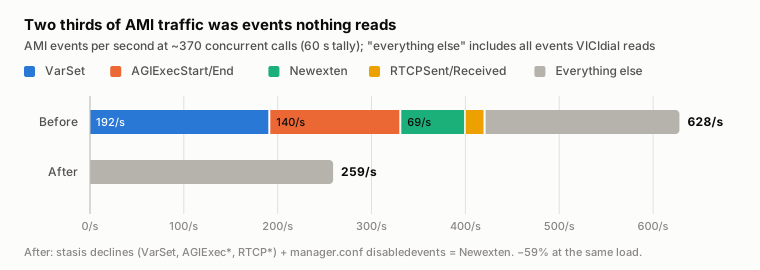
7.4 Evidence: two thirds of the events are never read
60 seconds of AMI at about 370 calls on our test server:
| Event | Share | Read by VICIdial? |
|---|---|---|
| VarSet | 31% | no |
| AGIExecStart / AGIExecEnd | 22% | no |
| Newexten (one per dialplan step) | 11% | no |
| RTCPSent / RTCPReceived | 3% | no |
The AGI events alone are more than a fifth of the stream: VICIdial's dialplan runs its AGI scripts on every call, and each command is two events nobody reads.
Two thirds of AMI traffic was events nothing reads
AMI events per second at ~370 concurrent calls (60 s tally); “everything else” includes all events VICIdial reads
- VarSet
- AGIExecStart/End
- Newexten
- RTCPSent/Received
- Everything else
Stacked bar chart. Before the trim, 628 AMI events per second: VarSet 192, AGIExec 140, Newexten 69, RTCP 21 and 207 everything else. After, 259.
After: stasis declines (VarSet, AGIExec*, RTCP*) + manager.conf disabledevents = Newexten. −59% at the same load.
Measured on the test server, 2026-10-22: 60 s AMI tallies at 369 calls (before) and 376 calls (after). Report §7.4, §7.5.
What VICIdial does read:
- Its listener matches events by prefix:
Event: Dialalso catches DialBegin, DialState and DialEnd;Event: Hangupalso catches HangupRequest; plusDTMF*, Newstate, NewCallerid, Shutdown, CPD-Result and SIP-Hangup-Cause. - Its other daemons read only replies to their own requests. Asterisk's
disabledeventsnever filters those replies.
7.5 The fix: stop the events nothing reads
Decline five stasis message types in stasis.conf, and stop Newexten in manager.conf. Configuration only. Nothing VICIdial reads changes.
Before you do it: make sure no other AMI client on the server reads these events, for example a CRM integration, and keep a copy of both files. The stasis.conf part needs an Asterisk restart: do it off-shift with no calls up, the way you restart VICIdial's Asterisk for anything else.
/etc/asterisk/stasis.conf (read at startup; restart Asterisk while idle):
[declined_message_types]
decline=ast_channel_varset_type
decline=agi_exec_start_type
decline=agi_exec_end_type
decline=ast_rtp_rtcp_sent_type
decline=ast_rtp_rtcp_received_type
/etc/asterisk/manager.conf (live on manager reload):
[general]
disabledevents = Newexten
Measured on our test server, same load:
| Before | After | |
|---|---|---|
| AMI events/s | 628 | 259 (−59%) |
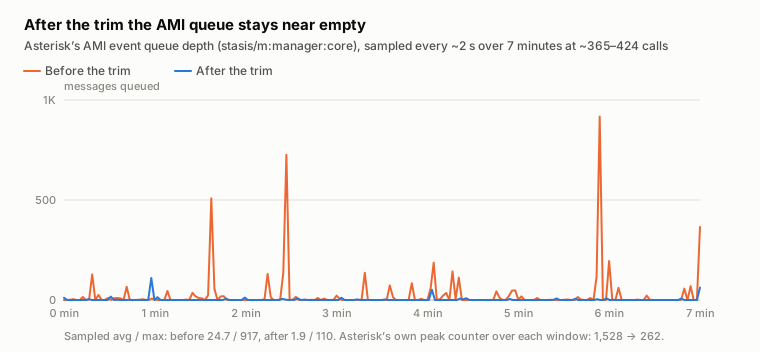
| AMI queue avg / peak (7 min) | 24.7 / 1,528 | 1.9 / 262 |
| Asterisk CPU per call | 6.3 m-cores | 4.6 m-cores (−26%) |
| Answered calls lost; transfers; inbound; recordings | 0; normal | 0; unchanged |
On the load rig (§7.2), stock Asterisk with and without the trim, same leads in the same order:
| Calls | Answered lost, no trim | Answered lost, trim | People who reached an agent, no trim / trim | Event backlog p95, no trim / trim |
|---|---|---|---|---|
| 200 | 0.1% | 0% | 98% / 99% | 2,050 / 276 |
| 300 | 13.7% | 8.7% | 69% / 65% | 43,120 / 1,984 |
| 400 | 28% | 23% | 40% / 41% | 116,385 / 2,805 |
| 500 | 41% | 33% | 30% / 34% | 199,964 (guard) / 6,991 |
The trim keeps the event thread from running away: without it the run hit the 200,000-event guard at 500 calls; with it the same dialer ran to 700. It cut calls lost as no-answer by about a third. It did not get more people to agents: the redirects it saved arrived late, and AMD hung up on those people instead (§7.2). Both setups started losing calls between 200 and 300.
Live change, no restart: toggling disabledevents with a manager reload kept every VICIdial AMI session connected.
After the trim the AMI queue stays near empty
Asterisk’s AMI event queue depth (stasis/m:manager:core), sampled every ~2 s over 7 minutes at ~365–424 calls
- Before the trim
- After the trim
Line chart. Before the trim the sampled AMI queue reaches 917; after it, it stays near zero.
Sampled avg / max: before 24.7 / 917, after 1.9 / 110. Asterisk’s own peak counter over each window: 1,528 → 262.
Measured on the test server, 2026-10-22: two 7-minute windows at the same load. Report §7.5.
Fleet rollout: applied to about 50 production servers by a nightly job.
- Asterisk was restarted only on idle servers (43); busy ones waited for their next idle night (2).
- Servers with an AMI login we did not recognise would have been skipped (none were).
- 0 failures.
- New servers get it at install.
The 70-agent cluster's dialers have run the stasis part since the load test. That raised its measured wall from about 850 to about 1,000 calls; Newexten was added since.
7.6 Going further: format AMI events on several threads (experimental)
We wrote a small, opt-in patch for Asterisk 22: about 300 lines, switched on with eventthreads = N in manager.conf [general]; 0 is stock.
- The AMI thread only numbers each message and hands it to N worker threads.
- The workers build the event text in parallel.
- One committer releases events strictly in arrival order, so AMI clients see exactly what they saw before.
- It also wakes only the AMI sessions that can receive an event. VICIdial keeps 85–156 command-only AMI sessions open, and stock Asterisk wakes each of them for every call event.
Measured, synthetic saturation on 8 vCPU (dialplan loops firing numbered UserEvents; a client checks that each number arrives exactly once and in order):
| Stock | Patched, 4 threads | |
|---|---|---|
| Messages processed at saturation | ~56k/s, then the queue grows without bound | ~100–110k/s, no backlog |
| Events delivered to an AMI client | ~14k/s | ~25–27k/s (1.8–1.9×) |
| Reordered / missing events | 0 / 0 | 0 / 0 |
Patched Asterisk keeps up where stock backs up
Synthetic AMI load (dialplan loops firing numbered UserEvents) on 8 vCPU; 0 reordered or missing events in every run
- Stock Asterisk
- Patched, eventthreads = 4
Two line charts. At 2 loops stock Asterisk delivers about 14K events per second and backs up to 2 million queued; patched delivers about 25K with an 11K backlog.
Events delivered to an AMI client, per second
Backlog behind the AMI thread (log scale)
At 4 loops the patched run hit our 200K safety guard (the 8 vCPU server was also saturated by the load generator); stock at 4 loops exhausted memory (9.6 GB) and was killed by the kernel.
Measured on the test server with the floor stopped, 2026-10-22. Report §7.6.
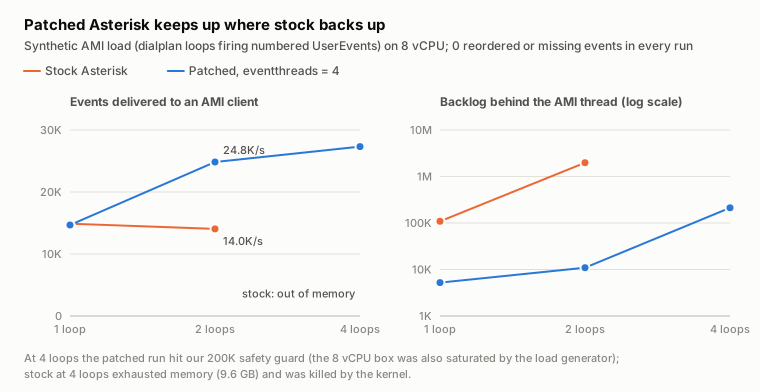
On the real floor (about 420 calls): no measurable difference. Calls, transfers, recordings and CPU were the same. Ordering audits covered 1,583–1,700 channels per minute with 0 events after a channel's hangup. Peak AMI queue fell from 262 to under 80.
Status: experimental, our test server only.
Over the soak the patched Asterisk grew from 1,075 to 1,157 MB in its last 5.7 hours (about +11 MB an hour by the end, 1,173 MB at the peak). After a restart it climbed from 90 MB to 606 MB in its first hour of load, then to 860 MB eight hours later, the growth slowing from about 32 to about 23 MB an hour.
That shape, fast growth that keeps slowing and an earlier run levelling off near 1.1–1.2 GB, looks like the allocator settling rather than a leak. We have no stock-binary run at the same load to compare against, so this is not proven.
Patched Asterisk memory during the soak
Resident memory (MB), patched v2 with eventthreads = 4, test server under full load
Line chart. Patched Asterisk memory: 867 MB at 02:58 UTC, then 1,075 MB at 05:08 rising to 1,144 MB at 09:56 UTC.
02:58 UTC: one reading right after the synthetic stress runs. Leak or allocator growth: pending the full soak readout.
Measured on the test server, 2026-10-22 (UTC): one reading at 02:58, then one every 60 s from 05:07. Report §7.6.
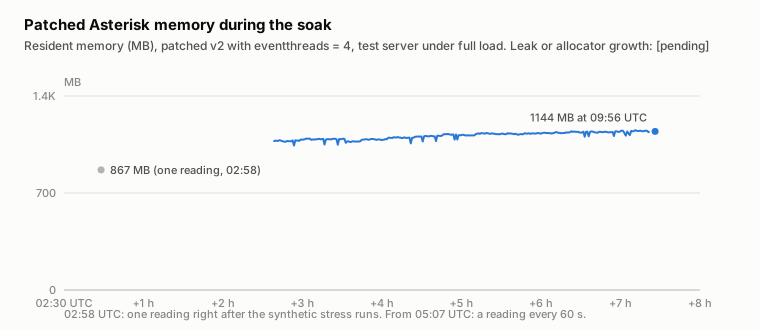
On the load rig at 300–700 calls (§7.2), the patch kept the router's backlog under 30 events at every step, where stock with the trim reached 2,000 at 300 calls and 123,000 at 700. It lost as many answered calls all the same: 7.6% against 8.7% at 300 calls, 23% against 23% at 400. The losses come from the front door (§7.1).
Where it does matter: with the front door open. With the accept fix of §7.3 on stock Asterisk, connections flowed freely and the stock event thread fell 56,000 events behind at 300 calls; the guard ended that run at 500. With the accept fix and this patch, the backlog stayed under 30 events up to 700 calls. That is what the patch is for. It did not get more people to agents (§7.3).
VICIdial's own AMI listener, one Perl process per dialer that we had suspected as the next single lane, used 1–4% of one core at up to 700 calls on the rig (8% at its busiest): not a limit at these loads.
Benchmark warning: stock Asterisk's AMI queue is unbounded. We overloaded it with no guard; it reached 9.6 GB and the kernel killed Asterisk. Always give a load test a stop condition.
7.7 A leak that multiplies the AMI stream (Asterisk 21 and 22)
What you see
While setting up the production watch in §3.4, we found idle dialers with dozens of extra subscribers on Asterisk's AMI topic. Each one handles every message the manager module handles. On one dialer, 27 of them meant every call event was dispatched 28 times. We call it the users.conf leak.
Why it happens
From the code (pbx/pbx_config.c, Asterisk 22.5.1):
- Each time
users.confis loaded,pbx_load_users()subscribes to the AMI topic. The subscription exists only to print a "users.conf is deprecated" warning when Asterisk finishes booting, and that boot event is the only thing that removes it. - After boot, every dialplan reload loads
users.confagain and creates a new subscription. The previous one is overwritten without being unsubscribed. - The subscription has no message filter, so it receives the whole topic: channel, bridge and RTP messages for every call.
- The code arrived with the change that deprecated
users.conf(June 2023). It is on the 21 and 22 branches. Asterisk 18 and 20 do not have it, and Asterisk 23 removedusers.confaltogether.
Why VICIdial servers collect them: VICIdial's keepalive script runs dialplan reload every time it rebuilds the conf files, which happens after admin changes to phones, carriers or conferences. Nothing removes the subscribers except an Asterisk restart.
Evidence
- On our test server: 0 subscribers, then 1 after one
dialplan reload, then 2 after a second. The first had handled 1,313 messages within about two seconds. - Across about 50 production servers:
| Server (anonymised) | Asterisk uptime | Leaked subscribers | Deepest queue on one |
|---|---|---|---|
| A single-box floor | 14 days | 69 | 221 |
| Cluster dialer 1 | 4.2 days | 27 | 489 |
| Cluster dialer 3 | 2.2 days | 16 | 377 |
| A single-box floor | 3.4 days | 14 | 31 |
| Cluster dialer 2 | 3.2 days | 12 | 158 |
| 43 servers restarted that night | 5 hours | 0–1 | none |
That is about 4–6 a day on a server whose admins make changes.
Why it matters
- CPU: every AMI-topic message is queued and dispatched once per leaked subscriber.
- A hidden cliff on stock settings: each subscriber has its own queue with a high-water mark of 500. When any Asterisk taskprocessor crosses its high-water mark, Asterisk raises a global overload alert. With PJSIP's default
taskprocessor_overload_trigger = global, PJSIP then stops taking new requests until the queue drains:- new UDP requests are ignored and left to the caller's retransmissions;
- new TCP, TLS and WebSocket requests, which includes WebRTC agent phones, get 503.
On cluster dialer 1 one subscriber has already peaked at 489 of 500. Our servers set taskprocessor_overload_trigger = pjsip_only after an earlier incident, so there the leak costs CPU only. A stock install does not have that protection.
We measured the cost on our test server at a steady 258 calls: five minutes with no leaked subscribers, then 50 dialplan reloads with users.conf in place, then the same five minutes again.
| Leaked subscribers | Asterisk CPU | CPU per call-second | Manager messages/s | Extra dispatches/s | |
|---|---|---|---|---|---|
| Before | 0 | 1.16 cores | 4.52 ms | 261 | 0 |
| After 50 reloads | 50 | 1.37 cores | 5.32 ms | 258 | 12,981 |
50 leaked subscribers cost 0.21 cores, +18%, at the same call count. Each one re-dispatches every manager message (12,981 ≈ 50 × 258 a second), at about 16 µs each: roughly 0.35% of Asterisk's CPU per leaked subscriber.
At that rate a dialer that has collected 27 leaked subscribers spends about 9% more CPU on the same calls, and one with 69 about 24%. On the production dialers in §3.4, at 225–242 calls each, that difference was still inside the normal variation between servers; it grows with every reload until the next restart.
The fix
Configuration only, any version:
- Move
/etc/asterisk/users.confout of the way. On a VICIdial server it is the stock sample with no users in it, and VICIdial never reads it. With no file,pbx_load_users()returns before it subscribes. - Restart Asterisk while idle to drop the subscribers already leaked.
Moving the file is safe on a live server and keeps a copy. The restart that clears the leaked subscribers is not: do it off-shift, with no calls up.
# First check that it is the stock sample and defines no users you rely on.
mv /etc/asterisk/users.conf /etc/asterisk/users.conf.disabled
Count the subscribers with:
asterisk -rx 'core show taskprocessors' | grep -c 'p:manager:core'On an affected server this number rises after each dialplan reload. With the file moved, a reload adds none.
Upstream: the fix in Asterisk is one guard: subscribe only while Asterisk has not finished booting, and on a reload print the warning straight away. We built it into Asterisk 22.5.1 on our test server: with users.conf present, the warning prints once at boot, 50 reloads leave 0 subscribers, and each reload prints the warning once.
-	fully_booted_subscription =
-		stasis_subscribe_pool(ast_manager_get_topic(), startup_event_cb, NULL);
+	if (ast_test_flag(&ast_options, AST_OPT_FLAG_FULLY_BOOTED)) {
+		/* A reload: FullyBooted will not come again, so warn now instead of subscribing. */
+		ast_log(LOG_WARNING, "users.conf is deprecated and will be removed in a future version of Asterisk\n");
+	} else if (!fully_booted_subscription) {
+		fully_booted_subscription =
+			stasis_subscribe_pool(ast_manager_get_topic(), startup_event_cb, NULL);
+		if (fully_booted_subscription) {
+			stasis_subscription_accept_message_type(fully_booted_subscription, ast_manager_get_generic_type());
+			stasis_subscription_set_filter(fully_booted_subscription, STASIS_SUBSCRIPTION_FILTER_SELECTIVE);
+		}
+ }7.8 Check your server
Check 3 runs a few asterisk -rx show commands on a dialer: the AMI router's queue, the leaked subscribers and their deepest queue, whether users.conf is there, the overload trigger and the AMI connections. Then it reads the AMI's listen queue and counts, for 10 seconds, the connection attempts the kernel drops on full listen queues.
#!/usr/bin/env bash
# VICIfast Research, Report 01: "The Two Bottlenecks Inside a Busy VICIdial Server"
# Check 3: is Asterisk's AMI keeping up (event thread and connection queue), and is it leaking?
#
# READ-ONLY. Runs a few `asterisk -rx` show commands and reads two kernel counters for 10 seconds;
# safe on a live dialer.
# Usage:  sudo bash asterisk-check-ami.sh
#
# Every manager event VICIdial reads goes through one Asterisk thread. On
# Asterisk 21 and 22 each `dialplan reload` also leaves one more subscriber on
# the manager topic while /etc/asterisk/users.conf exists, and each subscriber
# handles every manager message again (section 7.7 of the report). VICIdial also opens a new AMI
# connection for every originate and every answered call, into a queue Asterisk keeps at 10 slots;
# when that queue overflows, connections wait 1-3 s and answered calls are lost (sections 7.1-7.3).
set -u
A() { asterisk -rx "$1" 2>/dev/null; }
command -v asterisk >/dev/null || { echo "asterisk not found: run this on a dialer." >&2; exit 1; }
A 'core show version' | grep -q Asterisk || { echo "Cannot reach the Asterisk console (run as root)." >&2; exit 1; }

echo "== AMI check on $(hostname -s), $(date '+%Y-%m-%d %H:%M:%S %Z')"
ver=$(A 'core show version' | awk '{print $2}')
up=$(A 'core show uptime seconds' | awk -F': ' '/System uptime/ {print $2}')
calls=$(A 'core show channels count' | awk '/active call/ {print $1}')
echo "-- Asterisk ${ver}, up $(( ${up:-0} / 86400 ))d $(( ${up:-0} % 86400 / 3600 ))h, ${calls:-0} active calls"

TP=$(A 'core show taskprocessors')
leaked=$(printf '%s\n' "$TP" | grep -c 'stasis/p:manager:core-')
router=$(printf '%s\n' "$TP" | awk '$1 ~ /^stasis\/m:manager:core/ { print "in queue " $3 ", max depth " $4 }' | head -1)
rq=$(printf '%s\n' "$TP" | awk '$1 ~ /^stasis\/m:manager:core/ { print $3 + 0; exit }')
worst=$(printf '%s\n' "$TP" | awk '$1 ~ /^stasis\/p:manager:core-/ && $4+0 > m { m = $4+0 } END { print m+0 }')
echo "-- manager topic router: ${router:-not found}"
echo "-- manager-topic pool subscribers: ${leaked} (deepest queue reached: ${worst})"
if [ -e /etc/asterisk/users.conf ]; then
  echo "-- /etc/asterisk/users.conf is present"
else
  echo "-- /etc/asterisk/users.conf is absent"
fi
trig=$(awk -F'=' '/^[[:space:]]*taskprocessor_overload_trigger/ { gsub(/[[:space:]]/, "", $2); print $2 }' /etc/asterisk/asterisk.conf 2>/dev/null)
echo "-- taskprocessor_overload_trigger: ${trig:-global (default)}"
ami=$(A 'manager show connected' | grep -cE '^[[:space:]]*[A-Za-z0-9_.-]+[[:space:]]+[0-9]')
echo "-- AMI connections: ${ami}"
port=$(awk -F'=' '/^[[:space:]]*port[[:space:]]*=/ { gsub(/[[:space:]]/, "", $2); print $2; exit }' /etc/asterisk/manager.conf 2>/dev/null)
port=${port:-5038}
lq=$(ss -ltnH "sport = :${port}" 2>/dev/null | awk '{ print $2 " waiting, queue size " $3; exit }')
echo "-- AMI listen queue on port ${port}: ${lq:-not found}"
ovf() { awk '/^TcpExt:/ { if (!h) { for (i = 1; i <= NF; i++) n[i] = $i; h = 1 } else { for (i = 1; i <= NF; i++) if (n[i] == "ListenOverflows") print $i } }' /proc/net/netstat; }
o1=$(ovf); sleep 10; o2=$(ovf)
drops=$(( ${o2:-0} - ${o1:-0} ))
echo "-- connection attempts the kernel dropped on full listen queues: ${drops} in 10 s (${o2:-?} since boot, all ports)"
echo
echo "-- Verdict"
major=${ver%%.*}
qsize=$(printf '%s' "$lq" | awk '{ print $NF }')
if [ "${drops:-0}" -gt 0 ] && [ "${qsize:-0}" -le 128 ]; then
  echo "   ${drops} dropped connection attempts in 10 s, and the AMI queue holds only ${qsize:-?}."
  echo "   AMI clients wait 1-3 s to connect. On VICIdial that loses answered calls (section 7.2);"
  echo "   see section 7.3 for the fix. Other services count in this number too: run it again at your"
  echo "   busiest minute, and compare with 'ss -ltn' for port ${port}."
fi
if [ "$leaked" -gt 0 ] && { [ "$major" = 21 ] || [ "$major" = 22 ]; }; then
  echo "   ${leaked} leaked manager-topic subscriber(s): every AMI message is handled $((leaked + 1)) times."
  echo "   Stop new ones: move /etc/asterisk/users.conf aside if you do not use it"
  echo "   (mv /etc/asterisk/users.conf /etc/asterisk/users.conf.disabled). The existing ones clear at"
  echo "   the next Asterisk restart; do that with no calls up."
elif [ "${rq:-0}" -ge 3000 ]; then
  echo "   The manager router is ${rq} events behind: VICIdial sees answers and hangups late."
  echo "   Apply the AMI trim (section 7.5); if it stays behind at your peak, see section 7.3."
elif [ "${worst:-0}" -ge 300 ]; then
  echo "   A manager subscriber's queue reached ${worst}. Near 500 Asterisk raises its overload alert."
else
  echo "   No leak, and the manager queues are shallow."
fiHealthy is No leak, and the manager queues are shallow. with 0 dropped connection attempts. Dropped attempts at your busiest minute, with the AMI's queue at 10, mean the dialer is at the wall of §7.1: its AMI connections wait 1–3 s and it is losing answered calls. A router more than 3,000 events behind means VICIdial is seeing answers and hangups late. On Asterisk 21 or 22 with leaked subscribers, it prints how many times every AMI message is handled and the fix from §7.7. A subscriber queue that has reached 300 or more is close to the 500 that raises the overload alert.
Put its numbers into the estimator below: your calls per dialer, whether the trim is applied, and the leaked subscribers. It shows how close the dialer is to the walls measured in §7.1 and §7.5.
AMI load estimator
Based on §7 and §9
Everything VICIdial knows about a call arrives over AMI, and it moves every answered call over a new AMI connection (§7.1). Past a dialer’s wall those connections and events arrive late, and VICIdial logs answered calls as no-answer while the CPU still looks fine. Enter a dialer’s load; the defaults are a production dialer’s busiest hour.
Runs in your browser. Nothing you enter or paste leaves this page.
The dialer
Asterisk’s “active calls”. A production dialer carried 217–224 in its busiest hour (§3.4).
Only sizes the channel estimate: ≈ 534 channels (2.2 × calls + 2.5 × agents, our capacity model, §9).
The AMI stream
Without the trim: 3.1 ÷ (1 − 0.56) = 7.05, derived from the measured trimmed rate and the share the trim removes. Measure yours if you can.
Production cluster: 2,008 → 878 messages a second with the declines (§7.5). The test server: −44% per call on the thread, −59% of events sent.
The users.conf leak (§7.7)
VICIdial reloads after admin changes to phones, carriers or conferences: about 4–6 a day where admins make changes (§7.7).
Only a restart removes them. 4.2 days: the production dialer that had 27 (§7.7).
Assumption
Not in the report: the cluster lost no answered calls up to 800 of its 850-call stock wall (94%), 0.6% at 900 (§7.1).
OK: Headroom: 22%
Messages on the AMI thread
1,551/s
The measured wall for this setup: ~283 calls per dialer, ≈ 1,996/s at the measured rate.
Leak dispatch multiplier
×26
25 leaked: 40K dispatches/s; under 0.10 core extra.
With the trim: 682 messages/s, 66% of its wall (~333 calls per dialer).
Problem: The users.conf leak
Where the wall is
Share of the measured wall by calls per dialer, at this floor’s rate.
- Stock
- With the trim
Fix order
- 1Apply the AMI trim: stasis declines for VarSet, AGIExec and RTCP, and disabledevents = Newexten. Config only; check first that no other AMI client reads those events. §7.5
- 2Move /etc/asterisk/users.conf out of the way (on a VICIdial server it is the unused stock sample), then restart Asterisk while the floor is idle to drop the subscribers already leaked. §7.7
- 3Set PJSIP’s taskprocessor_overload_trigger to pjsip_only, as our servers do, so a backed-up AMI queue cannot stop PJSIP taking calls. §7.7
- 4Experimental: format AMI events on several threads (the eventthreads patch): 1.8–1.9× the synthetic throughput, in order, on one test server. Its real-floor wall is not measured yet. §7.6
How this is calculated
Load. Messages on the AMI thread = calls × messages per call-second. The thread’s ceiling is the wall the production cluster measured, per dialer: ~283 calls stock and ~333 with the stasis declines (850 and 1,000 on three dialers, §7.1, §7.5). In messages, the ceiling is that wall × the measured rate for the setup, so load = your messages ÷ the ceiling. A floor that makes more messages per call than the measured one reaches the wall sooner, in proportion; that is an assumption (its extra messages cost what the measured mix costs).
Why not one messages-per-second limit. The declines removed more than half of the thread’s messages but raised the wall by only ~18%: the messages they drop are cheap ones. So each setup keeps its own measured wall. Newexten was cut after that test; its effect on the wall is not measured, so the trimmed wall here is the declines-only one.
The synthetic ceiling (§7.6) is a different measure: about 56K messages/s on stock Asterisk on 8 vCPU before the queue grows without bound, and 100K–110K/s with the eventthreads patch. Those are cheap UserEvent messages, so they do not convert to floor calls.
The leak. On Asterisk 21 and 22 each dialplan reload adds a subscriber to the AMI topic while users.conf exists, and only a restart removes them: leaked = reloads per day × days since restart (or your count). Each one is handed every message on the topic, so dispatches = messages × (1 + leaked). They run on Asterisk’s pool threads, not the AMI thread, so they cost CPU rather than moving the wall. Their cost is bounded by the shift watch: 700 messages/s × 27 subscribers stayed under 0.05 core, under 2.6 µs a dispatch. The risk on a stock install is each subscriber’s own queue: past 500 it trips the global overload alert (§7.7).
7.9 How to revert
disabledevents: set it empty and runmanager reload. Deleting the line leaves the old value active until a restart.
; /etc/asterisk/manager.conf, then: asterisk -rx 'manager reload'
[general]
disabledevents =- The stasis declines: remove the
decline=lines from/etc/asterisk/stasis.confand restart Asterisk while idle. users.conf: move it back (mv /etc/asterisk/users.conf.disabled /etc/asterisk/users.conf). Eachdialplan reloadwill leak a subscriber again.- The experimental patch: install the stock Asterisk binary, delete the
eventthreadsline, and restart Asterisk while idle.
Every step that restarts Asterisk follows the same rule as the change: off-shift, with no calls up.
8. Smaller things we found on the way
8.1 Midnight agent-screen freeze
Every agent screen writes a row to VICIdial's agent latency log about once a second. At midnight VICIdial's keepalive (ADMIN_keepalive_ALL.pl) archives it, in four steps:
INSERT IGNORE INTO vicidial_agent_latency_log_archive SELECT * FROM vicidial_agent_latency_log;
DELETE FROM vicidial_agent_latency_log WHERE log_date < '<today>';
OPTIMIZE TABLE vicidial_agent_latency_log;
-- then the archive: delete rows older than 7 days, OPTIMIZE TABLE vicidial_agent_latency_log_archiveIn our 20-hour soak, the midnight run queued 65 agent-screen writes, with waits of up to 23 seconds. The longest statement of the run, 143 seconds, was the archive's side, which no agent writes to.
Which step blocks agents. We replayed one real day of latency rows (3.7 million, from our test server under pressure) through the same steps on copies, with 44 simulated agent screens writing every second throughout:
| Engine | Copy into the archive | Delete from the log | Agents' slowest write |
|---|---|---|---|
| MyISAM (VICIdial's default) | 66.5 s, writes unaffected | 27.5 s | 27.1 s, during the delete |
| InnoDB | 28.3 s | 17.3 s | 0.01 s |
| InnoDB, READ COMMITTED for the archiving session | 28.6 s | 16.9 s | 0.02 s |
The freeze is the DELETE. During the copy MyISAM lets new rows in at the end of the table (concurrent_insert), but the DELETE locks the whole table, and every agent screen's write waits for all of it. The archive is already capped at 7 days, so trimming it does not help.
Move vicidial_agent_latency_log to InnoDB. It is a small, write-mostly table that no VICIdial code uses as a lock, and on InnoDB the agents' writes never waited while the copy and the delete ran 1.6–2.3 times faster. How long the freeze lasts on MyISAM depends on the day's rows, about one per agent per second worked, and it only matters if agents are logged in at midnight.
Our test server runs without binary logging. With binary logging on (to feed a replica), InnoDB's INSERT … SELECT can lock the source rows under the default REPEATABLE READ, so set READ COMMITTED for that table's workload there. We have not tested that case.
-- Off-shift, after a backup. Revert with ENGINE=MyISAM.
ALTER TABLE vicidial_agent_latency_log ENGINE=InnoDB;
8.2 Voice packets dropped by the kernel
With Linux's default UDP receive buffers a busy dialer overflows in bursts and drops RTP. Agents hear it as choppy audio, and nothing in Asterisk logs it. The kernel counts it in /proc/net/snmp as RcvbufErrors. Our servers run 4 MB default and 16 MB maximum receive buffers.
A scan of 48 servers on the default 208 KB buffer (2026-10-12) found one 60-agent server that had dropped 458,378 packets in 101 hours, a second dropping about 690 an hour, a third about 100 an hour, and the rest at most about 4 an hour. Raising the buffers needs no restart: new sockets pick it up.
Not every choppy-audio complaint is this. On one server with the larger buffers and no RcvbufErrors in 15 days, pjsip show channelstats showed the carrier legs and agent-to-server audio clean, and 2–4% loss only from the server to a few agents: their own networks.
Check 4 reads that counter twice, 10 seconds apart, on a dialer.
#!/usr/bin/env bash
# VICIfast Research, Report 01: "The Two Bottlenecks Inside a Busy VICIdial Server"
# Check 4: is the kernel dropping voice packets?
#
# READ-ONLY. Reads /proc/net/snmp twice, 10 seconds apart.
# Usage:  sudo bash linux-check-udp.sh
#
# With Linux's default receive buffers a busy dialer overflows in bursts and
# drops RTP. Agents hear it as choppy audio; nothing in Asterisk logs it.
set -u
rcv() { awk '/^Udp:/ { if (!h) { for (i = 1; i <= NF; i++) n[$i] = i; h = 1 } else print $n["RcvbufErrors"] }' /proc/net/snmp; }
echo "== UDP check on $(hostname -s), $(date '+%Y-%m-%d %H:%M:%S %Z')"
echo "-- net.core.rmem_default=$(sysctl -n net.core.rmem_default)  net.core.rmem_max=$(sysctl -n net.core.rmem_max)"
up=$(awk '{ print int($1) }' /proc/uptime)
a=$(rcv); sleep 10; b=$(rcv)
echo "-- receive-buffer drops since boot: ${b} ($(( b * 3600 / (up > 0 ? up : 1) )) an hour on average)"
echo "-- in the last 10 seconds: $(( b - a ))"
echo
echo "-- Verdict"
if [ $(( b - a )) -gt 0 ]; then
  echo "   Dropping packets now. Raise the buffers (section 8 of the report):"
  echo "     printf 'net.core.rmem_default=4194304\\nnet.core.rmem_max=16777216\\n' > /etc/sysctl.d/99-udp-rmem.conf"
  echo "     sysctl --system      # new sockets pick it up; no restart needed"
elif [ "$(sysctl -n net.core.rmem_default)" -lt 1048576 ] && [ "$b" -gt 0 ]; then
  echo "   No drops in this window, but ${b} since boot on default-sized buffers: check at your busiest hour."
else
  echo "   No drops."
fiNo drops. is healthy. If it prints Dropping packets now, raise the buffers.
This changes a kernel setting for every new socket on the server. Note the current values first (the check prints them) so you can put them back. It needs no restart, and calls already up keep their old buffers.
printf 'net.core.rmem_default=4194304\nnet.core.rmem_max=16777216\n' > /etc/sysctl.d/99-udp-rmem.conf
sysctl --system
To revert, delete /etc/sysctl.d/99-udp-rmem.conf and set the two values back to what the check printed, with sysctl -w.
8.3 Every dialplan step logged
With the console at high verbosity and messages logging verbose and debug, our test server wrote about 1.6 GB of Asterisk log a day at about 50,000 dials. Unless you need them, take verbose and debug off the messages => line in /etc/asterisk/logger.conf and run asterisk -rx 'logger reload'. Keep a copy of the file first; the reload does not touch calls.
8.4 Live-state reset at 01:02
At 01:02 every night VICIdial's AST_reset_mysql_vars.pl deletes the server's rows from vicidial_live_agents, vicidial_auto_calls and vicidial_hopper. On a floor that works through the night, that is a reset of live state under working agents: on our test server, one 5-minute dip of −8% calls and +25% drops (§4.4).
8.5 A 25-second stall at minute 11 of every hour
At 11 minutes past every hour, VICIdial's AST_flush_DBqueue.pl (its stock cron line is 11 * * * *) deletes all but the last 2 minutes of the dialer's cid_channels_recent_<server> table: the table the redirect lookup reads (§7.1). It is MyISAM, so the delete holds the table for as long as it runs.
On the load rig at 300–400 calls the table held about 950,000 rows by minute 11. MariaDB's slow log, two hours running:
# Query_time: 24.450882  Lock_time: 0.000019  Rows_sent: 0  Rows_examined: 950227
DELETE from cid_channels_recent_<server> where call_date < '2026-10-23 13:09:00';
# Query_time: 25.629146  Lock_time: 0.000028  Rows_sent: 0  Rows_examined: 957499
DELETE from cid_channels_recent_<server> where call_date < '2026-10-23 14:09:00';
At 300 calls, in the run with both fixes of §7.3, that minute lost 24% of answered calls against 0.6% in the minutes either side: redirects took up to 27 s (95th percentile 24 s), and 109 lookups found no channel at all. It happened at minute 11 in every run that crossed one.
Keep that table small: run the flush every few minutes instead of hourly, as the 70-agent cluster has since its load test. Each delete then covers minutes, not an hour. It is VICIdial's own script; --seconds=240 also shortens how long it keeps vicidial_manager and the other queue tables, to 4 minutes, so check your reports do not read them.
On InnoDB the delete would lock only the old rows, so lookups and new rows would not wait at all. Not tested yet.
9. Capacity: what this means for sizing (estimates)
Per dialer, on the load rig (§7.2): with stock Asterisk and the AMI trim, nothing was lost at 200 concurrent calls. At 300, 8.7% of answered calls were lost and a third of the live people never reached an agent, with the CPU at 64%. The 70-agent cluster's dialers (8 cores / 16 threads) showed the same symptom from about 280–330 calls.
Plan on about 250 concurrent calls per dialer on VICIdial's stock flow with AMD, whatever the core count: the limit is the AMI path of §7.1, not the CPU.
The AMI trim did not move that point. It cut the calls lost as no-answer at 300 calls from 13.7% to 8.7% and at 400 from 28% to 23%, but not the share of people who reached an agent, and both setups started losing calls between 200 and 300 (§7.5).
The rig is close to a real floor; the test server's simulated floor is not. The rig has carrier RTP over the network, AMD on recorded voices, recording, WebRTC/Opus for every agent and conference mixing. Its talk times are short and its carrier is one rule, not many carriers. The simulated floor on our test server has none of that, so its calls are much cheaper.
On a production all-in-one server with 16 dedicated cores, 219 calls with 20 agents used 58% CPU. Our model puts an 8 shared vCPU server at about 110–150 real concurrent calls after the AMI trim. Our simulated floor on the same size of server reached 400+.
Beyond one dialer: add dialers (a cluster) before buying a bigger single box. Faster cores help a little; more cores do not raise the AMI wall. The AMI fixes we tested in §7.3 do not raise that number yet.
10. Recommendations, in order
- Apply the AMI trim (§7.5), after checking for other AMI clients. Configuration only; −59% events.
- Fix your own readers (§6).
- Short queries on VICIdial's running totals.
- Dashboards that share one poller.
SET STATEMENT max_statement_timeon report queries, never on a writing account.- An index on
vicidial_log.phone_numberfor the lead search.
- Move the high-traffic log and lead tables to InnoDB (§4.1).
- Off-shift.
- Size the InnoDB cache, the buffer pool.
- Leave the settings, live and MEMORY tables alone.
- Take the converted tables out of nightly OPTIMIZE, or accept an online rebuild.
- Trim the agent-latency archive if your floor works at midnight (§8.1).
- On Asterisk 21 or 22, move
users.confaway and restart Asterisk while idle (§7.7). - Lower Asterisk log verbosity in
logger.confunless you need it (§8.3). - Run VICIdial's flush every few minutes on busy dialers (§8.5).
- Scale out, not up, once a dialer nears about 250 calls (§9).
- Experimental: the AMI accept fix with the parallel AMI formatting, after a load test on your hardware (§7.3, §7.6).
11. Caveats and open questions
- Window length: most comparisons are 2–7-minute windows. Drop rates at that length are noisy, so we compare stalls, throughput and queue depth.
- The test floor is emulated: a simulated floor with a simulated carrier and bot agents.
- The load rig is one dialer, emulated too (§7.2): real VICIdial, real agent screens and real audio, but a fake carrier, short talk times and the database on the same server. The mechanism in §7.1 is VICIdial's and Asterisk's own code, so it should show on any dialer that runs this flow; where in calls it starts depends on the hardware and the call mix.
- InnoDB endurance: one test server, one night so far. Production results to follow.
- The patches (§7.3, §7.6) have run on test servers only, the accept fix for under two hours. jemalloc ran for one 25-minute ramp, and the trace's timing lines and
gdbsnapshots disturbed the runs they measured (§7.3). - The power-cut test (§5) is one server type and one cloud disk: 7 power-offs and 2 kernel crashes.
- Untested:
- a read replica for reports;
- trimming the latency archive.
Appendix A. Converting a table, and reverting
Each ALTER blocks writes to its table until it finishes, at about 10–12 MB of MyISAM data a second. Stop dialing, work off-shift, one table at a time, and take the backup first. Size the buffer pool to your RAM before the first conversion.
Take a backup of the tables first:
mysqldump --single-transaction <db> <tables> | gzip > pre-innodb.sql.gz-- off-shift, dialing stopped; one table at a time
ALTER TABLE vicidial_log ENGINE=InnoDB;
-- revert
ALTER TABLE vicidial_log ENGINE=MyISAM;# /etc/mysql/mariadb.conf.d/99-zz-innodb-tables.cnf (size to your RAM; the name must sort last)
[mysqld]
innodb_buffer_pool_size = 3G
innodb_flush_log_at_trx_commit = 2 # thousands of tiny autocommits: no fsync per commit; 1 if a power cut's last second matters (§5)MariaDB reads the files in this directory in name order, and the last setting wins. A tuning file that sorts after yours (ours is 99-vicifast-tuning.cnf) silently puts the buffer pool back to its default. After the restart, check that your value is the one running:
SELECT @@innodb_buffer_pool_size / 1024 / 1024 AS buffer_pool_mb, @@innodb_flush_log_at_trx_commit;To revert the configuration, delete the file and restart MariaDB off-shift, after the tables are back on MyISAM.
Appendix B. Test scripts
The four read-only checks are in Downloads and in the sections they belong to. The harness behind the measurements is below. Each file opens with what it does and what it changes. None of these is for a live floor: they generate load, change dial levels, convert tables or reset counters.
| Script | What it is | Changes the server? |
|---|---|---|
soak.sh | Long-run sampler: counters, locks, stuck statements, agents, calls, every 10 s | No |
window.sh | AMI router, Asterisk CPU and call health over one window | No |
tally2.py | AMI event tally and ordering audit | No (uses bench.sh’s AMI user) |
amiwin.sh | AMI router sampler | Resets Asterisk’s taskprocessor counters |
step.sh | Pressure-step sampler (§4) | Sets two campaigns’ dial level when LEVEL is given |
reportload.sh | The report load of the side-by-side in §4 | Heavy reads, and one OPTIMIZE TABLE vicidial_log |
latency-archive-test.sh | The midnight latency-archive test in §8.1 | Creates and drops scratch tables, heavy load |
bench.sh | Guarded AMI load generator (§7) | Adds an AMI user to manager.conf |
local-engine-tests.sh | The isolated local lock, statement-cap and crash tests (§2) | Writes to its own private database |
vicifast-ami-eventthreads-v2.patch | The experimental Asterisk 22.5.1 patch (§7.6) | A rebuilt Asterisk |
vicifast-ami-accept-fix.patch | The experimental AMI accept-path fix (§7.3) | A rebuilt Asterisk |
rig-setup.sh | Load rig (§7.2): fake carrier, campaign, 300k fake leads, agents and WebRTC phones | Yes: a throwaway server only |
rig-ramp.sh | Load rig: holds the live calls at each target, with a stop guard | Sets the test campaign's dial level |
rig-sampler.py | Load rig: CPU, VICIdial daemons, Asterisk threads, AMI queue and listen overflows, every 5 s | No |
rig-amiprobe.py | Load rig: one AMI connect, login and ping a second, timed | No |
rig-agents.mjs | Load rig: real agent screens on WebRTC in headless Chrome | Logs agents in |
rig-fake-carrier-extensions.conf, rig-fake-carrier-pjsip.conf | Load rig: the fake carrier on its own server | It is the carrier |
rig-analyze.py, rig-redirect-timing.py, rig-redirect-stages.py | Load rig: per-step results, redirect delay per minute, redirect stages | No |
rig-timing-lines.py | Load rig: timing print lines in two VICIdial files | Edits two VICIdial files (prints only) |
rig-redirect-trace.py | Load rig: timing lines in Asterisk's Redirect handler (§7.3) | Patches the Asterisk source tree; a rebuilt Asterisk |
rig-redirect-inside.py, rig-gdb-threads.py | Load rig: the redirect's stages inside Asterisk; what the threads in gdb snapshots are doing | No |
Glossary
VICIdial
- Agent latency log
- The keepalive copies the day's rows into vicidial_agent_latency_log_archive at midnight with INSERT IGNORE … SELECT. Both tables are MyISAM, and with a large archive the copy holds agent screens for minutes (section 8.1).
- AMI redirect
- agi-VDAD_local_optimize.agi finds the carrier channel in cid_channels_recent, writes a Redirect into vicidial_manager and starts AST_send_action_child.pl, a new Perl process that connects to the AMI, logs in, sends the Redirect and logs off. The dialplan then waits 2 seconds (Wait(2)) before hanging up the Local channel, so the whole round trip has to fit in that window.
- astguiclient.conf
- Holds the server's IP, the database host, name, user and password (VARDB_*), and the keepalive flags. The report's database checks read their credentials from it, the same way VICIdial's own scripts do, and never print them.
- Calls-per-second cap
- Set in Admin › Servers. On our test server, raising the dial level alone stalled near 4.4 dials a second; raising this cap as well reached 6.7 (section 4.2).
- Cluster
- Every dialer reads and writes the one database, so a lock on it stalls calls on every dialer at once. The floor measured in this report ran three dialers on one database server.
- Dial level
- auto_dial_level on a campaign. At 3, VICIdial keeps three calls ringing for every agent waiting. Set higher than the floor can take, more people answer than there are agents, and the drop timer hangs up on them. That is pacing, not the database, and the report keeps the two apart. Glossary page
- Dialer
- Also called a telephony or Asterisk server. Each runs its own copy of VICIdial's dialing and AMI processes against the shared database.
- Disposition
- Saving a disposition is an UPDATE of the call's row in vicidial_log and the lead's row in vicidial_list. On MyISAM that write waits for any read of those tables to finish, which is why a slow report shows up on the agent screen as a status that takes seconds to save. Glossary page
- Drop timer
- Set per campaign. A call that has waited this long in the LIVE state with no agent is hung up and logged as a drop, the abandonment that drop-rate limits count. The floor in this report ran 3 and 5 seconds. Glossary page
- Hopper
- AST_VDhopper.pl fills vicidial_hopper from the campaign's lists every few seconds, choosing leads by status, call times and order. Its counts over vicidial_list are among the reads that can hold that table. Glossary page
- In-group
- Inbound calls, and outbound calls transferred to closers, are queued in an in-group. Their records go to vicidial_closer_log rather than vicidial_log. Glossary page
- Keepalive
- Run from cron every minute. It starts the VICIdial processes selected by active_keepalives in /etc/astguiclient.conf, and when a server is flagged rebuild_conf_files it regenerates the Asterisk phone and carrier configs from the database and reloads the dialplan. On Asterisk 21 and 22 each of those reloads can leak an AMI subscriber (see users.conf leak).
- Lead search
- Stock VICIdial has no index on vicidial_log.phone_number, so a search by phone reads the whole call log. On MyISAM the table is locked while it does: about 2 s on 1.5 million rows, during which the dialer's writes queue.
- VDAD
- The VICIdial Auto Dialer. AST_VDauto_dial.pl decides how many lines to dial from the dial level and the agents ready. When a call is answered, an AGI script finds a free agent in the database and sends the call to that agent's conference. Every step reads and writes the database, so a locked table stalls it.
Asterisk
- AGI
- Each AGI command a script runs produces an AGIExecStart and an AGIExecEnd manager event. VICIdial's AMI listener never reads them, so the trim in section 7.5 declines them. Glossary page
- AMD
- It runs on each answered call's real audio. On a production dialer that is CPU an emulated call does not spend, one reason a simulated floor carries more calls than a real one (section 9). Glossary page
- AMI
- VICIdial keeps several AMI connections open on each dialer. Every channel, bridge and state change becomes a manager event, formatted and queued for each connection on one Asterisk thread. That thread is the second bottleneck in this report.
- Dialplan reload
- VICIdial's keepalive reloads the dialplan whenever a phone, carrier or server setting changes, so a busy admin day can mean dozens of reloads. Harmless in itself; on Asterisk 21 and 22 with users.conf present, each one leaks an AMI subscriber.
- Local channel
- On Asterisk 13 and later VICIdial originates each outbound call as a Local channel to an extension such as 138369. When the carrier answers, the Local channel runs an AGI that looks up the real carrier channel and asks Asterisk to move it to AMD and the agents (see AMI redirect). If that move does not arrive within 2 seconds, the Local channel hangs up and takes the answered call with it.
- PJSIP
- With taskprocessor_overload_trigger = global, the default, PJSIP stops taking new requests while any Asterisk taskprocessor is over its high-water mark: new UDP requests are ignored, and new TCP, TLS and WebSocket requests get 503. With pjsip_only, only PJSIP's own queues can do that (section 7.7).
- RTP
- A busy dialer receives tens of thousands of RTP packets a second. If the kernel's receive buffer overflows they are dropped before Asterisk sees them, which agents hear as choppy audio.
- Stasis
- The manager module subscribes one message router to its topic and turns each message into AMI events for every connected session. A router handles its messages strictly in order, on one taskprocessor: that keeps AMI events in order, and it is the single lane in section 7. stasis.conf can decline message types that nothing needs.
- Taskprocessor
- Stasis topics deliver messages through taskprocessors. A queue that passes its high-water mark (500 by default) raises the overload alert, and with taskprocessor_overload_trigger=global Asterisk then turns away new SIP requests until it drains.
- users.conf leak
- pbx_config subscribes to the manager topic on each load to print a deprecation warning, and only unsubscribes on the start-up FullyBooted event, which a reload never sees. Every leaked subscriber handles every manager message again. Moving users.conf aside stops new ones; a restart clears the rest.
MariaDB
- Aria
- Survives a crash without REPAIR, but locks like MyISAM, so it does not help with lock convoys.
- Buffer pool
- Servers tuned for MyISAM size it for a database with nothing on InnoDB, typically 128 to 256 MB. After converting the hot tables, size it for their working set. We used 3 GB on a 15 GB server (section 4.1).
- concurrent_insert
- With ALWAYS (VICIdial's usual setting) new rows go to the end of the file even during a read. Updating a call's status, which is what a disposition does, still waits.
- InnoDB
- A long report reads a consistent snapshot while the dialer keeps writing. The cost is more memory (the buffer pool) and more disk writes. Section 4 covers which VICIdial tables gain from it and which must stay MyISAM or MEMORY.
- Lock convoy
- The first bottleneck in this report. A 2-second read of vicidial_log blocks VICIdial's next UPDATE of it, and with low_priority_updates off that waiting UPDATE blocks every read that comes after, including the ones the dialer needs to route the next call.
- low_priority_updates
- OFF is what turns one slow read into a convoy: the waiting UPDATE goes to the front and every read behind it waits too. ON avoids that but can starve writes on a busy table, so the report does not recommend changing it.
- max_statement_time
- Set for one statement with SET STATEMENT max_statement_time=N FOR SELECT …, or for a whole account. On a report query it limits how long the report can hold a MyISAM table. On an account that writes it is dangerous: a killed UPDATE on MyISAM keeps the rows it already changed (section 6.2).
- MEMORY table
- VICIdial uses MEMORY for state its processes rebuild within seconds: the hopper, calls in flight, Asterisk's channel lists and server heartbeats. Rows are fixed width, TEXT columns are not allowed, and every statement locks the whole table, as on MyISAM. This report leaves these tables as they are.
- MyISAM
- A read takes a shared lock on the whole table and a write an exclusive one, for as long as the statement runs. Inserts can slip past a read at the end of the file (concurrent_insert), but updates and deletes cannot. No transactions and no crash recovery beyond REPAIR.
- OPTIMIZE TABLE
- VICIdial's AST_DB_optimize.pl runs it on 20 tables every night. On the converted InnoDB tables it ran as an online rebuild while the dialer kept writing, and the tables came out smaller (section 4.4).
- Process list
- A statement in state 'Waiting for table level lock' is queued behind a lock; one that has run for seconds while others wait is likely holding it. Check 1 samples it once a second, and the processlist analyzer reads a pasted copy.
- Read replica
- VICIdial can send its reports to one (slave_db_server and reports_use_slave_db in System Settings), and the replica's tables can be InnoDB while the primary stays stock. We have not tested it (section 6.4).
- Table lock
- While a read holds a MyISAM table, any UPDATE or DELETE must wait; and because a waiting write blocks the reads queued after it, one slow read can stop everything on that table.
Linux
- Listen queue
- Its size is the backlog a server passes to listen(); Asterisk's TCP servers, the AMI among them, pass 10 whatever net.core.somaxconn says. When the queue is full the kernel drops the new connection's first packet and counts it in TcpExt ListenOverflows; ss -ltn shows the queue's length and size.
- SYN retry
- The client cannot tell a dropped SYN from a slow network, so it waits out Linux's retransmit timer, doubling each time. A full AMI queue therefore turns a sub-millisecond connect into whole seconds, in steps.
- UDP receive buffer
- Sized for a desktop by default (208 KB). A dialer carrying hundreds of calls needs megabytes; drops show in /proc/net/snmp as RcvbufErrors.
VICIfast
- Floor tab
- It reads the box through a small PHP script (floor.php). Its day's totals were one statement over the whole day of vicidial_log, which is one of the slow reads measured in section 3. The fix reads the day five minutes at a time.
- Frozen call
- Our measure of a lock stall the caller can feel. Calls that wait while every agent is busy are pacing. A call that waits while an eligible agent sits ready on the same dialer is waiting on VICIdial's routing, and in these measurements that meant a locked table. Waits under 2 s, or with the free agent on another dialer, are counted separately.
- LIVE-n
- In vicidial_auto_calls an answered call waiting for an agent has status LIVE. Our shift watcher sampled every call once a second, so LIVE-3 means the call had waited 3 seconds when it was last seen. A call that left at LIVE-3 with a 3 s drop timer was dropped by the timer; one that left at LIVE-0 with an agent free never got as far as the agent search.
- Load rig
- Three servers, deleted after the test: VICIdial on 16 dedicated vCPU with the same Asterisk and MariaDB builds as production; an Asterisk on a second server answering every call by a rule on its number, as voicemail or a person, with recorded audio; and 42–45 real VICIdial agent screens in headless Chrome on a third, talking over WebRTC. A controller holds the number of live calls at each target.
- Shift watch
- It only reads: vicidial_live_agents, vicidial_auto_calls and the process list, plus Asterisk's own counters on each dialer. Everything in sections 3.2 and 3.4 comes from it.
- Simulated floor
- About 45 bots log into real agent sessions on an outbound and a blended campaign, with inbound calls through a DID, an IVR and in-groups, and recordings. Its calls are cheaper than real ones: no carrier RTP over the network and no answering machine detection on real audio (section 9).
- Stats agent
- It used to count the day's calls on every server of a cluster against the one shared database, each run taking 26 to 40 seconds. Section 3.2 measures what pausing it did; it now takes about a second.
- Today tab
- Each of its figures was a scan of the day (and for the sales pace, eight days) of vicidial_log in one statement. They are now refreshed less often on busy servers, and read an hour at a time in the next version.
Downloads
The four checks are read-only and safe on a live floor. The data files are the production shift in §3.4, by hour, and the load rig in §7.2, by step, with no server names.
- Check 1: who is holding VICIdial's tables?Script · vicidial-check-locks.sh
- Check 2: does the lead search read your whole call log?Script · vicidial-check-lead-search.sh
- Check 3: is the AMI keeping up (event thread and connection queue), and is it leaking?Script · asterisk-check-ami.sh
- Check 4: is the kernel dropping voice packets?Script · linux-check-udp.sh
- Production shift, hour by hourData · shift-hourly.csv
- Harness: soak samplerScript · soak.sh
- Harness: AMI window samplerScript · window.sh
- Harness: pressure-step samplerScript · step.sh
- Harness: report load (§4)Script · reportload.sh
- Harness: midnight latency-archive test (§8.1)Script · latency-archive-test.sh
- Harness: AMI load generatorScript · bench.sh
- Harness: AMI tally and ordering auditScript · tally2.py
- Harness: AMI router samplerScript · amiwin.sh
- Harness: isolated local engine testsScript · local-engine-tests.sh
- Experimental Asterisk 22.5.1 patch (§7.6)Script · vicifast-ami-eventthreads-v2.patch
- Load rig, step by step (CSV)Data · load-rig-steps.csv
- Experimental Asterisk 22.5.1 AMI accept fix (§7.3)Script · vicifast-ami-accept-fix.patch
- Load rig: setupScript · rig-setup.sh
- Load rig: closed-loop controllerScript · rig-ramp.sh
- Load rig: samplerScript · rig-sampler.py
- Load rig: AMI connect probeScript · rig-amiprobe.py
- Load rig: agent screens (Playwright)Script · rig-agents.mjs
- Load rig: fake carrier dialplanScript · rig-fake-carrier-extensions.conf
- Load rig: fake carrier PJSIPScript · rig-fake-carrier-pjsip.conf
- Load rig: per-step analysisScript · rig-analyze.py
- Load rig: redirect timing per minuteScript · rig-redirect-timing.py
- Load rig: timing lines for the redirectScript · rig-timing-lines.py
- Load rig: redirect stagesScript · rig-redirect-stages.py
- Load rig: timing lines in Asterisk's Redirect handlerScript · rig-redirect-trace.py
- Load rig: the redirect inside Asterisk, stage by stageScript · rig-redirect-inside.py
- Load rig: what Asterisk's threads are doing (gdb snapshots)Script · rig-gdb-threads.py
Revision history
| Date | Version | What changed |
|---|---|---|
| 1.0 | First public version. Added a trace of the redirect inside Asterisk, with timing lines in its Redirect handler and gdb snapshots of every thread, and the same build with jemalloc (§7.3). | |
| 0.9.2 | Measured: a power-cut test of MyISAM, Aria and InnoDB (§5); a load rig at 200–700 calls on one dialer, stock, trimmed and patched Asterisk (§7.1–7.3, §9); an hourly 25-second stall (§8.5). The AMI wall is the per-call redirect and Asterisk's AMI front door, not the event thread alone. §7 renumbered (the trim is now §7.5, the patched event thread §7.6, the leak §7.7). Appendix A's config file renamed so it applies. Subtitle updated. | |
| 0.9.1 | Wording: the upstream Asterisk issue is marked as not filed yet, and the reading guide names the "Not measured yet" notes. | |
| 0.9 | Review draft: full production shift, 20-hour soak, MyISAM/InnoDB side-by-side, leak cost and patch test, midnight-freeze test. |