Live Monitor widget: listen, whisper, barge
Listen to live agent calls from your browser — no desk phone, nothing to install. Monitor silently, whisper to the agent only, or barge in as a third party.
Listen to any live agent call straight from your browser — no desk phone, nothing to install. The Live Monitor widget is a small softphone built into your dashboard. Pick an agent on the Floor, click one button, and you are on their call. This guide covers the three modes — Monitor, Whisper, and Barge — who hears what, and who is allowed to use them.
Meet the Live Monitor widget
The widget appears on its own, floating over your dashboard, the first time you open a server. It is a real phone: it registers with your server and waits. When it says READY, you are set — there is nothing to configure.
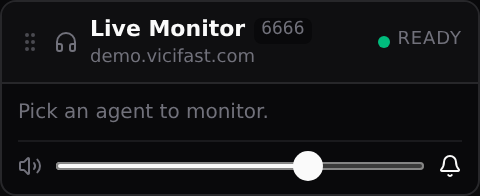
A few things worth knowing about it:
- It stays alive while you click around the dashboard — Reports, Users, Billing, anywhere. You do not have to stay on the server page.
- It is tied to the last server you opened. Manage several servers? Open the right server’s page first.
- Drag it by its top bar to move it. It remembers where you left it.
- The slider sets your listening volume; the speaker icon mutes it. The bell turns call notifications on or off — a short chime when a session starts, plus a red tab title and a desktop notification if you are looking at another tab.
- Only one browser tab can hold the phone. In any second tab it says "Active in another tab."
Step 1 — Open the Floor
- Click Servers in the left sidebar.
- Click your server’s name.
- You land on the Floor tab — the live wall of agent cards.
Each card is one logged-in agent: their name, what they are doing right now (READY, INCALL, PAUSED…), how long they have been in that state, and their campaign.

Step 2 — Pick an agent and a mode
- Click the card of an agent who is on a call (INCALL). A panel opens on the right.
- In the panel, find the Listen row: Monitor, Whisper, Barge.
- Click the mode you want. Within a few seconds you are on the call — the widget shows the agent’s name, the mode, a running timer, and signal-quality bars.
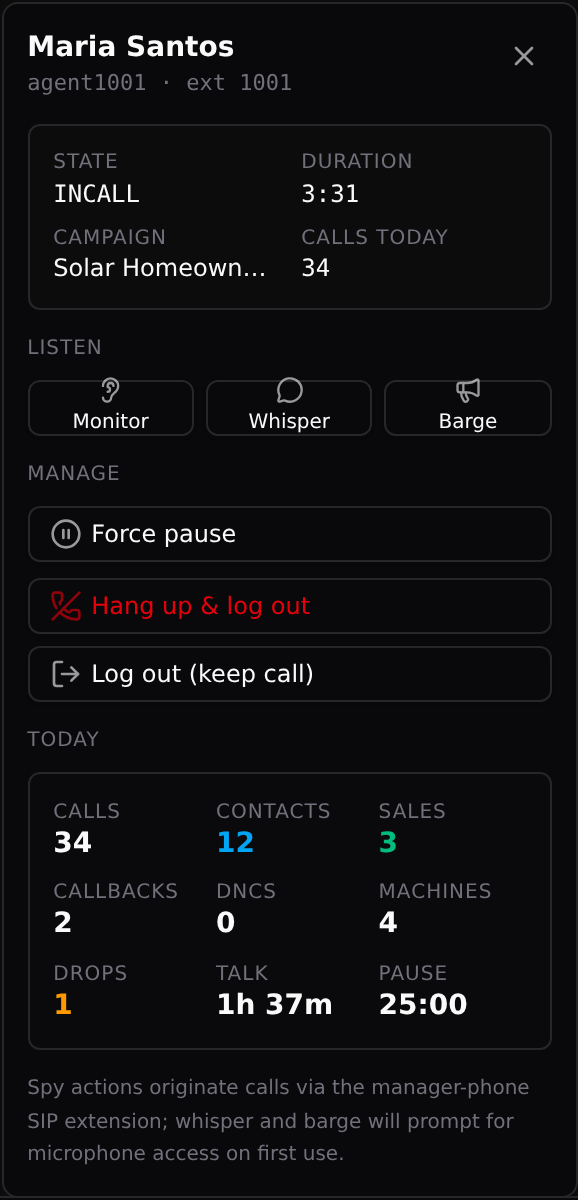
The buttons only light up when the agent is actually on a call. On a paused or idle agent they stay grey — hover over one to see why.
What each mode sounds like
- Monitor — you hear both sides of the call. Neither the agent nor the customer hears you, and the agent gets no beep or warning. Pure coaching and quality listening.
- Whisper — you hear the call, and only the agent hears you. The customer hears nothing from your side. Perfect for feeding an answer to a new agent mid-call. Your browser will ask for microphone permission the first time.
- Barge — you join the call as a third party. Both the agent and the customer hear you. Use it to rescue a call or take over.
While a session is live, the widget gives you a microphone mute button (Whisper and Barge) and a red hang-up button to leave the call. Leaving never touches the agent’s call — they talk on.
Who can listen in
The account owner and team members with the Operator role. Anyone else on your team (Viewer, Billing, QA) never sees the widget and cannot start a session — the server refuses even if they tried. Every Monitor, Whisper, and Barge is written to the server’s audit log with who did it and when, so there is always a trail.
Good to know
- The agent must be on a live call. On an idle or paused agent the buttons stay grey — wait for INCALL.
- Whisper and Barge need your microphone; Monitor never asks for it. If you deny the mic prompt, Whisper and Barge simply refuse to start.
- One tab at a time. If the widget says "Active in another tab," close the other tab or keep working in this one — the phone stays where it was first opened.
- If the widget never gets past "Connecting," your own IP is probably not allowed through the firewall. Open Manage Firewall and click Whitelist me.
- Wi-Fi blip? The widget reconnects itself ("Reconnecting…") — no need to refresh.
- The quality bars during a session show packet loss and jitter. If they drop low, the problem is your local connection, not the agent’s call.
- Agent names, campaigns, and numbers in these screenshots are fictional demo data.
You might also like
Call recordings — find, play, download
Where your call recordings live, three ways to find the exact call you need, how to play and download the audio, and how long recordings are kept.
Read article →Backups, scheduled snapshots, and one-click restore
Three layers of data safety for your dialer: the managed daily backup (7-day rolling), a mirror to your own S3, and on-demand downloads — plus how restores actually work.
Read article →Reports and agent stats
The Today tab and the Reports tab, click by click: every metric that exists, per-agent talk / pause / dispo stats, campaign stats, and how to export or schedule any report by email.
Read article →