Add a SIP trunk from the Trunks tab
A trunk is the connection between your dialer and the phone network. Add your SIP carrier from the Trunks tab — we render the config, push it to your server, and whitelist the carrier in the firewall. Step by step, with screenshots.
A SIP trunk is the connection between your dialer and the outside phone network. Calls can’t go out — or come in — without at least one. This walkthrough takes you from your carrier’s credentials to a live trunk, click by click. About ten minutes.
Before you start
Grab three things from your carrier’s portal: the SIP hostname (sometimes called the registrar or termination URI), how the carrier authenticates you — a username and password, or your server’s IP address — and, for IP-auth carriers, your server’s public IP added to the carrier’s own allowlist. Your server’s IP is shown on its page in the dashboard.
Step 1 — Open the Trunks tab
- Click Servers in the left sidebar.
- Click your server’s name in the list.
- A row of tabs appears under "VICIdial Management & Reporting". Click Trunks.
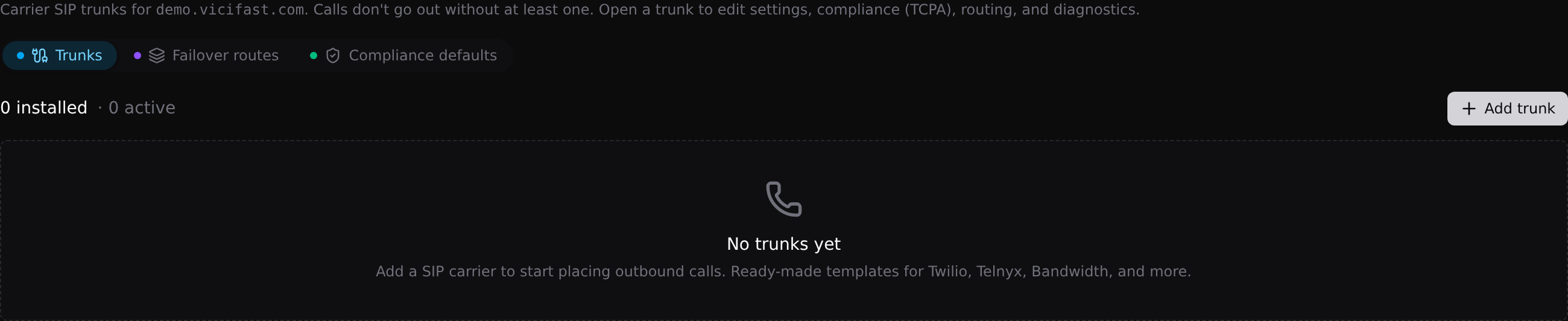
This is where every trunk on your server lives — status, direction, and whether it is enabled. The + Add trunk button sits top-right. Three pills sit at the top of the tab: Trunks (the list you are looking at), Failover routes (bundle two or more outbound trunks in priority order, so calls fall through to the next trunk when the first fails — link campaigns to the route instead of a single trunk), and Compliance defaults (the server-wide TCPA scrubbing default that every trunk inherits unless you override it per trunk).
Step 2 — Pick your carrier
- Click + Add trunk.
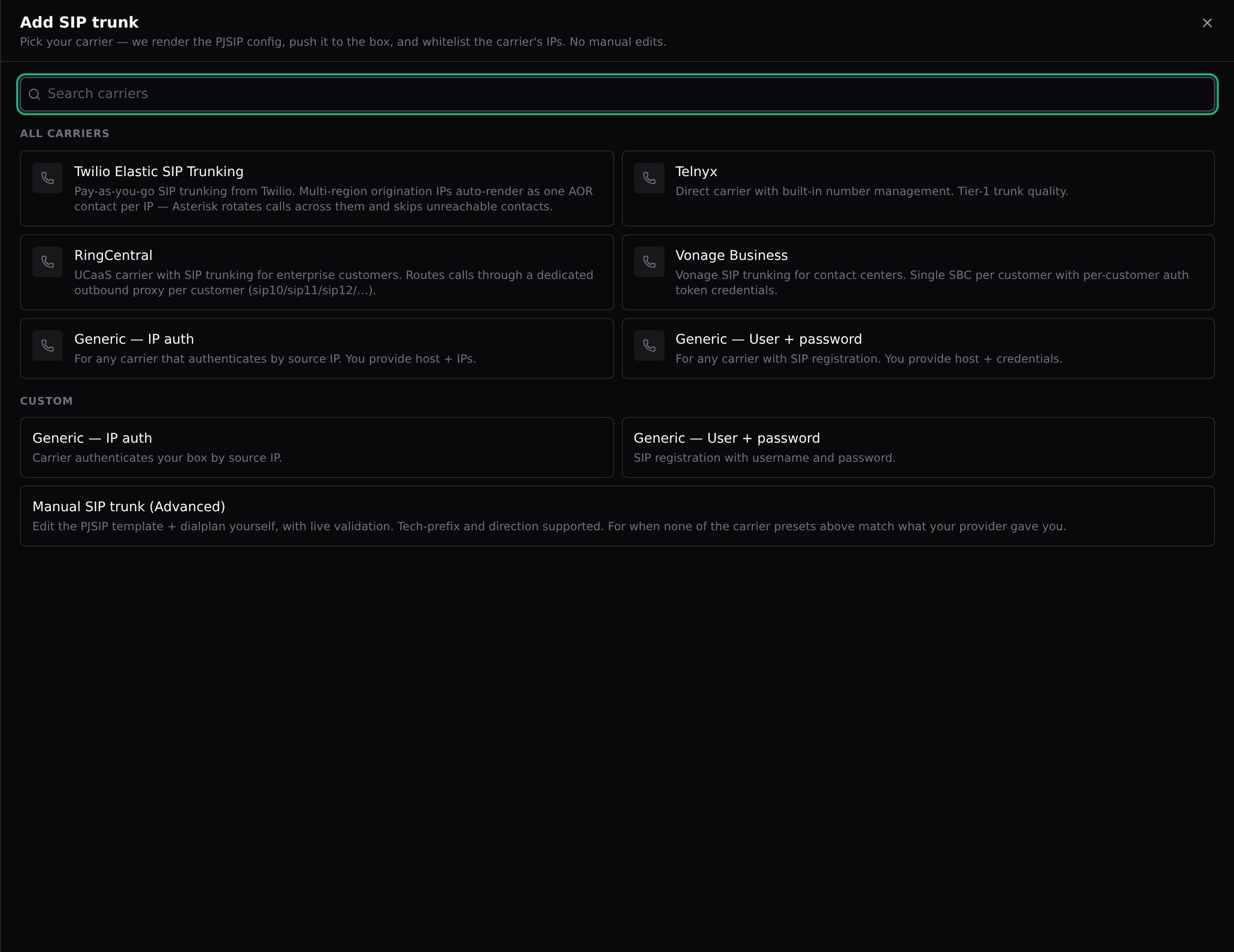
- Find your carrier in the list — ready-made templates exist for Twilio Elastic SIP Trunking, Telnyx, RingCentral, and Vonage Business.
- Carrier not listed? Pick Generic — IP auth when the carrier authenticates your server by IP, or Generic — User + password when they gave you a username and password for SIP registration.
- Only if your provider handed you an exact config to paste: Manual SIP trunk (Advanced) under Custom lets you edit the PJSIP template and dialplan yourself, with live validation.
Picking the right template matters: each one carries the carrier’s correct registration, codec list, and IP ranges, so you never have to know what any of that means.
Step 3 — Fill in the form
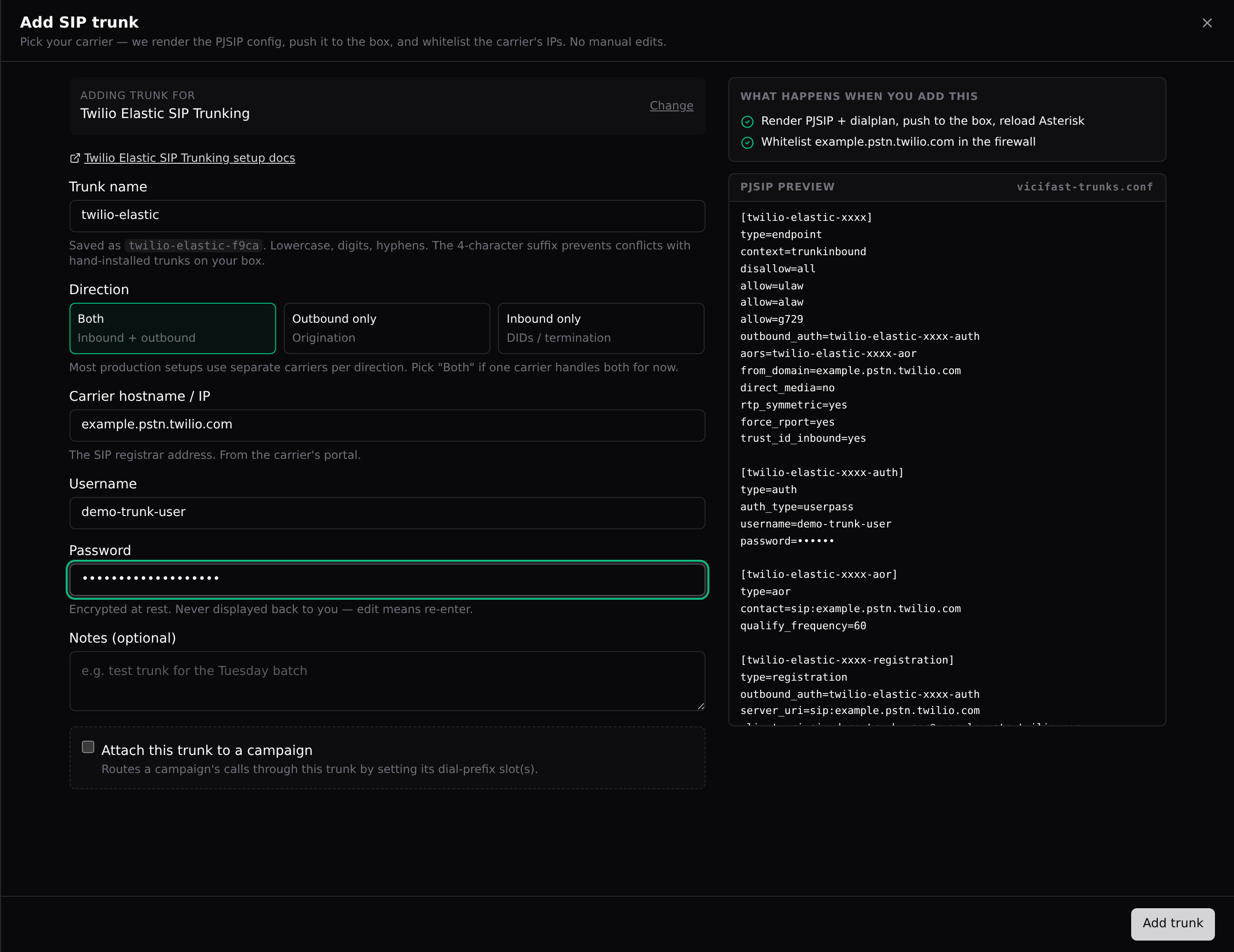
- Trunk name — anything lowercase. We save it with a short random suffix (like twilio-elastic-f9ca) so it can never clash with a trunk someone installed by hand.
- Direction — Both, Outbound only, or Inbound only. Most production setups use separate carriers per direction; pick Both if one carrier does everything for now. Some carriers lock this choice for you.
- Carrier hostname / IP — the SIP registrar address, copied from the carrier’s portal.
- Username and Password — only for user/pass carriers. Encrypted at rest and never shown back to you — changing it later means re-entering it.
- Any extra fields the carrier template asks for (RingCentral, for example, also wants your outbound proxy and phone number — and offers an extra step that routes that number straight to an in-group, existing or created on the spot, so inbound works the moment the trunk is live).
- Notes — optional, for future-you.
- Optionally tick Attach this trunk to a campaign and pick which call types use it — auto dial, manual dial, 3-way transfer. You can also do this later from the trunk’s Routing & campaigns section.
- Watch the right pane as you type: What happens when you add this is the exact checklist we run, and the PJSIP preview shows the config that will land on your box. When it looks right, click Add trunk.
Step 4 — What we do with it
The trunk appears in the list as Installing, then Applying… — usually for well under a minute. Behind the scenes we:
- render the carrier template into two managed files on your server — vicifast-trunks.conf for the SIP side, vicifast-trunks-dialplan.conf for call routing — and reload Asterisk (active calls are not affected);
- reserve a 4-digit dial prefix for the trunk and wire it to your campaign if you attached one;
- whitelist the carrier’s IPs in your firewall, so its calls and call audio actually reach the box.
When the status flips to Active with a green dot, the trunk is live. If it lands on Failed, the row shows the exact error in red — fix the cause and click Retry.
The firewall part (automatic)
Every trunk change also syncs the carrier’s IPs into your firewall as carrier-auto whitelist rules. You can see them in Manage Firewall → Firewall Rules, but not delete them there — they are managed for you. The Auto-whitelist carriers switch in Manage Firewall → Settings (on by default) keeps re-resolving your trunk hostnames and refreshing those rules when carrier IPs change. Leave it on: turn it off and you re-whitelist by hand every time a carrier IP moves — inbound calls are the first thing to silently break.
Step 5 — Test the trunk
- Click the trunk’s row to open it.
- Click Diagnostics in the drawer’s left menu.
- Click Run diagnostics. It takes about 3–5 seconds and places no calls.
Four checks come back. Endpoint status — Loaded should say yes; Registered should say yes for user/pass carriers (IP-auth trunks show n/a (IP auth), because there is no registration to check). SIP OPTIONS ping — a 2xx code means the carrier answered. Carrier IP reachability — can your box actually reach each carrier IP. And the last 7 days of calls through this trunk. For carriers that use registration, your box re-registers every 60 seconds on its own; after a hard rejection it waits 10 minutes and tries again.
Still stuck? The Live SIP trace tab captures the raw SIP conversation for 10, 30, or 60 seconds — exactly what carrier support asks for. Send it with Copy trace.
When a trunk fails — the usual suspects
- 401, auth rejected — wrong username or password. Open the trunk, click Settings, and re-enter the password from the carrier portal.
- 403, not recognised — your server’s IP is missing from the carrier’s allowlist. Add it in the carrier portal (Twilio: IP ACLs on the trunk; Telnyx: the connection’s authentication; Bandwidth and Skyetel: trusted source IPs / endpoint group), then click Retry.
- 404 — the hostname is wrong. Check Carrier hostname / IP against the carrier portal.
- 408, no answer — DNS, firewall, or a carrier-side outage. Run diagnostics and look at Carrier IP reachability.
- 488 — the carrier rejected the codec offer. The built-in templates offer the standard g.711 codecs (ulaw and alaw) plus g.729; this error usually means a hand-edited config offers something the carrier doesn’t speak.
- 603 — the carrier declined the call outright: caller ID rejected, account suspended, or a fraud flag. Check your caller ID and account status in the carrier portal.
You rarely need to decode these yourself — the diagnostics verdict card translates the SIP code into plain language with a What to do line, including carrier-specific hints for Twilio, Telnyx, Bandwidth, and Skyetel.
Editing a trunk later
Click its row. The drawer has six sections: Overview (the facts, plus delete), Settings (label, host, password, notes), Dialplan & advanced (edit the dialplan or the raw PJSIP template — an edit that breaks the reload rolls back to the last working version automatically), Compliance (TCPA), Routing & campaigns, and Diagnostics. The switch on each row pauses a trunk without deleting it.
Good to know
- Only the account owner can add, change, or delete trunks. Team members can open the tab and run diagnostics, nothing more.
- Trunk management is included on every current plan, including Launch. If your Trunks tab says it isn’t on your plan, that’s an account flag — contact support.
- Never edit vicifast-trunks.conf or vicifast-trunks-dialplan.conf on the box by hand — both are rewritten end-to-end on every trunk change, and your edits will be overwritten. Use the trunk’s Dialplan & advanced section instead.
- You won’t find these trunks under Carriers in the VICIdial admin screens — routing runs through our managed dialplan file instead. That’s normal; manage trunks here, not there.
- Pausing a trunk with the switch unlinks it from its campaigns. Turning it back on does not relink them — re-attach in Routing & campaigns.
- Carrier passwords are never displayed after saving. "I forgot it" means re-enter it.
- The screenshots use a fictional Twilio hostname on our demo server. Always use the exact values from your own carrier portal.
You might also like
Call recordings — find, play, download
Where your call recordings live, three ways to find the exact call you need, how to play and download the audio, and how long recordings are kept.
Read article →Live Monitor widget: listen, whisper, barge
Listen to live agent calls from your browser — no desk phone, nothing to install. Monitor silently, whisper to the agent only, or barge in as a third party.
Read article →Backups, scheduled snapshots, and one-click restore
Three layers of data safety for your dialer: the managed daily backup (7-day rolling), a mirror to your own S3, and on-demand downloads — plus how restores actually work.
Read article →