Paying your provider
Bought your dialer from a reseller? You pay them, not us. How each payment option works, what happens after you pay, and how renewals are taken.
Partners · 3 min read
Some companies resell our servers under their own name. If you bought your dialer from one of them (your provider), you pay your provider, not us. This page explains the payment options you see at checkout, what happens after you pay, and how renewals work.
Which payment options you see
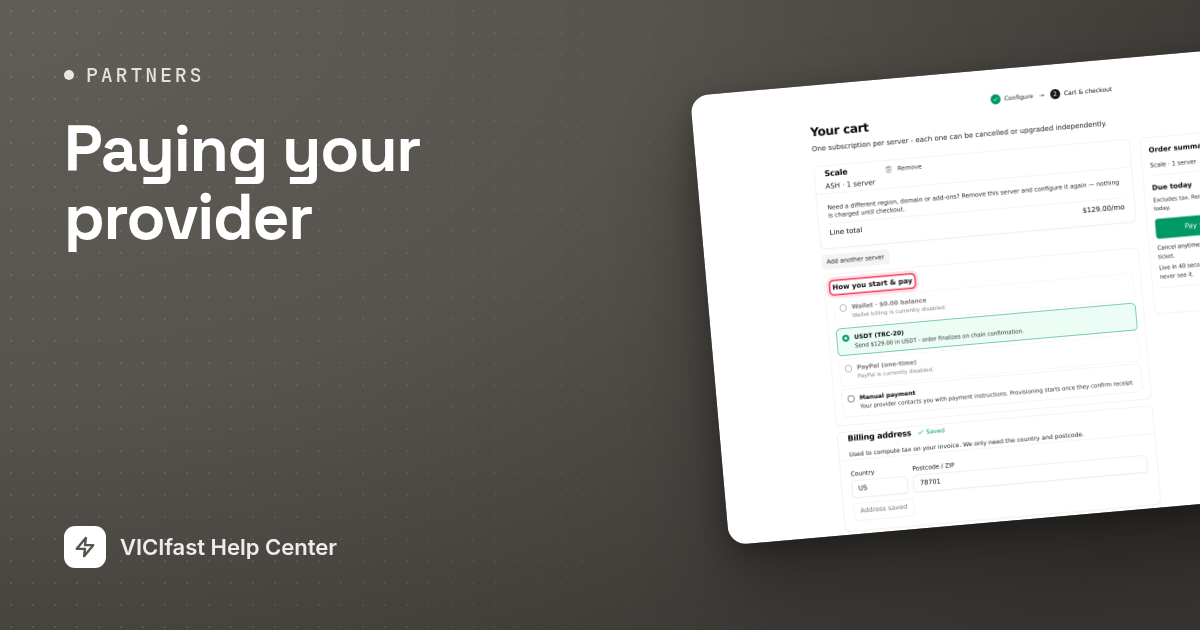
At checkout, under How you start & pay, you only see the options your provider has turned on:
- USDT (TRC-20): a crypto payment to your provider’s address.
- PayPal (one-time): paid to your provider’s PayPal account.
- Manual payment: you pay your provider another way, such as a bank transfer, and they confirm it.
- Wallet: when your wallet balance covers the order.
Cards and recurring PayPal are not offered when you buy from a provider. An option your provider hasn’t turned on is greyed out, for example "PayPal is currently disabled." Pick an option and click the Pay $… and go live button.

Paying with USDT (TRC-20)
- After checkout, the Pay with USDT (TRC-20) page shows the network (Tron, TRC-20), the Amount to send and the Send to address. Use the copy buttons.
- Send exactly that amount, in one transfer, from your own wallet. The last digits of the amount are how your payment is recognised.
- You can leave the page open; it updates by itself. When your payment is matched, the order completes and your server starts building.

Good to know:
- The quote is valid for 1 hour, and the page shows the time left. Send your payment straight away.
- Payments to providers are checked once an hour, so the page can take up to an hour to update after you pay.
- If the amount doesn’t match exactly, the payment is not applied automatically. It is set aside for manual review: contact your provider with your transaction ID.
- If the quote runs out with no matching payment, the page says "Quote expired without a matching payment. Start a fresh order if you still want to buy."
Paying with PayPal (one-time)
You are taken to PayPal to approve the payment, then brought back. Once PayPal confirms it, the order completes and your server starts building. The money goes to your provider’s PayPal account. PayPal is used for this order only, not for renewals.
Manual payment
- Choose Manual payment and finish checkout. The Awaiting confirmation page shows your order number and the total to pay your provider.
- Your provider contacts you with payment instructions. Pay them as agreed.
- When they mark your order paid, your server is built automatically and we email you. You can close the page in the meantime.

If you haven’t heard back within an hour, the page shows an email address to reach your provider. If your provider rejects the order, it is cancelled and nothing is built.
Renewals come from your wallet
However you paid for the order, renewals are taken from your wallet balance.
- We email you 7 days and 3 days before a server renews.
- On the renewal date, a daily check takes the renewal from your wallet.
- If the balance is too low, you get an email showing how much is missing, and the server is suspended at the next hourly check. Reminders follow each day. If it stays unpaid, the server is removed.
- Once your balance covers the renewal again, the next daily check takes the payment and your server comes back.
Refunds
If your server can’t be built within an hour of payment, the payment is refunded automatically as wallet credit, not back to your crypto wallet or PayPal. Any other refund is between you and your provider.
If something goes wrong
Frequently asked
- Card payments are not available when you buy from a provider. Use USDT, PayPal, manual payment or your wallet.
- If you sent the exact amount before the quote expired, it is matched when it arrives, even a few minutes late, and your order goes ahead. A transfer sent after the quote expired, or a different amount, is set aside to be checked by hand. Contact your provider with the transaction details.
- Payments that don’t match exactly are not applied automatically. Contact your provider with your transaction ID.
- Your provider has to confirm they received your payment. Contact them at the email shown on the order page.
- The renewal could not be taken from your wallet. Ask your provider to add balance; the server comes back at the next daily renewal check.
- Your provider hasn’t turned that option on. Choose another option, or ask your provider.
› There is no card option.
› I paid in USDT but the page says the quote expired.
› I sent the wrong USDT amount.
› My manual order is still awaiting confirmation.
› My server was suspended.
› An option says "USDT payments are currently disabled." or "PayPal is currently disabled."
Related articles
Tags: billing, reseller, payment