VICIfast Firewall.
7-day free trial · Cancel anytime · Pay with card or USDT
# How the VICIfast Firewall decides - first match wins
 1  VICIfast platform addresses    allow  all ports
 2  Call audio + backup portal     allow  udp 10000-30000, tcp 446
 3  Your allow rules, by profile   allow  agent / carrier / admin ports
 4  Your block rules               drop   all ports
 5  Managed blocklist (104,872)    drop   SIP + webphone ports
 6  Blocked countries              drop   all ports
 7  Scheduled country allow        allow  tcp 443 + 8089
    Everything else                drop
How it decides
Closed by default. Seven rules, in a fixed order.
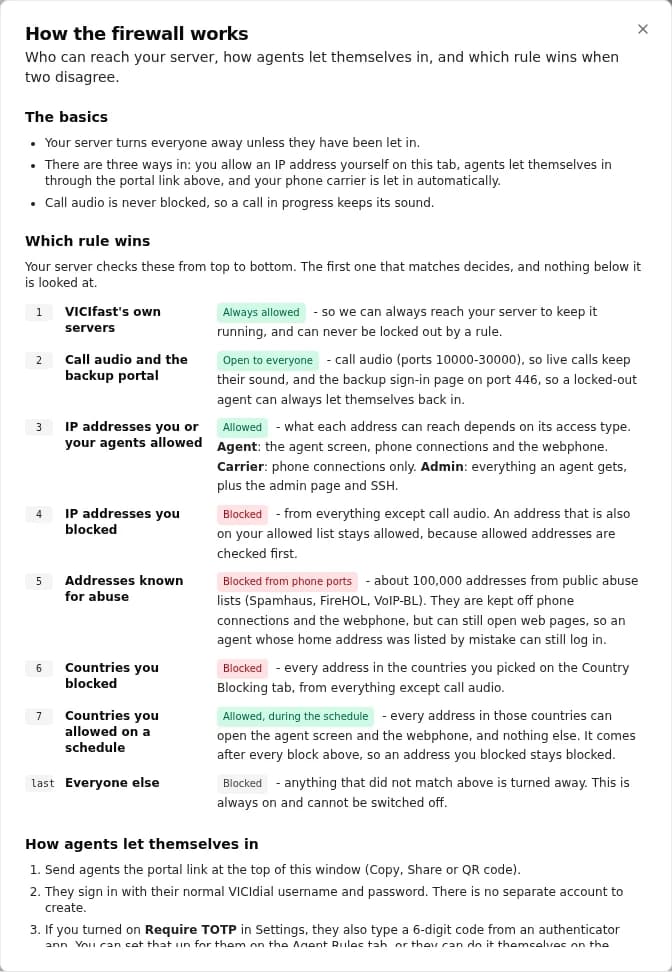
A new VICIfast server refuses every incoming connection it has not been told to accept. The firewall checks seven tiers from the top, and the first one that matches decides. The same order is explained in plain English inside the dashboard, so nobody has to guess why an address got in or didn't.
| Tier | What it covers | Decision | Ports |
|---|---|---|---|
| 1 | VICIfast platform addresses, so your rules, backups and updates reach the box | Allow | All |
| 2 | Call audio, and the backup agent portal | Allow | UDP 10000-30000, TCP 446 |
| 3 | Your allow rules, by access profile | Allow | The profile's ports |
| 4 | Your block rules | Drop | All |
| 5 | Managed blocklist | Drop | SIP 5060, 5061, 5070 and webphone 8089 |
| 6 | Blocked countries | Drop | All |
| 7 | Scheduled country allow | Allow | TCP 443 and 8089 |
| - | Everything else | Drop | All |
Allow beats block
Your allow rules sit above every blocklist and every blocked country. An address you let in is never caught by a list you didn't write.
Calls keep their sound
Call audio sits above every block rule, so tightening the firewall never cuts the audio of a call in progress.
Deny can't be switched off
There is no setting that opens the server to everyone. Everything the dashboard adds is an address you named or a country you chose, on a schedule you set.
Who gets in, and to what
Every address gets a profile, not the keys to everything.
When you allow an address you say what it is for, and the profile decides the ports. A carrier reaches SIP and nothing else. SSH stays shut to everyone except the people you trust with it.
AgentYour floor.
VICIdial web pages - TCP 443 · SIP - UDP 5060 and 5070 · Webphone - TCP 8089
CarrierYour SIP provider's signalling addresses.
SIP - UDP 5060, and nothing else
AdminYou, your supervisors and your IT.
Everything an agent gets · SSH - TCP 22 · The server's private admin port
Allow and block rules
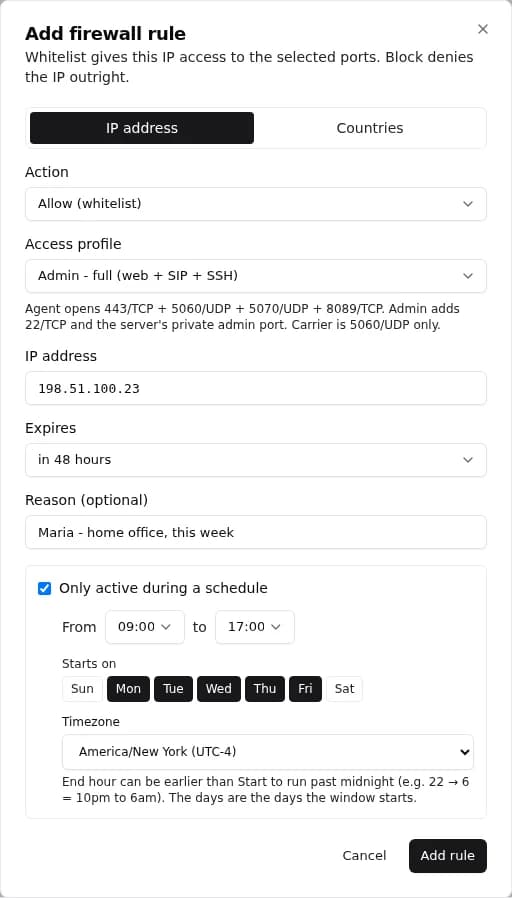
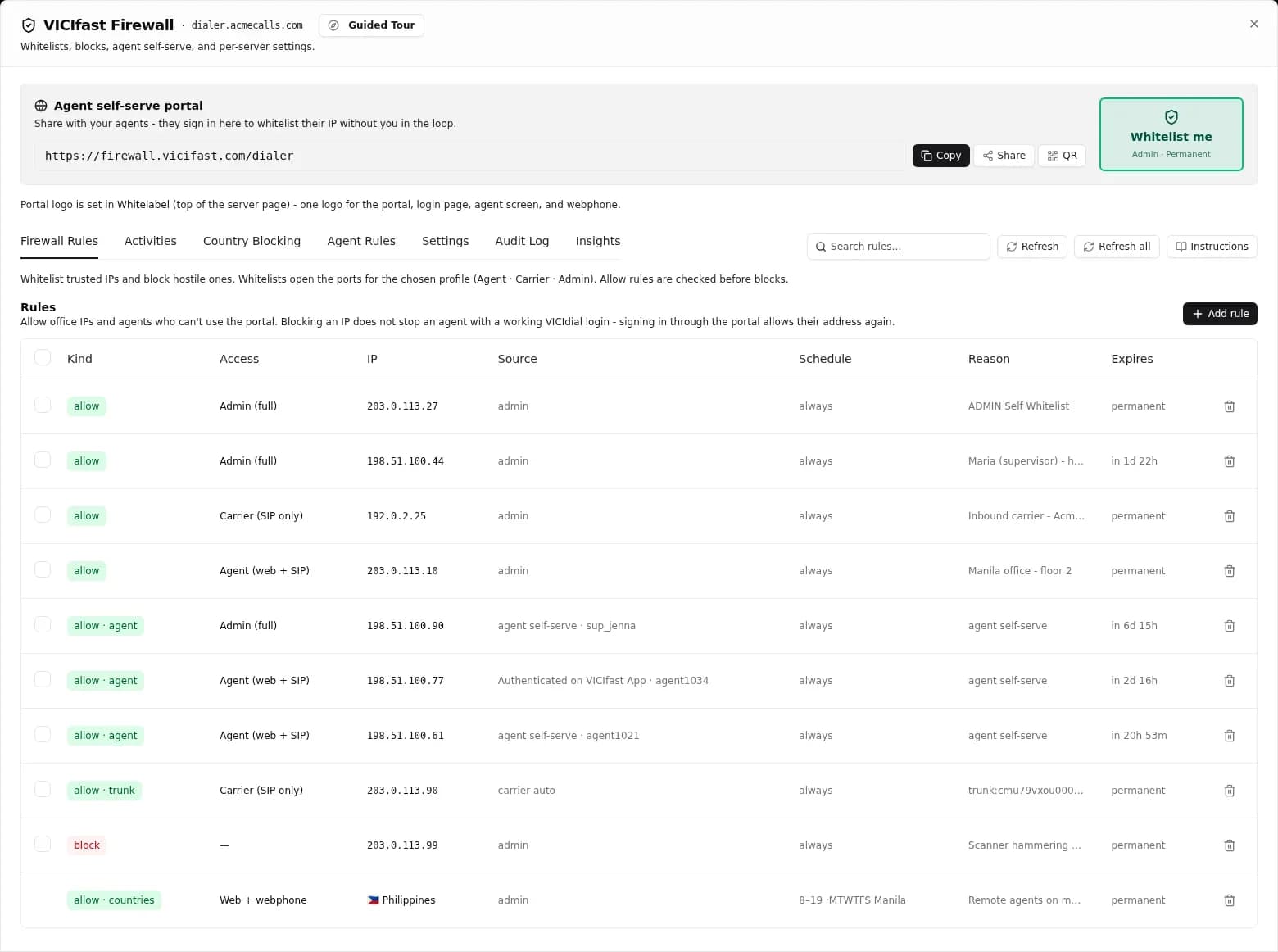
One address per rule, with a reason and an end date.
- One IP address per rule, never a range, so a single rule cannot quietly open a whole network.
- Permanent, or ending after 24 hours, 48 hours, 72 hours or 7 days. Expired rules are removed within a minute.
- A reason on every rule - "Office, Manila", "Supervisor at home" - so the list still makes sense a year later. Reasons and end dates can be edited afterwards.
- "Whitelist me" gives the address you are browsing from Admin access in one click.
- Block rules drop an address on every VICIdial, SIP and SSH port.
- Select up to 200 rules and delete them at once.
- Rules the platform adds for your carriers are marked and protected, so nobody deletes your SIP provider by accident.
Agent self-serve portal
When an agent's IP changes, they let themselves back in.
Home broadband, mobile hotspots and coworking Wi-Fi all hand out new addresses. Instead of messaging you, the agent opens your portal link and signs in with the same VICIdial username and password they already use. Their new address is allowed within seconds, and the portal sends them straight on to the agent screen.
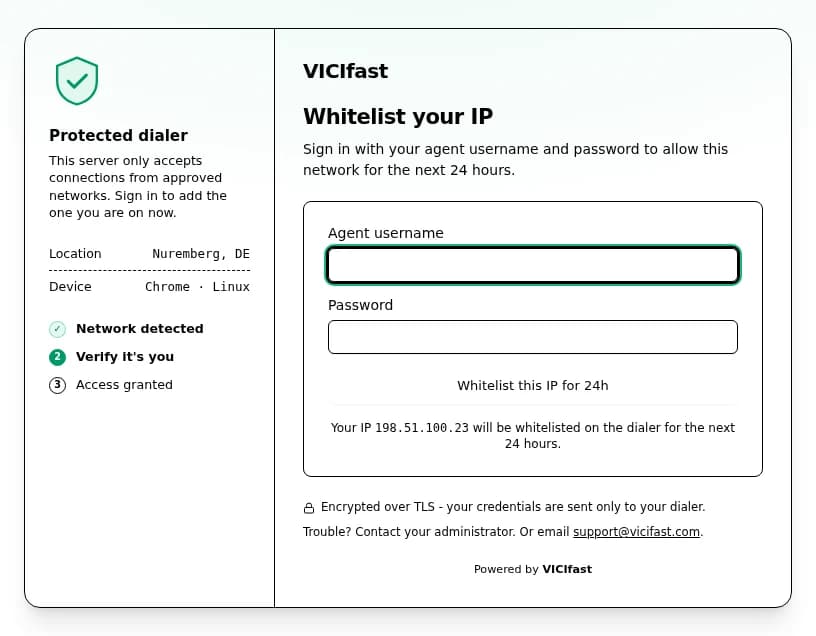
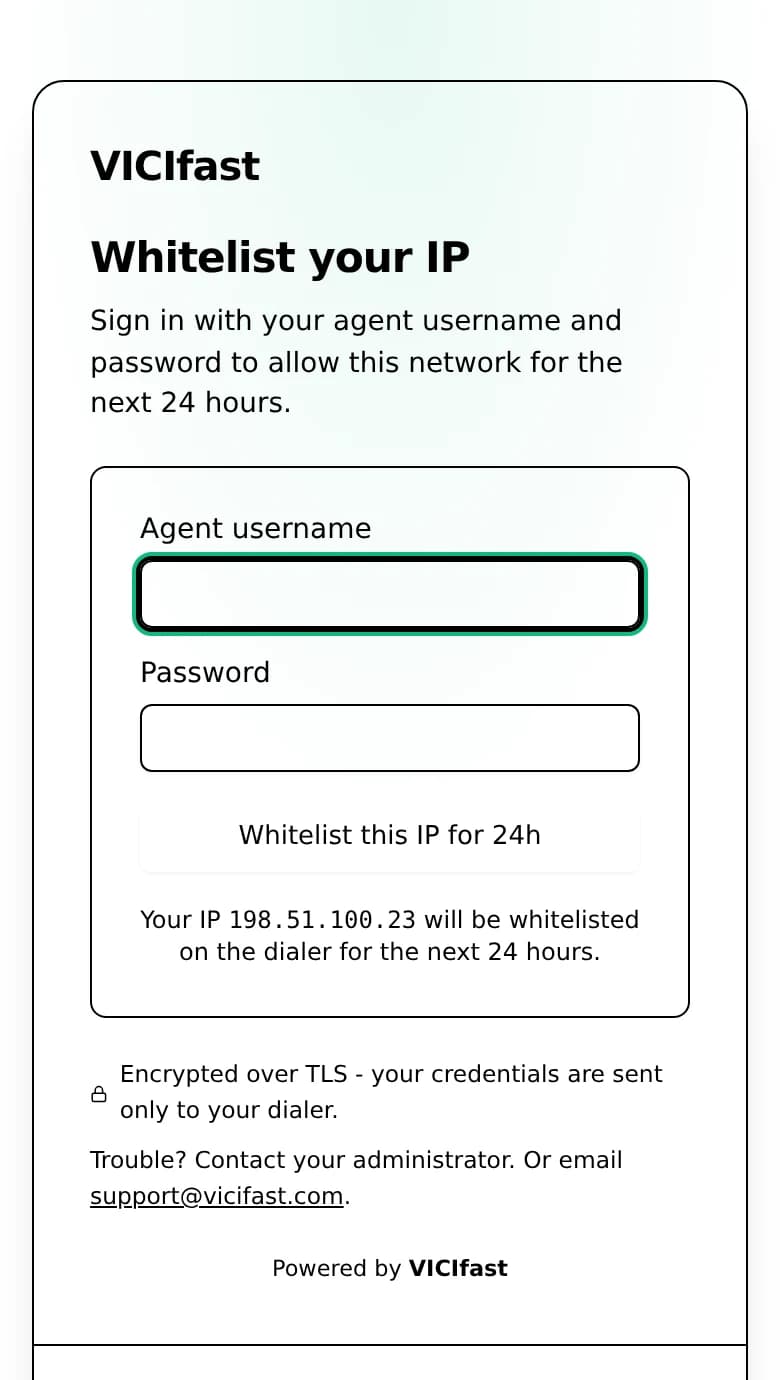
- Their normal VICIdial login - nothing new to remember. An unknown username gets the same answer as a wrong password, so the portal never confirms which usernames exist.
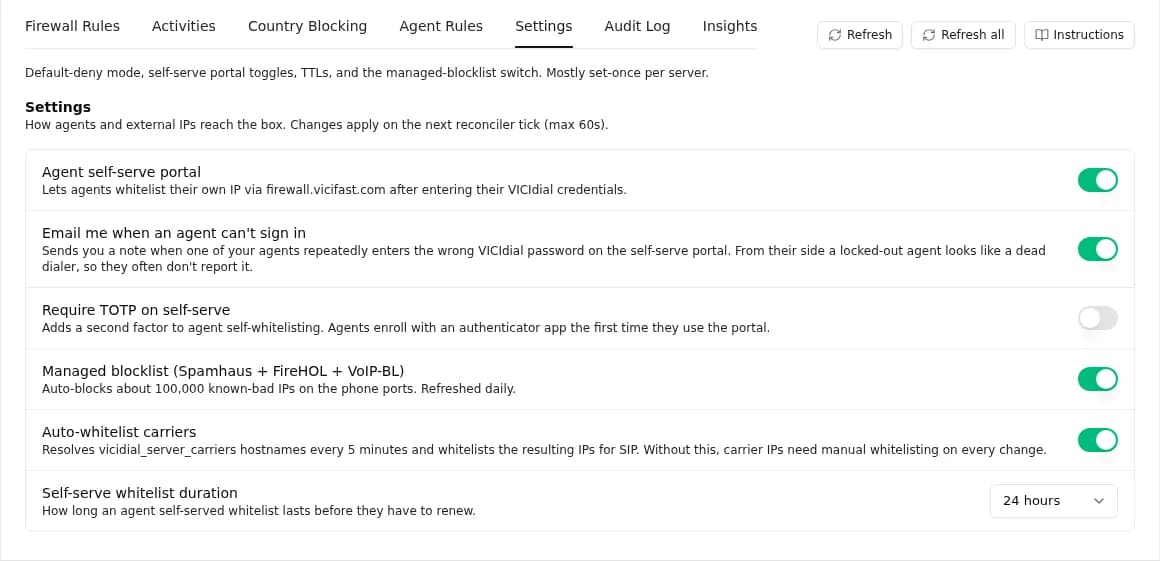
- You choose how long access lasts: 24 hours, 48 hours, 72 hours or 7 days. Signing in again starts the clock over.
- Managers (VICIdial user level 7 and up) get Admin access and land on the admin panel.
- Made for phones: the code field opens a number pad, and the dashboard gives you the link as a QR code to share.
- Agents on the VICIfast mobile app never see the portal. Signing in to the app allows the phone, and the rule follows it when its address changes.
- A backup portal on the server itself, on port 446, keeps agents working if the main portal cannot be reached.
Portal security
Public enough for your agents, not a door for anyone else.
CAPTCHA, then lockout
After 5 failed sign-ins the portal asks for a CAPTCHA. An address with 100 failures in an hour is locked out.
Optional TOTP
Require a six-digit code from an authenticator app on top of the password. Agents enrol themselves once; after that only an admin can reset it. Off until you turn it on.
You hear about it
When one agent gets their password wrong 3 times in an hour, you get an email - at most once a day per agent, and you can switch it off.
Every attempt, with a location
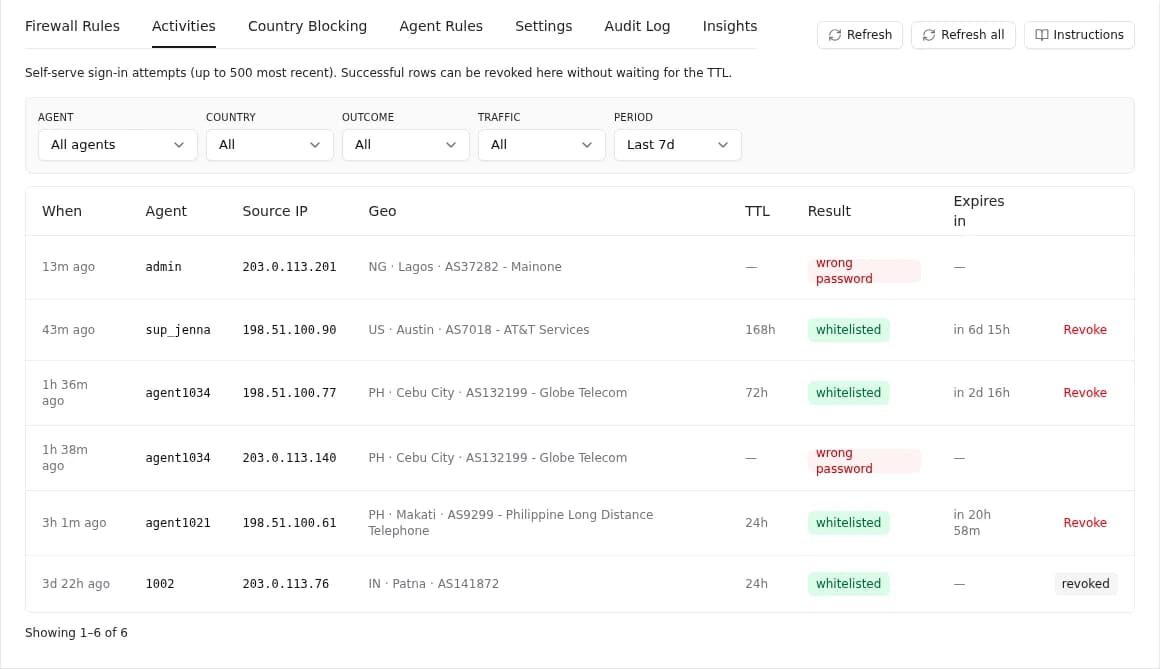
Each sign-in attempt is logged with its address, city, country, network, browser and outcome, and kept for 7 days.
Revoke in one click
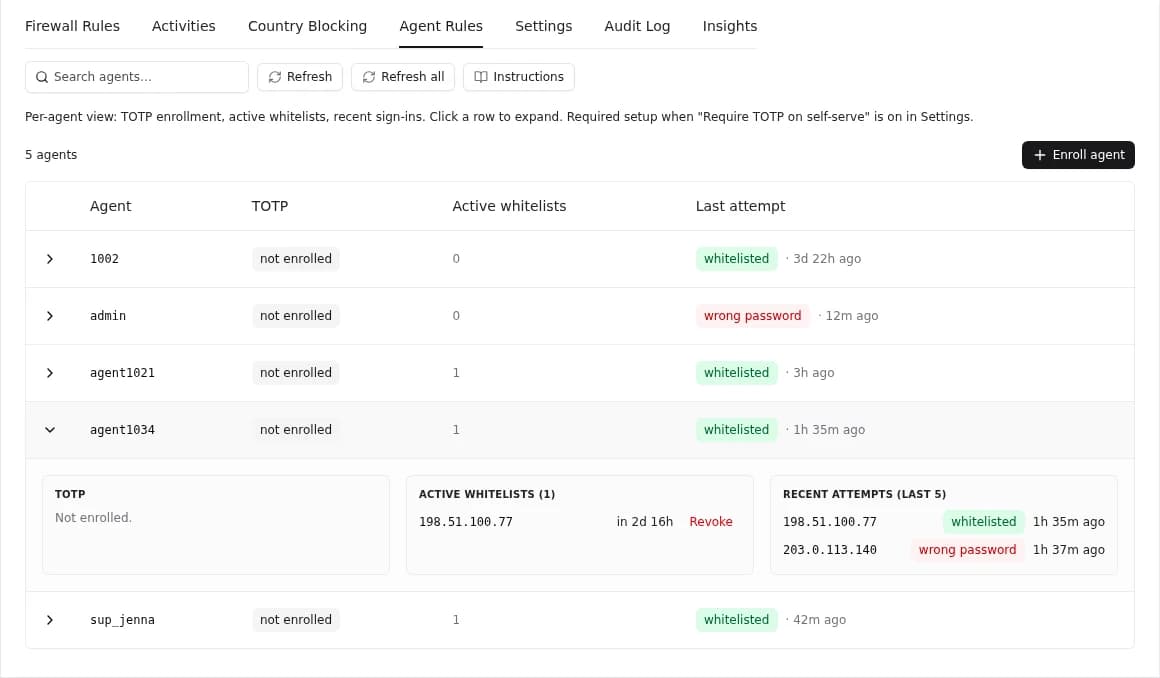
The Agent Rules tab shows each agent's active whitelists and when they end, with a Revoke button next to each. Removal takes effect at once.
Enrol and lock agents
From the dashboard you can enrol an agent in TOTP, remove their enrolment, or lock them out of the portal.
Your domain, your brand
The portal on your own domain, with your name on it.
On plans that include your own domain, the portal moves to firewall.your-domain.com. You add one CNAME and one TXT record; the certificate is handled for you, and every server under that domain uses the branded link. Resellers use a verified firewall domain of their own.
Whitelabel means no VICIfast at all
With whitelabelling on, the portal shows your logo and nothing of ours - no VICIfast name, logo, support email or "Powered by" line, not even in the browser tab. Your agents only ever see you.
Managed blocklist
104,872 known-bad addresses, kept current for you.
Every night at 02:00 UTC the platform rebuilds one blocklist from four public sources and sends it to every server that has it switched on.
- Only a complete rebuild ships. If a source fails to download, servers keep the last good list instead of a partial one.
- It covers the SIP and webphone ports only, never the web pages on 443 - and an address you allowed is never blocked by it.
- On by default, with one switch per server.
| Source | What it lists | Entries |
|---|---|---|
| VoIPBL | Addresses caught scanning and abusing SIP servers | about 100,000 |
| FireHOL Level 1 | A conservative list of addresses that are unsafe to accept traffic from | about 4,700 |
| Spamhaus DROP and EDROP | Networks hijacked or run by spammers and criminals | about 1,700 |
Counts as of September 2026.
Countries
Block countries you never work from. Open one on a schedule when you need to.
Country block
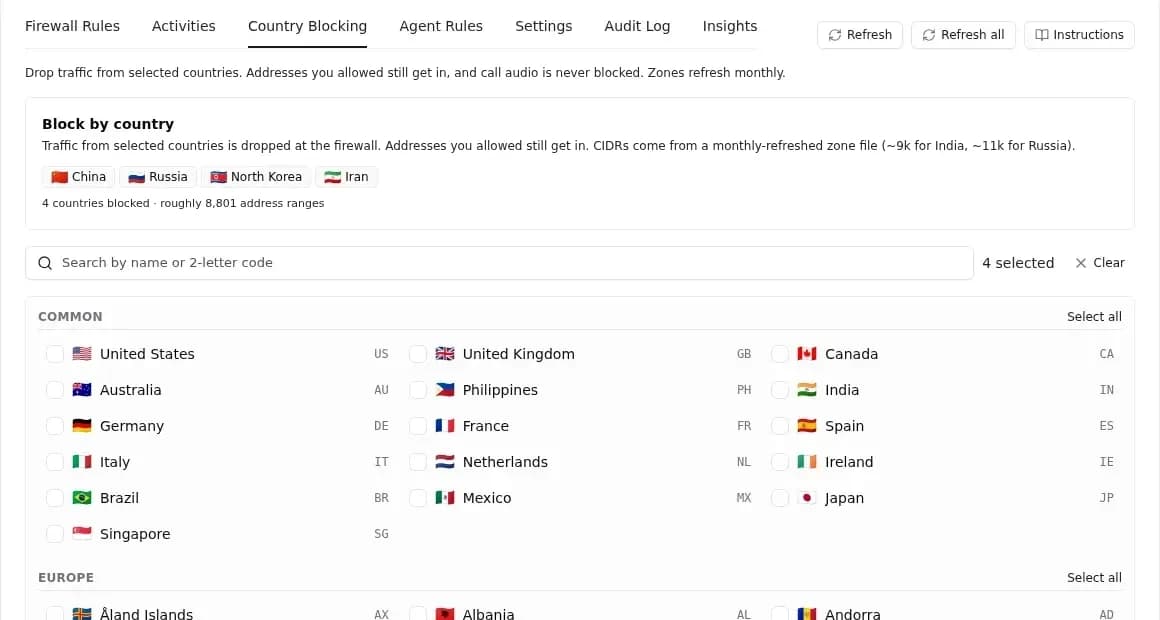
Tick up to 250 countries and every address from them is dropped before it reaches the agent screen, SIP or SSH. The ranges come from ipdeny.com, refresh on the 1st of every month, and are fetched the moment you add a country. Addresses you allowed still get in, and call audio is never blocked.
Scheduled country allow
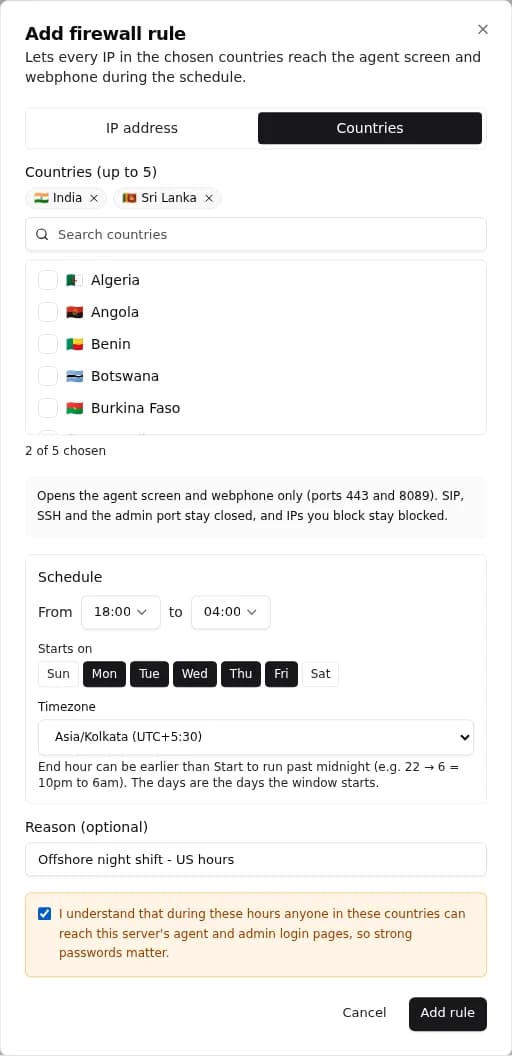
For agents whose address changes too often even for the portal - mobile data, shared networks - open the agent screen (443) and webphone (8089) to a whole country, only during the hours you choose.
- Up to 5 countries per rule.
- Days and hours in your time zone, overnight windows and daylight saving included.
- SIP, SSH and the admin port stay closed, and your block rules and blocked countries still win.
- You tick a warning before it saves, because it opens the login pages to everyone in those countries.
Carriers
Your SIP providers are let in automatically.
Every 5 minutes the platform reads the carriers configured on your dialer, resolves their hostnames and allows those addresses with the Carrier profile. When a provider's hostname starts pointing somewhere new, the old address is removed.
- Trunks from the VICIfast marketplace go further: the provider’s published addresses are allowed when you add the trunk and refreshed on their own, nightly or twice a day depending on the provider.
- Carrier access is SIP on UDP 5060 only.
- Automatic carrier rules can be switched off per server, and they are protected from accidental deletion.
Under the hood
Saved in the dashboard, on the box in seconds - and kept there.
Pushed when you save
A change goes to the server the moment you save it and usually lands within seconds. A button forces a fresh push whenever you want one.
Re-checked every minute
Every server is checked once a minute and anything it missed is sent again. A server with nothing to change is left alone.
Drift gets noticed
Each server reports the rules it is actually running. If that stops matching what was sent, the VICIfast team is alerted.
Reboots are covered
At boot the server restores its rules from its own saved state, and the platform pushes them again as a backstop.
Problems are visible
If a server stops accepting changes, the dashboard shows a warning and the nightly maintenance report flags it.
Careful updates
When the firewall software itself is updated, each server is backed up first, then checked - version, list sizes, rule order, a fresh SSH login and the web page - and put back automatically if any check fails.
Access and audit
Your team runs it, and every change has a name on it.
The owner manages the firewall, and so can any member you give the firewall permission along with a role that can make changes. Everything is set per server, and every rule and setting change lands in the audit log with who made it and when. Remove a member and the rules they added go with them.
Coming from ViciBox?
What changes if you're used to the ViciBox Dynamic Portal.
ViciBox's Dynamic Portal is a solid, free answer to the same problem, and plenty of VICIdial floors run it today. Agents sign in on the server's port 446 with their VICIdial login, a cron job rebuilds the allowed list every minute, and VoIPBL blocks known SIP abusers out of the box. Here is how the two compare, using ViciBox's own documentation.
| VICIfast Firewall | ViciBox Dynamic Portal | |
|---|---|---|
| Where agents sign in | firewall.vicifast.com/your-server - or firewall.your-domain.com on plans with your own domain - with their VICIdial login | https://your-server:446/valid8.php, with their VICIdial login |
| Where you manage it | A web dashboard, per server, for you and the members you choose | Over SSH: the vicibox-firewall menu, /etc/firewalld/whitelist.conf and cron jobs, plus the ViciWhite and ViciBlack lists in VICIdial admin |
| How fast a change applies | Pushed when you save, usually within seconds; every server re-checked each minute | Allowed list rebuilt by cron every minute; ViciWhite changes within 2 minutes |
| Blocklists | VoIPBL, FireHOL Level 1 and Spamhaus DROP/EDROP - 104,872 entries, rebuilt daily - plus your own block rules | VoIPBL (55,000+ addresses per its docs), refreshed every 6 hours, plus the ViciBlack list |
| Access levels | Agent, Carrier and Admin profiles, each with its own ports | Allowed addresses join firewalld's External zone, which carries the VICIdial agent services |
| Your own certificate or port | Handled by the platform; the portal moves to your domain with one CNAME and one TXT record | Edit dynportal-ssl.conf and listen.conf over SSH |
| Firewall engine | ufw with ipset | firewalld with ipset |
Also in the VICIfast Firewall
- A reason and an end date on every rule, from 24 hours to permanent.
- Country blocking and scheduled country allow, set from the dashboard.
- Optional TOTP on the portal, with self-enrolment.
- A log of every sign-in attempt with its city, country and network, and an email when one agent keeps failing.
- Your carriers allowed automatically, and kept current when their addresses change.
- Every change in the audit log with a name on it, and removed members’ rules taken back.
- Agents on the VICIfast mobile app followed automatically when their address changes.
ViciBox details from docs.vicibox.com (ViciBox 11.0 and 12.0 firewall documentation), checked September 2026.
The real rule order on every VICIfast server. Your allow rules sit above every block, so an address you let in is never caught by a blocklist or a blocked country. Call audio sits above every block too, so a call never loses its sound.
FAQ
Questions worth answering
Lock the dialer down without learning iptables.
Start the trial. Your server starts closed. Allow your team, let agents re-admit themselves from a portal on your domain, and block the rest - all from the dashboard.